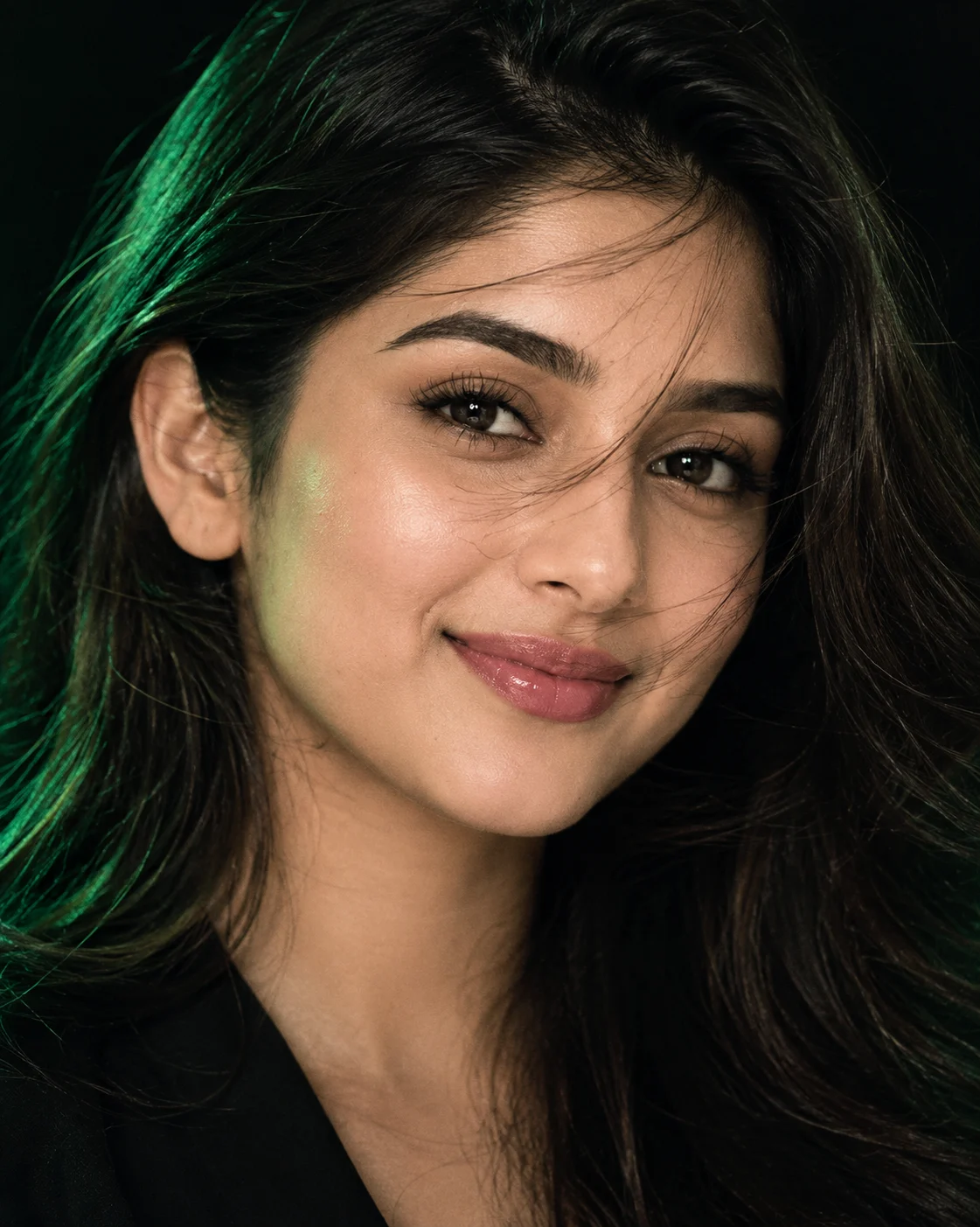
Emerald Midnight Cinematic Beauty Portrait in Deep Green Light
Create a cinematic close-up portrait with emerald side lighting, wind-swept hair, glossy lips, and deep velvet-black shadows while preserving your real facial identity.
Using the uploaded photo, create a photorealistic extreme close-up beauty editorial portrait of the same person, framed from the upper forehead to just below the chin, with emerald-green light grazing the cheekbones and eyelids against a velvet-black background. KEEP — Preserve the person's exact recognizable identity from the uploaded photo. Retain the original face shape, forehead proportions, facial width, eyebrow placement, eye shape, natural eye colour, nose bridge and tip, lip shape, cheek volume, cheekbones, jawline, chin, ears, and natural facial asymmetry. Keep the original skin tone, visible pores, fine lines, natural skin texture, age characteristics, and any visible facial marks. Preserve the original hairline, hair density, natural hair colour, and recognizable hair texture. If facial hair is present, retain its original outline and density. Maintain natural neck and shoulder proportions wherever visible. Do not replace the person's face with a generic beauty model. CHANGE — Style the hair with a believable wind-swept finish, allowing a few loose strands to cross the forehead without completely hiding either eye. Add a subtle, natural-looking gloss to the lips without changing their shape. Use a dark, understated outfit in matte black fabric, visible only at the lower edge of the frame. Introduce emerald illumination, controlled white eye highlights, and deep cinematic shadows without adding jewellery or decorative accessories. SCENE — Place the person in a dark studio with a seamless velvet-black backdrop. Keep the background nearly featureless, with no visible furniture, scenery, or coloured objects. The atmosphere should resemble a controlled nighttime fashion shoot rather than an outdoor scene. LIGHT — Position a soft emerald-green key light approximately 45 degrees to one side and slightly above eye level. Keep the illumination consistent across the forehead, nose, cheek, and lips. Add a restrained neutral-white reflection in the eyes and a faint opposite-side fill so facial structure remains readable. Avoid green colour contamination that makes the skin look unnatural. CAMERA — Use an 85mm portrait lens at f/1.8, camera at eye level, with precise focus on the nearer eye. Keep the eyelashes, iris detail, pores, and lip texture sharp while allowing the background to fall smoothly out of focus. GRADE — Apply deep blacks, controlled emerald highlights, neutral skin tones, rich midtone contrast, and subtle fine film grain. Avoid excessive saturation, crushed facial detail, artificial HDR, and exaggerated sharpening. OUTPUT — Vertical 4:5 composition, 8K-resolution output where supported, realistic skin detail, clean edges, and professional beauty-editorial finish. DO NOT slim the face, whiten the skin, change eye colour, smooth skin into plastic, invent jewellery or tattoos, reshape the lips, alter facial proportions, or obscure defining identity features.
Photo Guide
- Use a sharp, high-resolution photo with both eyes and facial features in focus.
- Choose an eye-level or slightly elevated angle to preserve the natural face shape.
- A clear front or three-quarter view helps retain the original cheekbone structure.
- Keep the hairline, eyebrows, nose, lips, and jaw visible in the reference.
- A dark background blends best with the emerald-and-black studio atmosphere.
- Avoid heavy beauty filters; they can erase pores and shift natural skin tone.
How to Build
- 1Open Gemini and select image generation with your uploaded photo as the reference.
- 2Upload one clear portrait showing the person's face without obstruction.
- 3Copy the complete Prompt Content into the image-generation prompt field.
- 4Choose a 4:5 portrait aspect ratio and the highest available output resolution.
- 5Keep the reference image enabled and preserve its identity during generation.
- 6Generate the portrait, then inspect the eyes, jawline, skin tone, and hairline.
- 7If the result is wrong, regenerate with a specific correction for the lighting or face.
Pro Tips
- Use a photo with visible iris detail so the emerald light does not erase eye colour.
- Keep the face evenly exposed in the reference so green shadows retain facial structure.
- Choose naturally textured hair so wind-swept strands look believable rather than painted.
- Avoid strong green lighting in the original photo so skin tones remain easier to match.
- Keep the lips naturally defined so added gloss does not alter their original shape.
- Use the same reference photo for every rerun so facial identity stays consistent.
Share This Prompt
About the Author
Naziya
Creative AI writer at MFDA, sharing trendy photo-editing prompts and fresh ideas for beautiful, stylish AI images.