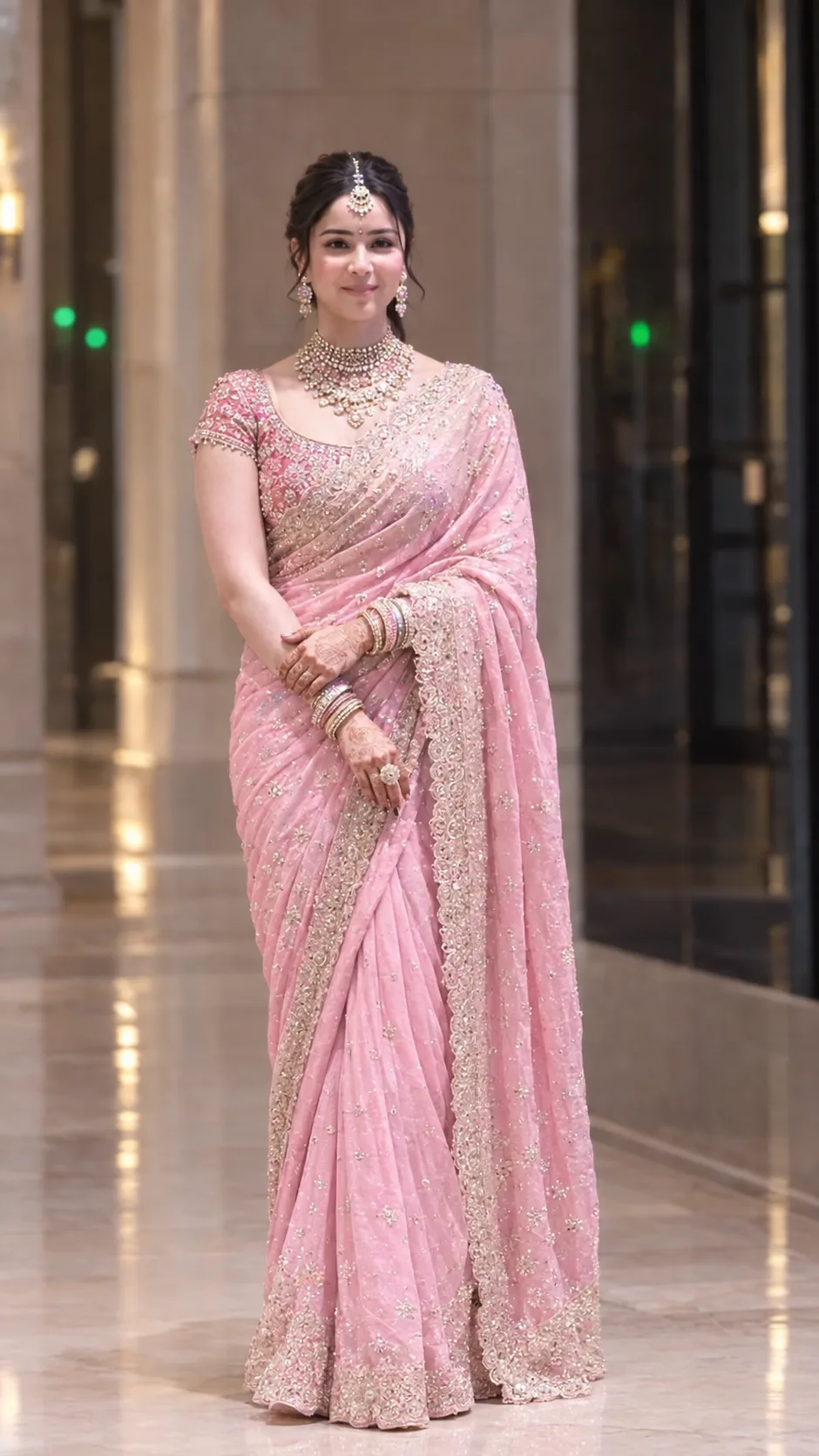
Elegant Indian Bridal Portrait in Pink Saree
Create a photorealistic full-length Indian bridal portrait preserving the same face, styled in a pink saree and detailed jewellery.
Using the uploaded photo, create a photorealistic full-length traditional Indian bridal portrait of the same woman in an elegant indoor corridor. KEEP - Preserve the exact facial identity from the uploaded photo. Keep the forehead shape, eyebrow placement and shape, eye shape and natural eye colour, nose proportions, lips, cheeks, cheekbones, jawline, chin, ears, facial proportions, and natural facial asymmetry unchanged. Keep the original skin tone, visible pores, fine texture, natural marks, and realistic facial details. Preserve the original hairline, hair density, natural hair texture, and any visible facial hair exactly as shown. Keep the original body proportions, shoulder width, neck length, arm and hand proportions, height impression, and overall physique. The woman must remain clearly recognizable as the same person. CHANGE - Replace the clothing with a [pastel pink embroidered saree] made from lightweight fabric, featuring dense silver-gold threadwork, small shimmering motifs, and a wide ornate embroidered border. Add a [matching pink short-sleeved blouse] with fine traditional embroidery. Add [layered traditional jewellery], including a detailed choker, necklace layers, dangling earrings, bangles, rings, and a maang tikka. Use a neat traditional updo and subtle bridal makeup without changing facial structure. Place her in a [luxurious neutral-toned indoor corridor]. Pose her facing the camera with a gentle closed-mouth smile, relaxed shoulders, and both hands naturally crossed in front while holding the saree drape. SCENE - Set the portrait inside a polished hotel or event-lobby corridor during evening indoor hours. Use tall beige stone walls, a reflective polished floor, dark glass or doorway panels, and small soft green lights in the distant background. Keep architectural details recognizable but strongly defocused behind her. LIGHT - Use soft warm-neutral ambient light coming mainly from the front-left, with gentle fill from the surrounding corridor. Keep the face, jewellery, and saree evenly illuminated with natural shadow transitions and no harsh directional shadow. CAMERA - Use an 85mm lens at f/2.8, camera positioned around chest height, with natural perspective and full-body framing from head to floor. GRADE - Apply a refined cinematic grade with warm beige highlights, restrained pink tones, moderate contrast, natural skin colour, and subtle film-like softness. OUTPUT - Create a vertical 9:16 image at 1024x1821 resolution with the entire saree and both feet visible. DO NOT - no face slimming, no skin whitening, no changed eye colour, no plastic smoothing, no invented jewellery or tattoos.
Photo Guide
- Use a sharp, high-resolution vertical photo where the full body is visible.
- Keep the forehead, hairline, face, hands, and clothing clearly visible.
- A front-facing or slightly angled portrait works best for this bridal pose.
- Soft indoor lighting helps match the warm corridor lighting in this look.
- Keep jewellery and saree borders visible; blur or clutter can ruin the result.
How to Build
- 1Open Gemini and choose Image Generation.
- 2Upload the reference photo before pasting the prompt.
- 3Set the image format to 9:16 vertical.
- 4Choose a photorealistic image style if available.
- 5Paste the full prompt and generate the portrait.
- 6Check the face, hands, saree border, and jewellery for unwanted changes.
- 7If wrong, strengthen KEEP details and regenerate with the same photo.
Pro Tips
- Use a clear face photo so the forehead and eye shape stay consistent.
- Keep the original skin tone specified to prevent artificial whitening.
- Describe the saree border precisely so its embroidery stays visible.
- Use 85mm framing to reduce body distortion and preserve proportions.
- Keep the green background lights subtle so they do not distract from her.
Share This Prompt
About the Author
Naziya
Creative AI writer at MFDA, sharing trendy photo-editing prompts and fresh ideas for beautiful, stylish AI images.