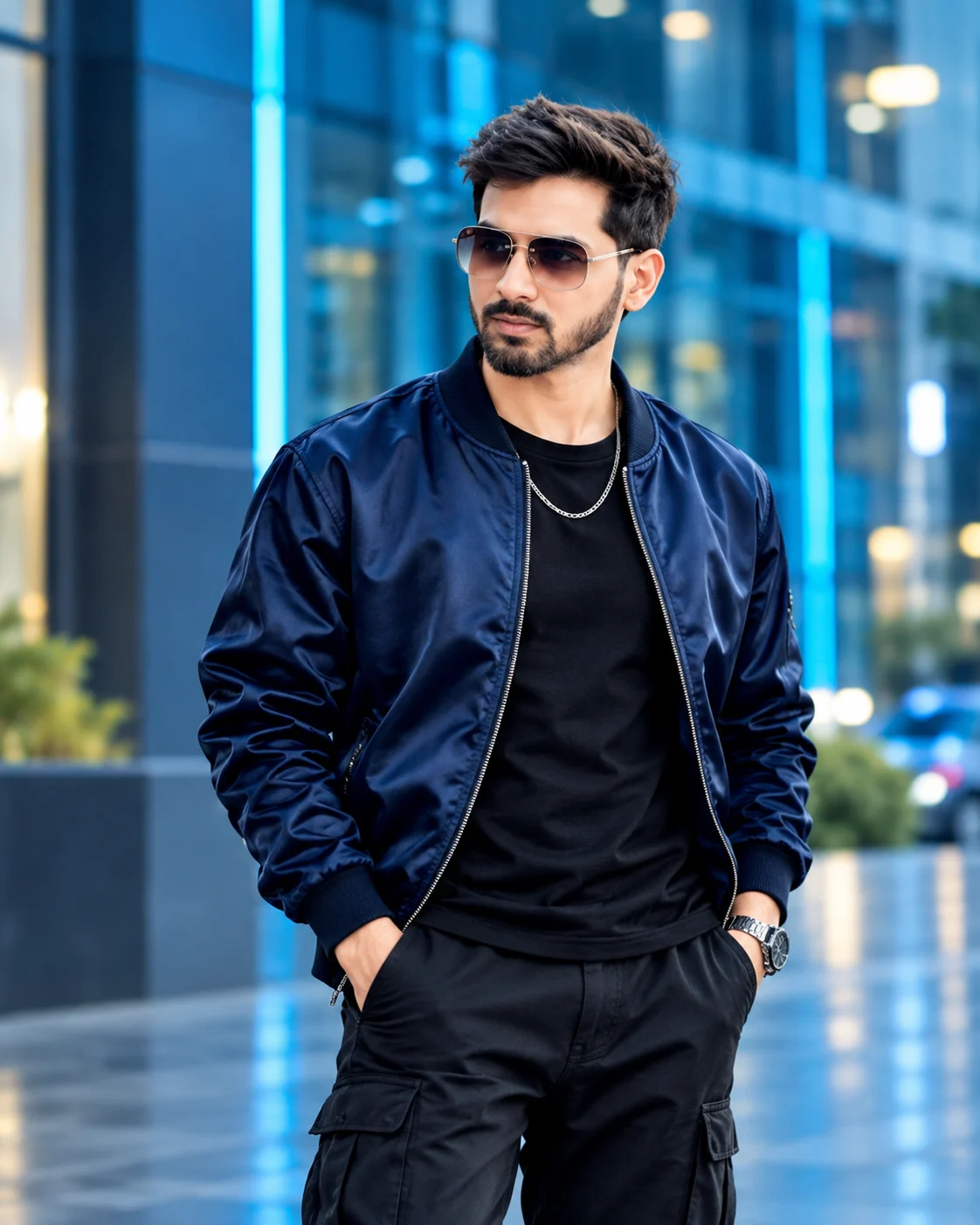
Electric Blue Street Luxury Menswear Editorial Portrait
Create a futuristic menswear portrait featuring a navy satin bomber, black cargo trousers and blue-lit city architecture while preserving your real face.
Using the uploaded photo, create an ultra-realistic luxury streetwear fashion editorial portrait of the same recognizable man standing confidently in a futuristic blue-lit urban environment, wearing a navy satin bomber jacket and black cargo trousers, in a vertical 4:5 composition. KEEP — Preserve the exact facial identity and natural appearance of the person in the uploaded photograph. Retain the original forehead width, eyebrow thickness and placement, eye shape and natural eye colour, nose bridge and tip, lip shape, cheek volume, cheekbone position, jawline, chin, ears and natural facial asymmetry. Maintain the original skin tone, pores, marks, natural texture and age. Keep the original hairline, hair density, hairstyle, natural hair texture and facial hair exactly as photographed. Preserve the person's neck, shoulders, hands, height relationship and overall body proportions. Do not replace or reconstruct the face. CHANGE — Dress the subject in an oversized deep navy-blue satin bomber jacket with a subtle reflective sheen, ribbed collar and cuffs, structured shoulders and realistic stitching. Add a plain fitted black crew-neck T-shirt underneath, relaxed black multi-pocket cargo trousers and a simple silver metallic chain necklace. Use black premium sneakers if visible. Keep accessories limited to the specified chain. Pose the subject standing casually with both hands inside the cargo pockets, shoulders relaxed and torso angled slightly toward the camera. Turn the head slightly to one side with a composed, confident expression. SCENE — Place the subject on a modern futuristic city street at blue hour, shortly after sunset. Behind him, include tall glass buildings, illuminated architectural panels, subtle cyan LED strips and distant urban lights. Keep the background softly blurred while preserving recognizable architectural shapes. The ground should have a slight reflective appearance, suggesting a recently cleaned urban surface rather than exaggerated wetness. LIGHT — Use a soft directional blue-toned key light from the upper left, balanced with a neutral front fill light so the facial skin retains its natural colour. Add restrained cyan rim lighting along the jacket shoulders and sleeves. Maintain realistic facial shadows and natural highlights across the satin fabric. CAMERA — Shoot at eye level using an 85mm portrait lens at f/2.0. Frame from the head to mid-thigh, keeping the complete jacket silhouette and both hands visible. Use realistic perspective and natural body proportions. GRADE — Apply a cinematic midnight-blue and cool-cyan colour grade with controlled contrast, deep natural blacks and accurate skin tones. Preserve fine satin reflections, fabric stitching and realistic skin texture. OUTPUT — Vertical 4:5 aspect ratio, ultra-detailed photorealistic quality, 8K resolution. DO NOT — Slim or reshape the face, whiten the skin, change eye colour, alter the hairline, remove facial hair, apply plastic skin smoothing, invent jewellery or tattoos, distort hands, exaggerate muscles or replace the person's identity.
Photo Guide
- Use a sharp, high-resolution photo with the face clearly visible.
- Choose a front-facing or slight three-quarter camera angle.
- Use even natural lighting so facial details remain easy to identify.
- Keep the original hairstyle, hairline and facial hair visible.
- A daylight photo blends better than a strongly coloured indoor photo.
- Avoid sunglasses or heavy shadows that hide the eyes.
How to Build
- 1Open Gemini or ChatGPT and select its image generation feature.
- 2Upload one clear reference photograph of yourself.
- 3Copy the complete prompt content into the image instruction box.
- 4Choose 4:5 portrait orientation if the tool offers aspect settings.
- 5Select the highest available image quality or resolution.
- 6Generate the image and inspect the face, jacket and hand placement.
- 7If the first result is wrong, refine only the incorrect details and regenerate.
Pro Tips
- Choose a navy jacket reference rather than bright blue so the satin stays realistic.
- Keep cyan lighting behind the subject so the face does not turn blue.
- Use a visible black T-shirt neckline to separate the jacket layers.
- Keep both hands visible inside the cargo pockets to avoid finger distortions.
- Use a softly blurred city background so the jacket remains the focal point.
Share This Prompt
About the Author
Naziya
Creative AI writer at MFDA, sharing trendy photo-editing prompts and fresh ideas for beautiful, stylish AI images.