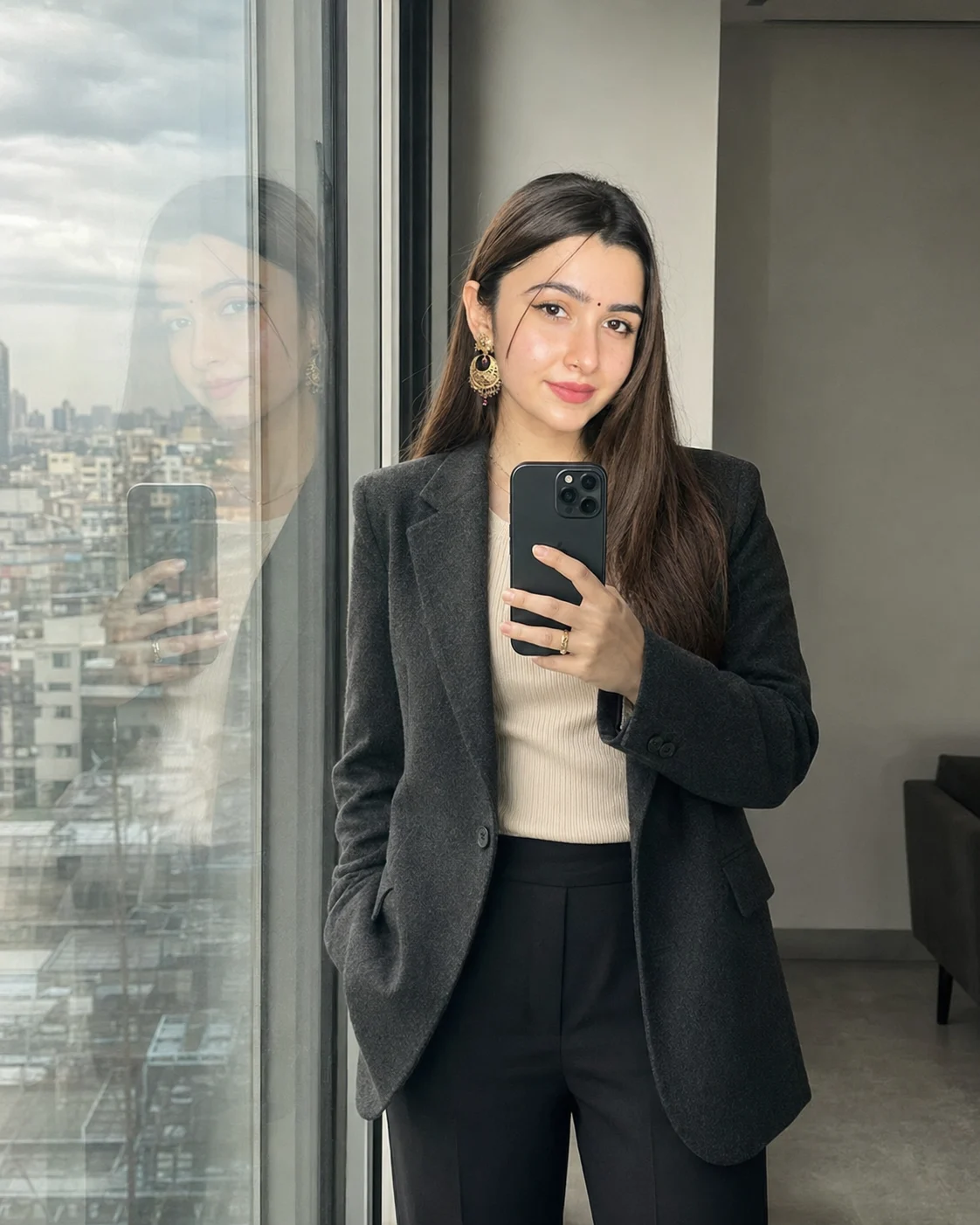
Editorial Window Reflection Selfie Portrait
Turn your photo into a refined editorial window reflection selfie with cool daylight, tailored styling, realistic glass depth, and preserved identity.
Using the uploaded photo, create a realistic editorial window-reflection selfie of the same person, preserving their recognizable identity and full natural body proportions. KEEP - Preserve the original face exactly: bone structure, jawline, nose and lip shape, eye shape and colour, eyebrow shape, hairline and hair texture, and facial hair. Keep the natural skin tone and visible texture, including pores, freckles, moles, scars and fine lines, with the same tone continuing across the face, neck, arms and hands. Preserve the person's height, build and weight, shoulder width, waist-to-hip proportion, arm and leg length, hand size and finger shape. Keep any glasses, piercings, tattoos, birthmarks and apparent age that are genuinely present. CHANGE - Dress the subject in a structured charcoal wool blazer over an ivory ribbed cotton top, with tailored black trousers and no newly invented accessories. Change the pose to a relaxed three-quarter stance beside a tall architectural window, holding the smartphone naturally at chest level. Replace the original environment with a quiet contemporary studio interior and a brushed-metal window frame. SCENE - Set the image during early morning, with a softly overcast city view visible beyond the glass. Keep the distant buildings gently defocused while the subject and window reflection remain crisp enough to read as one photograph. LIGHT - Use broad cool daylight entering from the left side through the window, around 6000K, with soft directional falloff across the face and clothing. Keep subtle contact shadows beneath the shoes and against the window-side surfaces. CAMERA - Use a 50mm lens at f/2.8, camera positioned slightly below eye level, framing from mid-thigh upward. Preserve realistic perspective in the smartphone, hands and reflected body. GRADE - Apply a restrained editorial digital grade with slate, ivory and charcoal tones, moderate contrast, natural skin colour, gentle highlight roll-off and fine grain across the entire frame. Apply identical focus falloff, grain and colour treatment to the person, reflection and background. OUTPUT - Create a vertical 4:5 image at 2048 × 2560 resolution. DO NOT slim the face or body, add muscle, change height, whiten or tan skin, smooth skin into plastic, change eye colour, erase moles scars or freckles, add jewellery makeup or tattoos not present in the photo, or change the number or shape of fingers.
Photo Guide
- Use a sharp, high-resolution photo with the face and body clearly visible.
- Choose a front or slight three-quarter photo with natural proportions.
- Soft daylight works best for matching this cool editorial window scene.
- Keep the forehead, hairline, hands and clothing unobstructed.
- Avoid heavy filters; they can make the reflection and skin look artificial.
How to Build
- 1Use Gemini and select an image-editing mode in the Nano Banana family.
- 2Upload one clear photo, then paste the full prompt unchanged.
- 3Generate the vertical 4:5 version and inspect the reflection carefully.
- 4Compare the face, hands, height and body proportions with your photo.
- 5Check that window light matches the subject and shadows touch surfaces naturally.
- 6If it is wrong, ask Gemini conversationally to correct only the drifting detail.
Pro Tips
- Use a daylight source photo so the cool window illumination blends naturally.
- Choose a photo showing your full torso; missing body detail invites reconstruction.
- Repeat the identity keep-list if your jawline or body proportions begin drifting.
- Keep hands visible enough to guide realistic smartphone and finger placement.
- Avoid strong beauty filters because they can erase the skin texture being preserved.
Share This Prompt
About the Author
Naziya
Creative AI writer at MFDA, sharing trendy photo-editing prompts and fresh ideas for beautiful, stylish AI images.