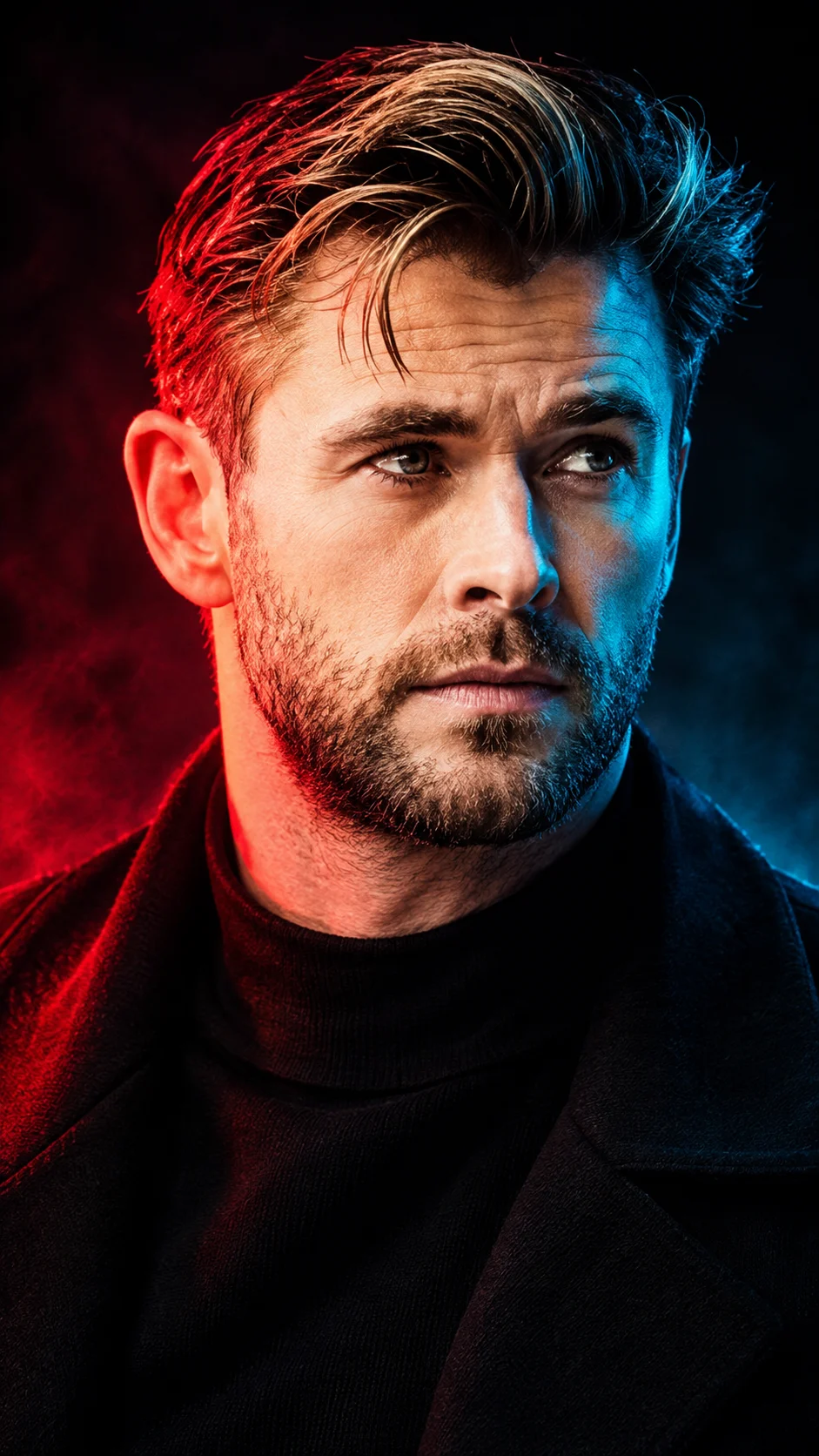
Duality Portrait – Crimson Red and Electric Cyan Split Lighting
Create a cinematic close-up portrait with crimson red and electric cyan lighting split across the face while preserving your original facial identity.
Using the uploaded photo, create an ultra-realistic cinematic extreme close-up portrait of the same recognizable person, featuring perfectly balanced crimson-red and electric-cyan split lighting across the face. KEEP — Preserve the person's exact facial identity and natural facial geometry from the uploaded photograph. Retain the original forehead proportions, facial width, eyebrow thickness and placement, eye shape, natural eye colour, nose bridge, nose tip, lip contours, cheek volume, cheekbones, jawline, chin and ears. Maintain the original skin tone, natural pores, fine lines, marks and realistic skin texture without beautification. Keep the original hairline, hairstyle, hair density, individual hair texture and natural hair colour. If facial hair is present, preserve its exact beard outline, moustache shape, density and length. Retain the original neck proportions, shoulder width and body proportions. Do not reconstruct, replace, blend or reinterpret the face. CHANGE — Transform the lighting, background, wardrobe and photographic atmosphere into a futuristic dual-colour editorial portrait. Position the subject in a tight frontal close-up with the face occupying most of the vertical frame. Dress the subject in a matte-black high-neck outfit made from fine textured cotton or black technical fabric, barely visible against the background. SCENE — Place the subject against a completely dark charcoal-black studio background with subtle atmospheric haze. Keep the background free from distracting objects, patterns and artificial scenery. LIGHT — Illuminate the viewer's left half of the face with saturated crimson-red light and the viewer's right half with electric-cyan light. Use two controlled softboxes positioned at approximately 45-degree angles to create a clean colour boundary around the nose bridge and central facial structure. Maintain realistic skin highlights and natural shadow transitions. CAMERA — Shoot using an 85mm portrait lens at f/1.8, camera positioned at eye level, with precise focus on both eyes and gentle background separation. GRADE — Apply deep blacks, controlled red and cyan saturation, crisp facial contrast and subtle cinematic film grain. Preserve natural skin colour beneath the coloured illumination. OUTPUT — Vertical 9:16 composition, 8K resolution, photorealistic editorial photography. DO NOT — Slim the face, whiten the skin, change eye colour, smooth skin into plastic, alter facial proportions, invent jewellery or tattoos, remove existing facial hair, or introduce a second face.
Photo Guide
- Upload a sharp, high-resolution photo with both eyes clearly visible.
- Use a straight-on or slightly turned face angle for balanced colour separation.
- Choose even, neutral lighting so the original facial details remain readable.
- Keep your forehead, eyebrows, nose, lips, jawline and hairline unobstructed.
- Avoid red or blue filters in the source photo; they interfere with split lighting.
How to Build
- 1Open Gemini or ChatGPT and select an image-generation model.
- 2Upload your original face photo as the identity reference.
- 3Paste the complete Duality Portrait prompt into the input box.
- 4Select a vertical 9:16 aspect ratio for the composition.
- 5Choose the highest available image-quality or resolution setting.
- 6Generate the portrait and inspect the red-cyan boundary around the nose.
- 7If the result looks wrong, refine the lighting while keeping the face unchanged.
Pro Tips
- Use a front-facing reference so both coloured halves remain visually balanced.
- Keep both eyes visible so the red-cyan contrast does not hide facial identity.
- Choose a matte-black outfit so clothing does not reflect unwanted coloured light.
- Avoid strong shadows in the original photo so facial geometry stays consistent.
- Request a softer centre transition if the nose appears artificially divided.
Share This Prompt
About the Author
Naziya
Creative AI writer at MFDA, sharing trendy photo-editing prompts and fresh ideas for beautiful, stylish AI images.