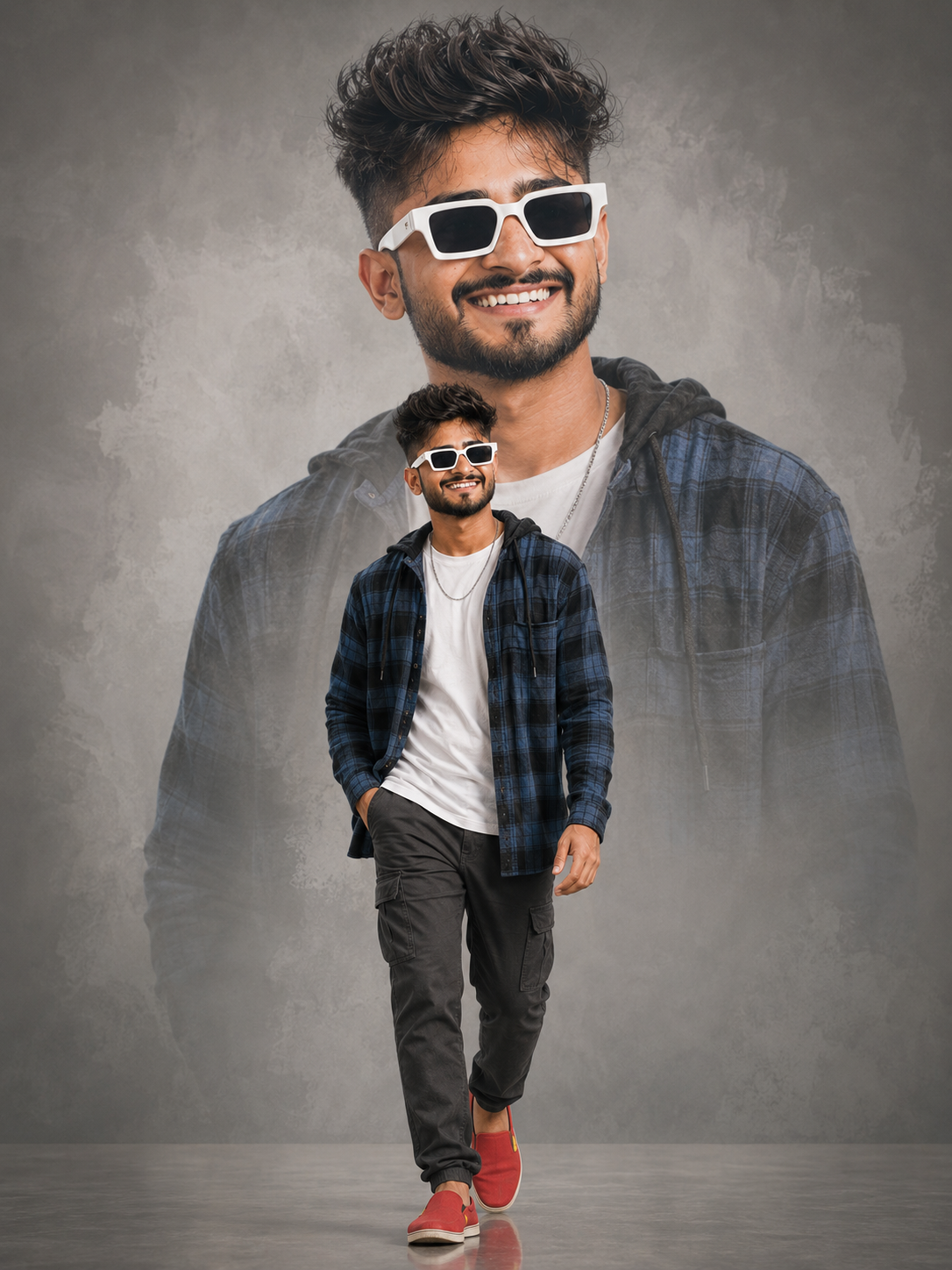
Double Exposure Movie Poster Portrait
Create a cinematic double-exposure portrait with a confident full-body pose, oversized background portrait, studio lighting, and polished movie-poster styling.
Using the uploaded photo, create a hyper-realistic double-exposure movie-poster portrait of the same person, keeping their identity clearly recognizable. KEEP: Keep the uploaded person's exact face structure, natural facial proportions, eye shape and eye colour, skin tone and visible skin texture, hairline, natural hair density, facial hair if present, and body proportions. Keep the person's recognizable jawline, cheeks, nose, lips, ears, facial asymmetry, and natural expression characteristics. Do not replace or redesign their facial identity. Keep the same person in both the foreground figure and the large background portrait. CHANGE: Change the wardrobe to an open blue-and-black plaid hooded flannel shirt over a plain white crew-neck T-shirt, dark charcoal-grey cargo pants with visible side pockets, bright red slip-on shoes with tiny yellow details, a thin silver chain necklace, and oversized thick white rectangular sunglasses with dark lenses. Change the pose to a confident mid-stride walk toward the camera, with one foot planted and the other lifted naturally, arms relaxed at the sides, and a genuine joyful smile. Change the setting to a seamless medium-grey studio backdrop with a polished floor. SCENE: Place the walking subject in the lower portion of the composition. Behind him, create a massive semi-transparent mid-chest-up portrait of the same person wearing the identical outfit and sunglasses. The large portrait should look slightly off camera, with its outer edges fading into the grey backdrop through subtle soft brush-like transitions. Keep the polished floor clean and show only a faint reflection beneath the red shoes. LIGHT: Use large, soft professional studio lighting positioned slightly above and in front of the subject, with gentle frontal illumination across the face. Add controlled fill from the opposite side so both eyes and facial structure remain naturally readable. Keep the large background portrait softer and slightly more luminous than the foreground figure. CAMERA: Photograph the foreground figure with an 85mm lens at f/4, camera positioned around lower-chest height for a subtle low-angle perspective. Keep the walking subject sharp while maintaining enough depth for the oversized background portrait to remain recognizable. GRADE: Use a neutral medium-grey base with controlled contrast, natural skin colour, crisp clothing texture, restrained saturation, and a clean cinematic movie-poster finish. Avoid excessive sharpening or artificial glow. OUTPUT: Render a vertical 3:4 composition at 8K resolution, with the complete walking figure comfortably inside the frame and enough upper space for the large background portrait. DO-NOT: No face slimming, no skin whitening, no changed eye colour, no plastic smoothing, no invented jewellery or tattoos, no altered body proportions, no duplicate facial features, no extra limbs, no distorted hands, no text, no watermark, and no logo.
Photo Guide
- Use a sharp, high-resolution photo where the full body and face are visible.
- A straight or slightly low camera angle works best for the walking-poster pose.
- Use even front-facing light so the face matches the soft studio lighting.
- Keep hairline, jawline, eyes, and facial contours unobstructed.
- A cluttered background can weaken the clean grey studio composite.
How to Build
- 1Open Gemini and upload one clear photo showing the person’s face and body.
- 2Paste the full prompt and choose image generation with a 3:4 ratio.
- 3Use the highest available quality or resolution setting.
- 4Check that both the walking figure and large portrait share the same face.
- 5If the first result drifts, regenerate using the same source photo and prompt.
Pro Tips
- Choose a photo with visible shoes or legs so body proportions stay consistent.
- Use a relaxed smile so the foreground expression looks natural during the walk.
- Avoid sunglasses in the source photo so the requested white frames render clearly.
- Keep the hairline unobstructed so the large portrait retains the same identity.
- A clean, evenly lit source helps the grey studio background look seamless.
Share This Prompt
About the Author
Jitesh Mali
Author