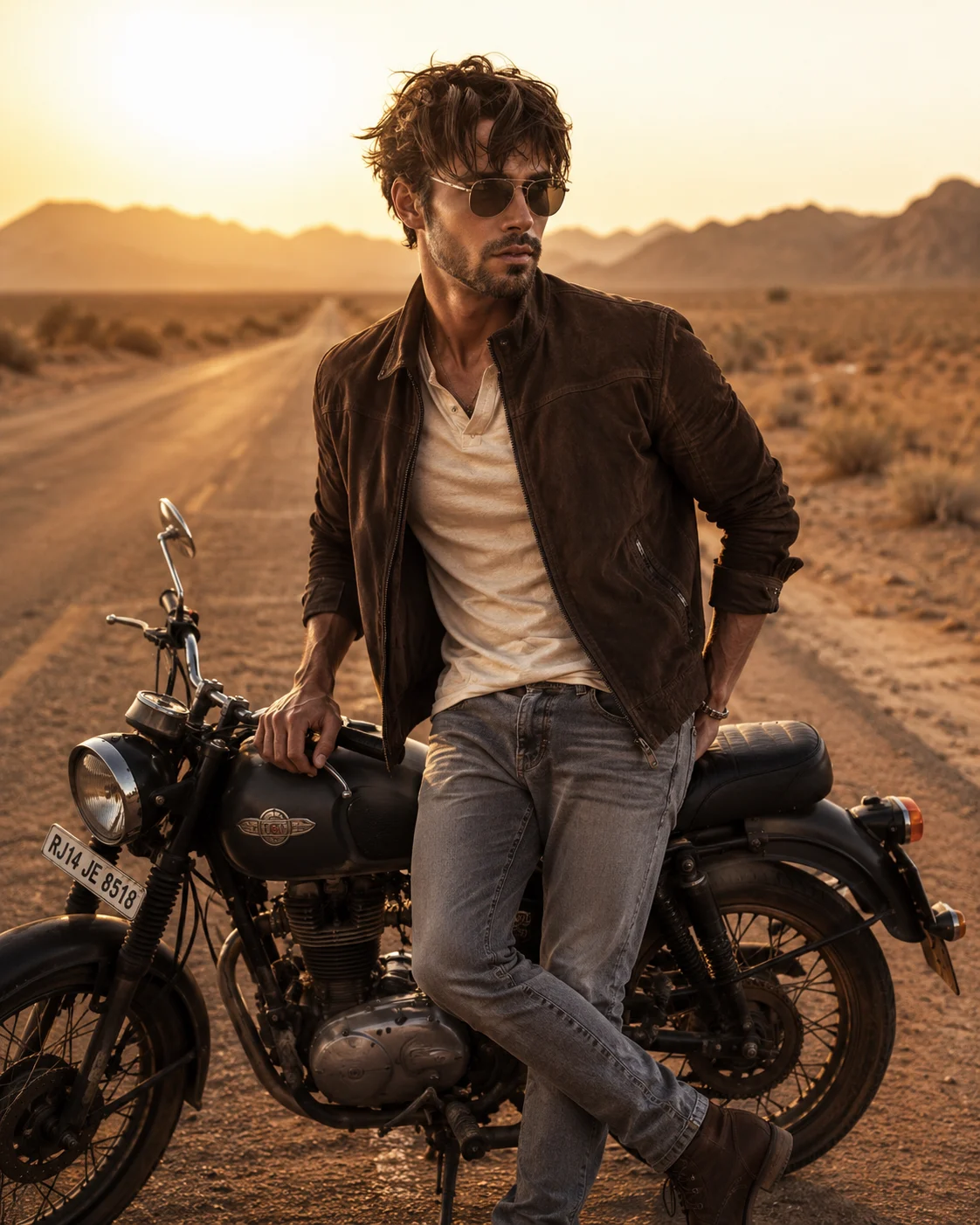
Desert Motorcycle Golden Hour Portrait
Create a realistic golden-hour motorcycle portrait that keeps your face and natural features intact while changing the setting and styling.
Using the uploaded photo, create a photorealistic cinematic editorial portrait of the same person standing beside a rugged classic motorcycle on an empty desert highway at golden hour. KEEP - Keep the uploaded person's exact facial identity and visible facial structure: forehead shape, eyebrow placement, eye shape and natural eye colour, nose structure, lips, cheeks, cheekbones, jawline, chin, ears, facial proportions, and natural asymmetry. Preserve the original skin tone, visible pores, fine skin texture, natural marks, hairline, hair density, hairstyle characteristics, and facial-hair characteristics if visible. Keep the person's natural body proportions, realistic age, and overall physical build. Do not beautify or reshape the identity. CHANGE - Dress the person in [weathered dark brown suede jacket], [cream cotton t-shirt], [faded grey jeans], [dark brown leather boots], [aviator sunglasses], and [simple metal bracelet]. Place [one hand resting on the motorcycle seat] while the body turns slightly toward the camera in a relaxed standing pose. Use a [matte black vintage classic motorcycle] with visible metal components and authentic retro proportions. SCENE - Set the portrait on an empty [dusty desert highway] during [late golden hour just before sunset]. Place [low distant mountains] across the horizon, with a long road receding behind the subject. Add fine wind-blown dust close to the ground and a thin layer of warm sunset haze. Keep the background softly compressed and moderately blurred so the person and motorcycle remain clearly separated from the landscape. LIGHT - Use warm sunlight coming from behind and slightly to one side of the person, creating a natural golden rim along the hair, shoulders, jacket, and motorcycle. Add soft reflected fill from the sandy ground onto the face so the facial planes remain naturally visible rather than appearing cut out. Use approximately 4200K-4800K sunset warmth. CAMERA - Shoot at [85mm f/1.8] from [chest height], with the camera positioned slightly below the subject's eye line. Use shallow depth of field while retaining enough detail in the motorcycle and road. GRADE - Apply a muted earth-tone grade with warm browns, dusty beige highlights, restrained saturation, medium contrast, subtle Kodak-style film grain, and gentle highlight roll-off. OUTPUT - Use [4:5 vertical] at [high resolution, 2048 pixels or higher on the long edge]. DO-NOT - No face slimming, no skin whitening, no changed eye colour, no plastic smoothing, no invented jewellery or tattoos, no altered facial proportions, and no replacement face.
Photo Guide
- Use a sharp, high-resolution photo where the full face is clearly visible.
- Choose a front or three-quarter angle so the jawline and nose remain readable.
- Use even daylight if possible; sunset styling blends better from a clear face photo.
- Keep the hairline, facial edges, and natural skin texture unobstructed.
- Avoid sunglasses or harsh shadows in the source photo; they can cause eye drift.
How to Build
- 1Open Gemini and choose its image-generation mode.
- 2Upload one clear, high-resolution photo as the identity reference.
- 3Paste the full prompt without changing the KEEP section.
- 4Set the output framing to 4:5 vertical before generating.
- 5Generate the image and check the face against the uploaded photo.
- 6If the face drifts, regenerate with stronger identity preservation enabled.
Pro Tips
- Use a front-facing source so the 85mm portrait keeps facial proportions stable.
- Keep natural facial hair visible so the desert styling does not invent it.
- Choose a source with visible skin texture so pores survive the warm grade.
- Avoid a heavily filtered source because smooth skin can trigger face reshaping.
- Keep the motorcycle behind the face area so overlapping details do not alter features.
Share This Prompt
About the Author
Naziya
Creative AI writer at MFDA, sharing trendy photo-editing prompts and fresh ideas for beautiful, stylish AI images.