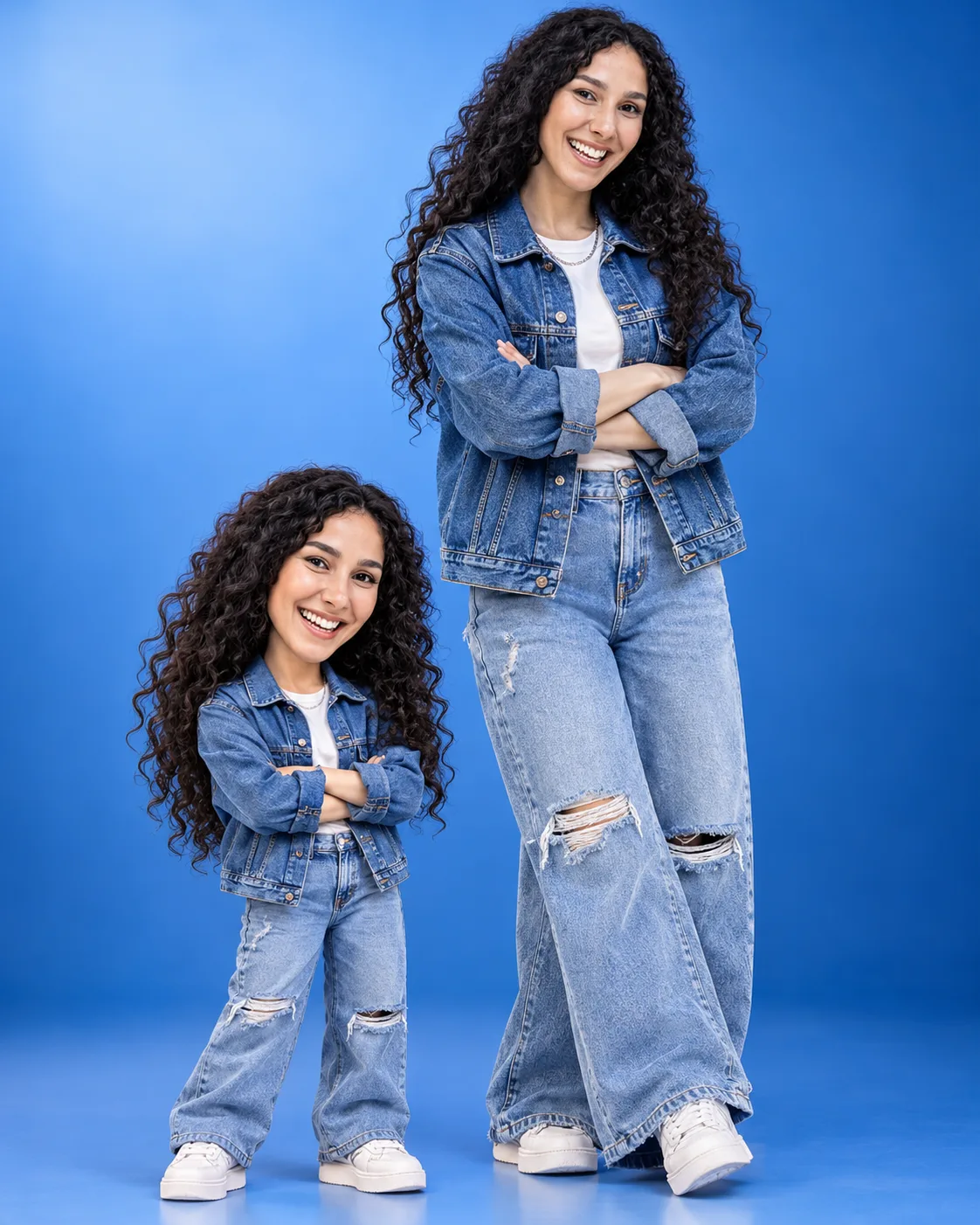
Denim Duo Mini Urban Explorer Fashion Portrait
Create a photorealistic denim fashion portrait beside your adorable 3D miniature twin, wearing matching streetwear in a blue urban studio.
Using the uploaded photo, create an ultra-realistic full-body fashion studio photograph of the same person standing beside a cute, highly detailed 3D miniature cartoon version of themselves, both dressed in identical urban denim streetwear. KEEP — Preserve the original person's exact recognizable facial identity from the uploaded photo. Retain their natural face shape, forehead proportions, facial width, eyebrow placement, eye shape and original eye colour, nose bridge and tip, lip contours, cheek volume, cheekbones, jawline, chin, ears and natural facial asymmetry. Maintain the original skin tone, undertones, pores, fine lines, age characteristics and realistic skin texture. Keep the original hairline, hair density, natural hair texture, colour, length and hairstyle. Preserve facial hair exactly if present. Retain the original neck length, shoulder width, body proportions and natural anatomy. Do not replace or reinterpret the face. CHANGE — Dress the real person in an oversized medium-blue denim jacket with visible diagonal twill weave, natural seam stitching, metal buttons and slightly dropped shoulders. Underneath, add a fitted plain white cotton T-shirt. Pair it with light-wash baggy denim jeans featuring controlled distressed patches around the knees, loose hems and realistic fabric folds. Add chunky white leather sneakers with textured rubber soles and a subtle silver chain necklace. Include a small silver accessory only if specified: [OPTIONAL ACCESSORY]. MINIATURE CHARACTER — Create a charming 3D cartoon miniature of the same person, approximately one-third of the real person's height. Preserve recognizable facial features, hairstyle, skin tone and identical clothing details. Use an oversized expressive head, compact body, slightly enlarged eyes and carefully modelled hands. The miniature must imitate the real person's exact pose and wear matching denim textures, sneakers and silver accessories. SCENE — Position the real person slightly behind and to the right, with the miniature standing in the lower-left foreground. Both face the camera with relaxed crossed arms and confident expressions. Use a modern blue urban photography studio with a smooth gradient background transitioning from pale electric blue to deep navy. Add subtle floor reflections and natural contact shadows without distracting objects. LIGHT — Use a large diffused softbox positioned 45 degrees to camera-left, gentle frontal fill and subtle blue edge lighting. Maintain natural facial illumination at approximately 5500K. CAMERA — Shoot at 50mm, f/5.6, eye-level height, with sufficient depth of field to keep both characters sharp and fully visible. GRADE — Apply cool blue colour grading, balanced skin tones, crisp denim texture, moderate contrast and restrained highlights. OUTPUT — Vertical 4:5 composition, 8K-quality detail, full-body framing with both subjects completely visible. DO NOT — Slim the face, whiten the skin, change eye colour, alter identity, smooth skin into plastic, change body proportions, invent jewellery or tattoos, add extra limbs or fingers, duplicate the full-sized person, mismatch outfits, crop shoes or heads, add text, logos or watermarks.
Photo Guide
- Upload a sharp, high-resolution photo showing the complete face clearly.
- Choose a front-facing or slightly turned camera angle.
- Use soft, even lighting so facial details remain visible.
- Keep your original hairstyle and hairline unobstructed.
- Blue or neutral clothing helps preview the denim colour contrast.
- Avoid blurry selfies, heavy beauty filters or strong coloured lighting.
How to Build
- 1Open Gemini or ChatGPT and select an image-generation model.
- 2Upload your original photograph as the identity reference.
- 3Paste the complete prompt into the image-generation instruction box.
- 4Choose 4:5 portrait aspect ratio and the highest available quality.
- 5Enable reference-image or identity preservation if available.
- 6Generate the image and inspect both faces, outfits and miniature proportions.
- 7If the first result is wrong, refine the specific error and regenerate.
Pro Tips
- Choose a photo with visible shoulders so jacket proportions remain natural.
- Keep the original hair visible so the miniature matches your hairstyle.
- Use a relaxed crossed-arm reference to improve pose consistency.
- Avoid oversized silver jewellery so the denim remains the main focus.
- Keep both characters in the same lighting direction to prevent a pasted-on look.
Share This Prompt
About the Author
Naziya
Creative AI writer at MFDA, sharing trendy photo-editing prompts and fresh ideas for beautiful, stylish AI images.