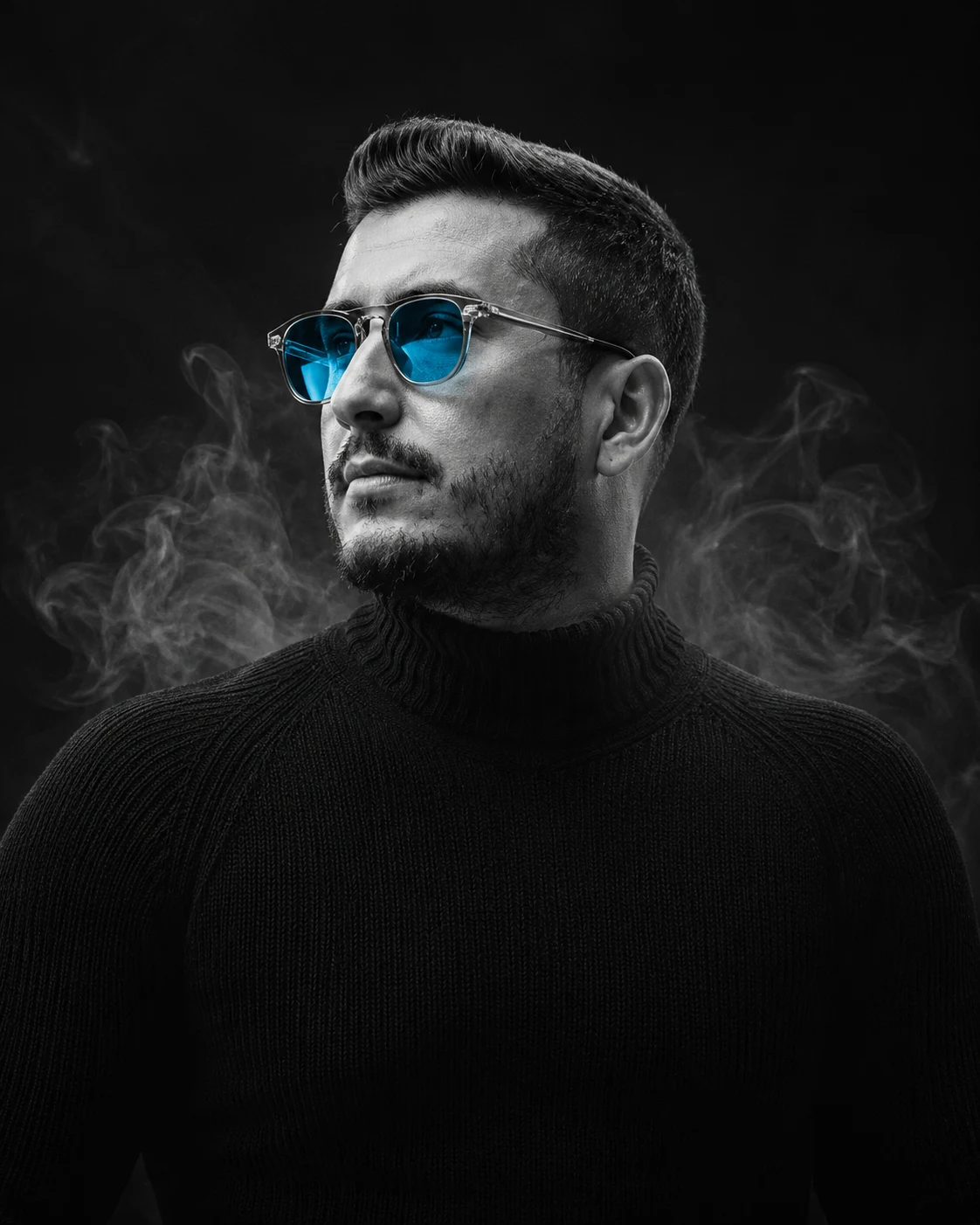
Cyan Lens Smoke Portrait in Dramatic Black and White
Create a dramatic black-and-white studio portrait with cyan-tinted sunglasses, drifting smoke, sculpted shadows, and your original facial identity preserved.
Using the uploaded photo, create a photorealistic, dramatic black-and-white studio portrait of the same man, framed from the chest upward, with translucent electric-cyan sunglasses and thin wisps of smoke behind his shoulders. KEEP — Preserve the man's exact recognizable facial identity, including forehead shape, eyebrow placement, original eye shape and natural eye colour, nose bridge and tip, lip shape, cheek contours, cheekbones, jawline, chin, ears, facial width, and natural facial asymmetry. Retain his original skin tone, visible pores, fine lines, marks, and natural skin texture. Keep his original hairline, hair density, hairstyle, facial hair, age, neck width, shoulder proportions, and body build. Do not reconstruct his face from a generic model or blend it with another identity. CHANGE — Dress him in a fitted black knitted turtleneck with a clearly visible ribbed collar and subtle wool texture. Add futuristic black sunglasses with translucent electric-cyan lenses and realistic reflections. Turn his head slightly to the right while keeping his shoulders relaxed and his expression focused and serious. Use a pure black studio background with narrow smoke trails curling behind the shoulders. Keep the cyan colour confined to the lenses and their faint reflections. SCENE — Place him in a dark indoor photography studio with no visible furniture or scenery. Thin grey smoke drifts laterally behind his head and shoulders, fading gradually into the black background. Keep the smoke out of his eyes and away from the outline of his face so the facial features remain clear. LIGHT — Use a large, diffused key light positioned 45 degrees to the left of the camera and slightly above eye level. Add a restrained fill light from the opposite side to retain natural detail in the shadows. A narrow rim light separates the black sweater from the background. Keep the facial highlights consistent with the direction of the shadows. CAMERA — Use an 85mm portrait lens at f/1.8, with the camera at chest height and focused precisely on the face. Maintain natural perspective, sharp facial detail, and softly blurred smoke. GRADE — Render skin, clothing, and smoke in neutral monochrome with deep blacks, controlled highlights, and crisp midtone contrast. Preserve realistic pores and fabric texture without artificial sharpening. OUTPUT — Vertical 4:5 aspect ratio, 2048 × 2560 pixels, high-detail photorealistic finish. DO NOT slim the face, whiten the skin, change the natural eye colour, smooth the skin into plastic, alter the hairline, replace facial features, or invent jewellery or tattoos.
Photo Guide
- Use a sharp, high-resolution photo with the full face clearly visible.
- Choose a front-facing or three-quarter portrait with both facial contours visible.
- Use even lighting so the original skin texture remains easy to identify.
- Keep the hairline, ears, neck, and shoulders visible in the reference.
- Avoid sunglasses in the source photo if accurate eye and brow matching matters.
- A dark top helps preview the black turtleneck and smoke-studio contrast.
How to Build
- 1Open Gemini and select image generation with photo upload enabled.
- 2Upload one clear portrait of the person whose identity must remain unchanged.
- 3Paste the complete prompt into the image-generation instruction box.
- 4Choose a 4:5 portrait aspect ratio and the highest available resolution.
- 5Generate the image and inspect the face, cyan lenses, and smoke placement.
- 6If the result is wrong, revise only the incorrect detail and regenerate.
Pro Tips
- Choose a reference with visible eyebrows so the sunglasses fit naturally.
- Keep both sides of the jaw visible so dramatic shadows do not reshape the face.
- Use a black knitted top in the reference to reinforce the intended fabric texture.
- Keep the smoke behind the shoulders so it does not obscure facial details.
- Ask for cyan only in the lenses so the monochrome grade stays consistent.
Share This Prompt
About the Author
Naziya
Creative AI writer at MFDA, sharing trendy photo-editing prompts and fresh ideas for beautiful, stylish AI images.