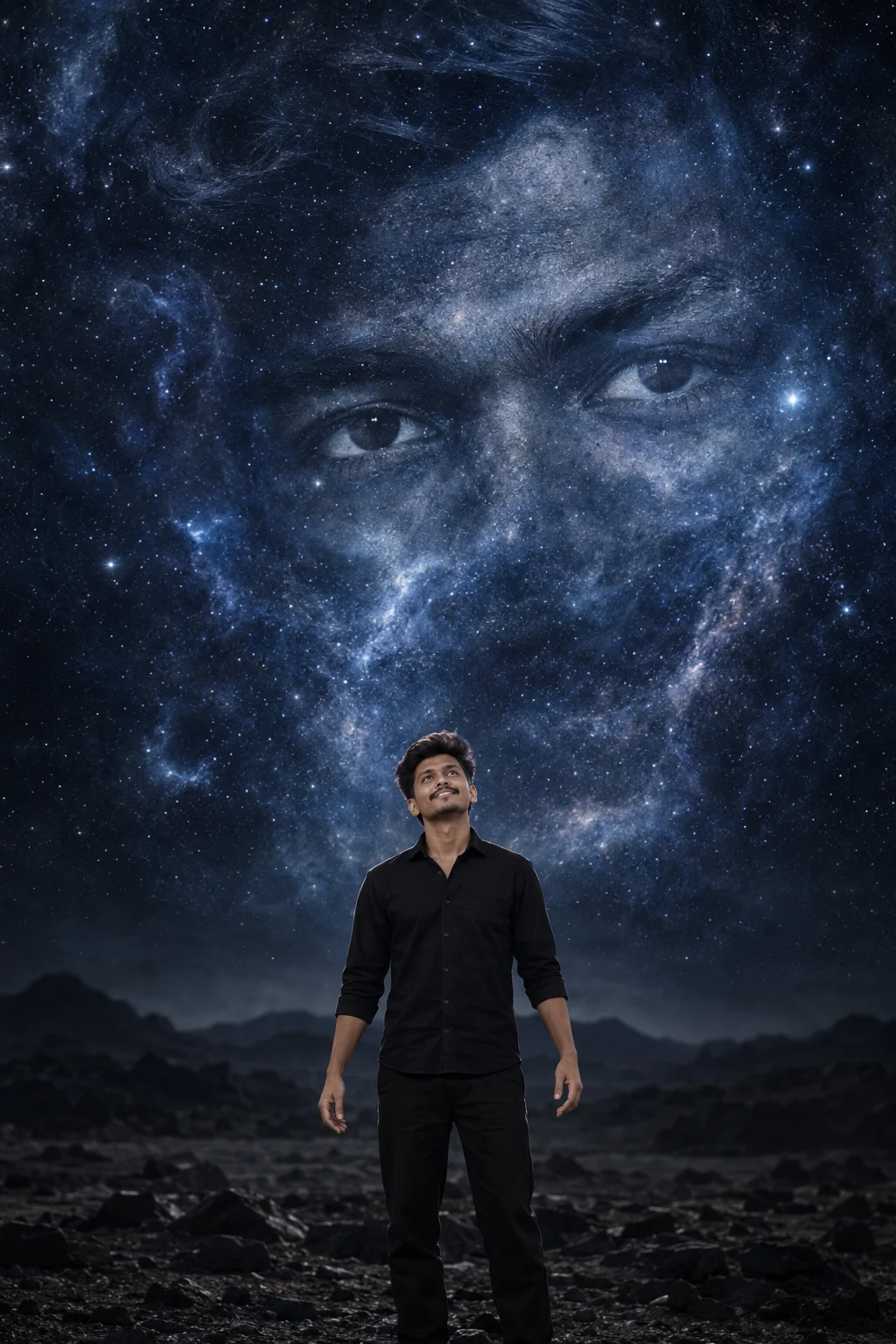
Cosmic Eye Portrait Beyond the Universe Prompt
Create a cinematic cosmic portrait where your real face stays recognizable while giant celestial eyes emerge from nebula clouds above a dark landscape.
Using the uploaded photo, create a photorealistic surreal double-exposure portrait of the same person standing alone on a dark barren landscape beneath an immense star-filled sky. KEEP - Keep the uploaded person's exact face structure, natural jawline, cheekbone placement, chin shape, nose structure, lip shape, forehead proportions, eye shape and natural eye colour. Keep the original skin tone, pores and visible skin texture, hairline, hairstyle characteristics, facial hair if present, natural facial asymmetry, body proportions, shoulder width and recognizable identity. Do not redesign or beautify the person's anatomy. CHANGE - Change the wardrobe to a simple matte-black cotton shirt and black trousers with no visible logos. Change the pose so the person stands in the lower center with the head tilted upward toward the sky and both arms relaxed slightly away from the body. Change the environment into a dark, barren rocky plain beneath a vast cosmic sky. Change the background so enormous translucent facial features emerge from nebula clouds, with the eyes as the strongest visual element. Let the giant face dissolve gradually into stars and cosmic dust rather than appearing as a pasted portrait. Change the lighting to cool celestial rim light and soft frontal fill. SCENE - Set the scene at night on a remote, empty rocky plain. Place dense indigo nebula clouds, fine stars and faint cosmic dust behind the person. Keep distant terrain softly blurred while the giant celestial face remains atmospheric and partially transparent. LIGHT - Use soft cool light from above and slightly behind the person, with a subtle frontal fill so the real face retains natural dimensionality. Keep the celestial rim light around the shoulders and hair without flattening facial features. CAMERA - Shoot at 85mm, f/2.0, camera positioned at chest height, using shallow depth of field and realistic perspective compression. GRADE - Apply a restrained indigo-gray monochromatic grade, deep blacks, controlled highlights, moderate contrast and subtle cinematic film grain. OUTPUT - Create a vertical 2:3 composition at 1200x1800 pixels, with the person occupying the lower third and the celestial face filling the upper two-thirds. DO-NOT - No face slimming, no skin whitening, no changed eye colour, no plastic smoothing, no invented jewellery or tattoos, no altered facial proportions, no extra limbs, no duplicated person.
Photo Guide
- Use a sharp, high-resolution photo where the full face is clearly visible.
- Choose a front-facing or slight three-quarter angle with both eyes unobstructed.
- Soft, even facial light works best for blending with the cool cosmic rim light.
- Keep the hairline, jawline, facial hair and shoulders visible in the source photo.
- A photo with harsh colored lighting can distort the celestial indigo grade.
How to Build
- 1Use Gemini and upload a clear portrait as the reference image.
- 2Paste the full prompt and choose a 2:3 vertical image setting.
- 3Set output quality to the highest available resolution.
- 4Keep the uploaded photo as the only identity reference for the person.
- 5Generate the first version without adding extra style instructions.
- 6If the face drifts, regenerate with stronger KEEP instructions and the same source photo.
Pro Tips
- Use a neutral expression so the upward-looking pose does not reshape the face.
- Keep both eyes visible so their natural shape survives the cosmic-eye composition.
- Avoid sunglasses because the eyes must remain the identity anchor.
- Choose a dark outfit so the celestial face remains visually dominant.
- Use a sharp source photo so facial texture survives the atmospheric blending.
Share This Prompt
About the Author
Naziya
Creative AI writer at MFDA, sharing trendy photo-editing prompts and fresh ideas for beautiful, stylish AI images.