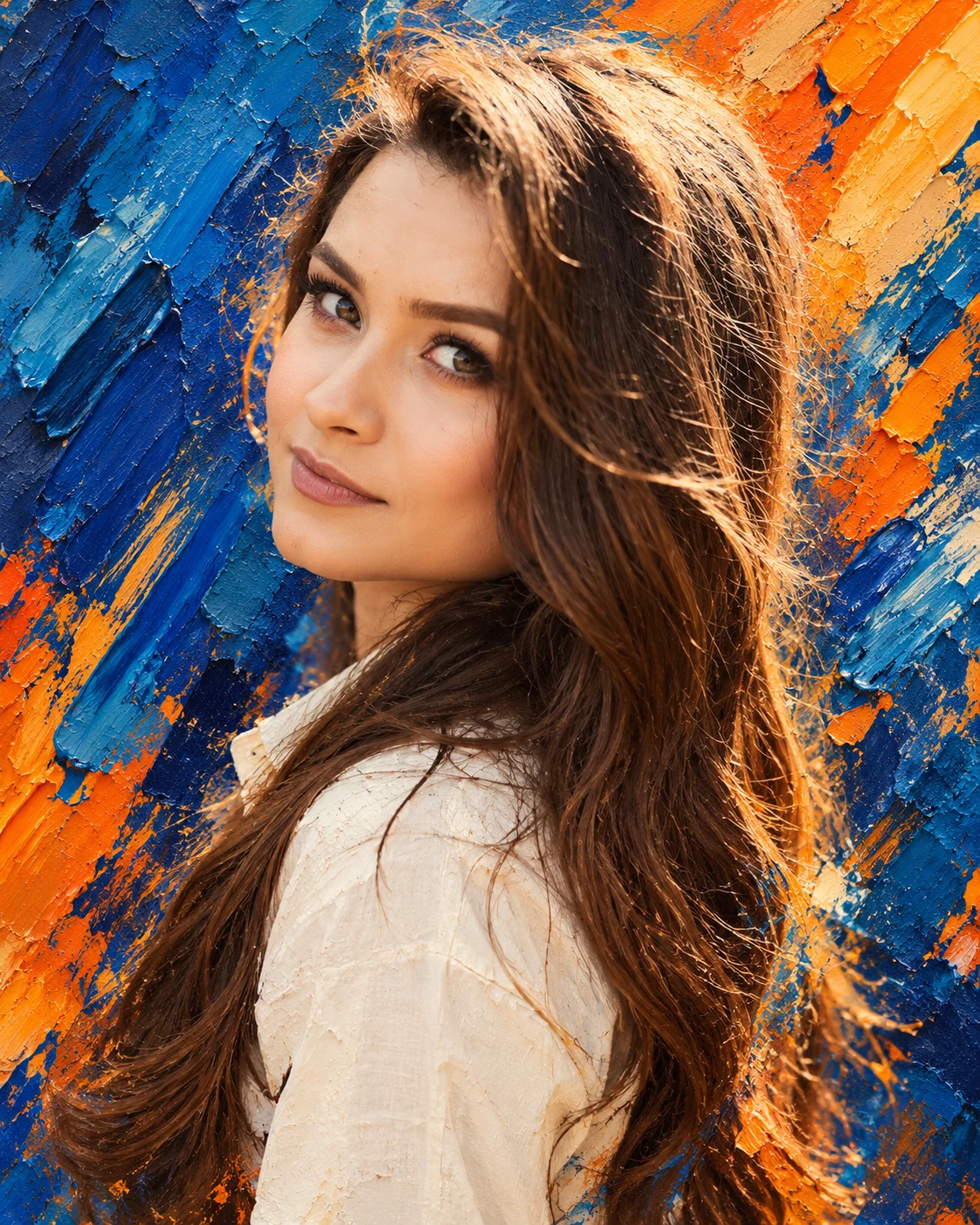
Cobalt Flame Impasto Portrait with Electric Blue and Orange
Create a realistic female portrait framed by cobalt-blue and fiery-orange impasto brushstrokes, combining lifelike facial details with bold contemporary oil-paint textures.
Using the uploaded photo, create a vertical 4:5 expressive impasto-style portrait of the same person, combining a remarkably realistic face with a bold abstract background of cobalt blue, ultramarine and fiery orange. KEEP — Preserve the exact facial identity and natural facial structure from the uploaded photo, including forehead shape, eyebrow placement, eye shape and original eye colour, nose bridge and tip, lips, cheeks, cheekbones, jawline, chin, ears and natural facial asymmetry. Retain the original skin tone, visible pores, fine skin texture, age characteristics and natural facial marks. Keep the existing hairline, hair density, natural texture, colour and length, including the original facial hair if present. Maintain the person's actual body proportions, shoulder width and neck length. Do not replace the face with a generic model or blend features from another person. CHANGE — Style the subject in a simple off-white cotton shirt with a softly structured collar and subtle woven fabric texture. Position the head slightly turned toward the camera, with a confident, composed expression and relaxed shoulders. Surround the subject with energetic cobalt-blue, ultramarine and burnt-orange impasto strokes, using thick palette-knife marks, sharp diagonal sweeps and raised ridges of paint. SCENE — Create a contemporary fine-art studio portrait with an abstract painted backdrop rather than a literal room. Place vivid blue strokes behind one side of the head and fiery orange accents across the opposite side. Keep the background softly out of focus at its outer edges while retaining visible paint relief near the shoulders and hair. LIGHT — Use a large, diffused key light positioned 45 degrees to the front-left of the subject, with a neutral-warm colour temperature around 5000K. Add restrained cool-blue reflected light along the hair edges and gentle warm highlights on the cheeks and nose. Preserve realistic facial shadows and natural skin colour. CAMERA — Capture a close-up to mid-chest portrait using an 85mm portrait lens at f/2.0, with the camera at eye level. Keep both eyes and facial features sharply focused while allowing the distant background to soften naturally. GRADE — Apply rich cobalt blues, saturated ultramarine, controlled burnt-orange accents and warm neutral skin tones. Use crisp tonal separation and painterly texture without turning the face into an oil painting or exaggerating saturation. OUTPUT — Vertical 4:5 aspect ratio, 8K-detail rendering, realistic facial texture, individual hair strands, visible palette-knife ridges and refined contemporary editorial composition. DO NOT slim or reshape the face, whiten the skin, change eye colour, smooth skin into plastic, invent jewellery or tattoos, alter body proportions, or obscure facial features with paint.
Photo Guide
- Use a sharp, high-resolution photo where both eyes and facial features are clear.
- Choose a front-facing or slight three-quarter angle to preserve facial proportions.
- Use even natural light so the blue-orange grade does not distort skin colour.
- Keep the hairline, jawline, shoulders and any existing facial hair visible.
- A plain background helps separate the face from the bold abstract paintwork.
- Avoid heavy filters; they can erase skin texture and weaken the realistic-face contrast.
How to Build
- 1Open Gemini and select image generation with your uploaded photo as the reference.
- 2Upload one clear photo and paste the complete prompt without removing KEEP.
- 3Choose a 4:5 portrait aspect ratio if the tool offers that setting.
- 4Select the highest available image resolution and quality setting.
- 5Generate the portrait and check facial identity before judging the paintwork.
- 6If the face drifts, regenerate with the same photo and reinforce the KEEP instructions.
Pro Tips
- Use one identity reference photo so facial features do not conflict between sources.
- Keep the original hair colour so cobalt reflections remain believable rather than dyed.
- Choose an off-white shirt to separate the subject from the saturated background.
- Keep orange strokes behind the face so warm paint does not look like skin discoloration.
- Request sharp eyes and soft background edges to balance realism with impasto texture.
- If the face becomes painterly, ask for realistic skin and restrict thick paint to the surroundings.
Share This Prompt
About the Author
Naziya
Creative AI writer at MFDA, sharing trendy photo-editing prompts and fresh ideas for beautiful, stylish AI images.