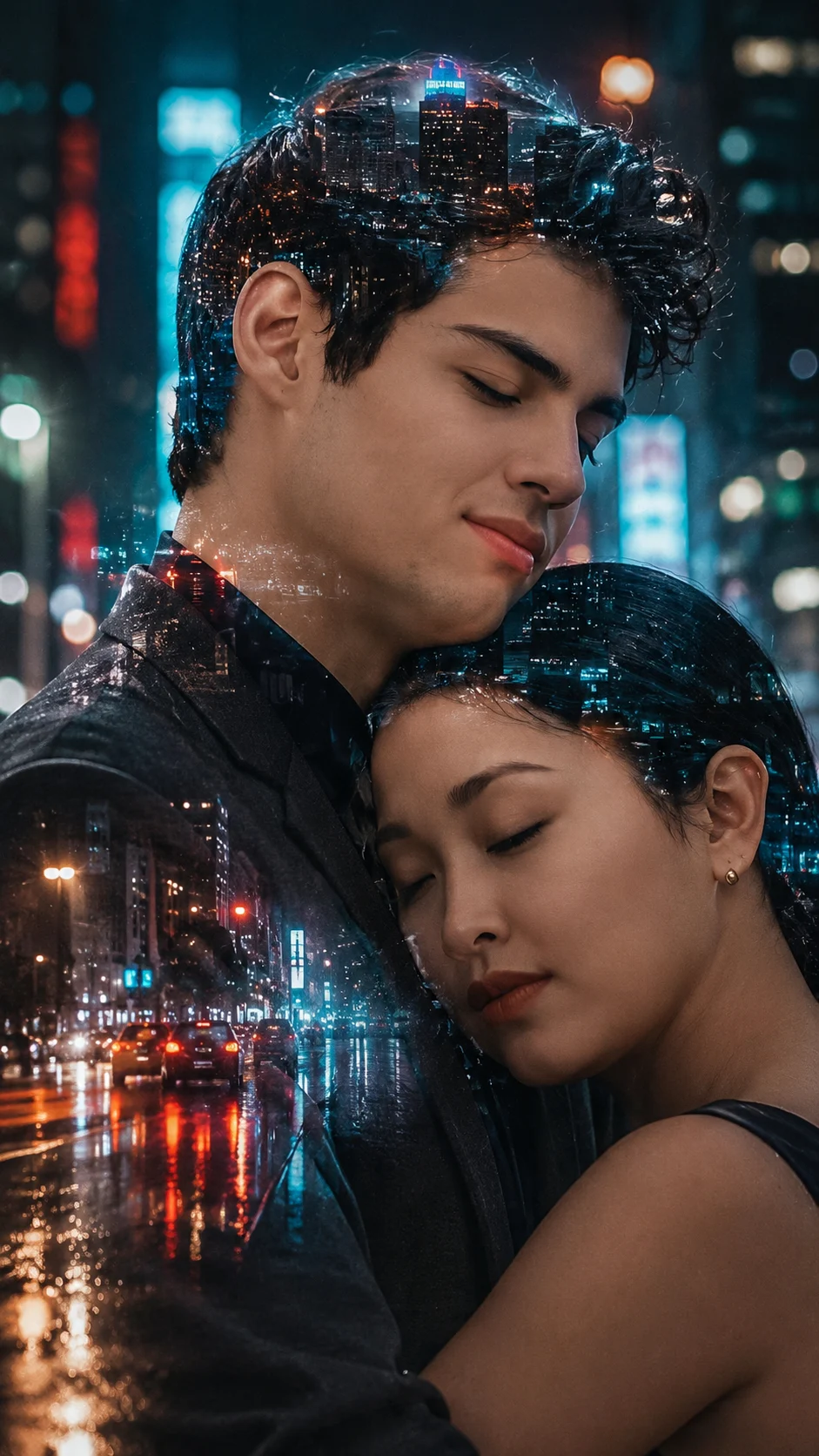
City Lights Double Exposure Portrait
Create a realistic double-exposure portrait that keeps your face unchanged while blending a rainy neon city into the facial silhouette.
Using the uploaded photo, create a photorealistic vertical 9:16 double-exposure fashion portrait of the same person, blending a rainy futuristic city into the facial silhouette. KEEP - Preserve the uploaded person's exact facial identity and face structure, including forehead shape, eyebrow placement, eye shape and natural eye colour, nose bridge and tip, lips, cheeks, cheekbones, jawline, chin, ears, facial width, and natural asymmetry. Keep the original skin tone, visible pores, fine texture, natural marks, authentic expression, hairline, hair density, hair texture and colour. Keep facial hair exactly as visible in the uploaded photo. Preserve the person's body proportions, shoulder width, neck length and overall build. Do not replace the person with a generic fashion model. CHANGE - Change the setting into a futuristic city street at night after rainfall. Blend glowing cyan and amber city lights, wet asphalt, distant building windows, moving headlights and soft neon reflections inside the face silhouette. Change the wardrobe to a clean dark charcoal tailored jacket over a matte black top, using realistic wool and cotton textures. Keep jewellery minimal and only add it if requested as [jewellery choice]. Change the pose to a relaxed chest-up editorial pose facing slightly toward the camera. SCENE - Place the person on a rain-wet urban street after dark. Keep tall buildings and distant traffic behind them, rendered with strong background blur. The city exposure should remain mainly inside the facial silhouette, while the real face stays sharply readable. LIGHT - Use soft frontal-left city light with subtle cyan fill and warmer amber light from the right, matching the direction across the nose, cheeks and jaw. CAMERA - Shoot at 50mm, f/1.8, camera at chest height, with shallow depth of field and natural facial perspective. GRADE - Use restrained cyan-and-amber colour grading, deep blacks, controlled highlights and subtle 35mm film grain. OUTPUT - Vertical 9:16 composition, high-resolution photorealistic finish, with the face occupying the central frame. DO-NOT - No face slimming, skin whitening, changed eye colour, plastic smoothing, invented jewellery or tattoos, facial reshaping, beauty-filter skin, duplicated features, or pasted-on lighting.
Photo Guide
- Use a sharp 4MP+ face photo so small eye details survive the blend.
- Choose a near-front or slight 3/4 angle so both eyes remain visible.
- Soft even light helps the cyan and amber exposure blend across the face.
- Keep the full hairline and jaw edges visible for a clean city silhouette.
- A dark jacket or black top in the source can strengthen the night-city blend.
- Harsh side shadows can make the double exposure look pasted on.
How to Build
- 1Open Gemini and upload a clear high-resolution portrait.
- 2Paste the full prompt without changing the KEEP section.
- 3Choose 9:16 portrait output at the highest available resolution.
- 4Generate the first result with image-reference strength kept high.
- 5Check that neon details stay inside the face, not across the eyes.
- 6If wrong, regenerate and state which facial feature drifted.
Pro Tips
- Use a night-compatible dark top so the city silhouette reads clearly.
- Keep both eyes unobstructed so their natural colour stays consistent.
- Choose a photo with visible jaw edges so the exposure follows the face.
- Avoid strong warm source lighting so cyan highlights remain believable.
- Keep the camera angle close to eye level so facial proportions stay stable.
Share This Prompt
About the Author
Naziya
Creative AI writer at MFDA, sharing trendy photo-editing prompts and fresh ideas for beautiful, stylish AI images.