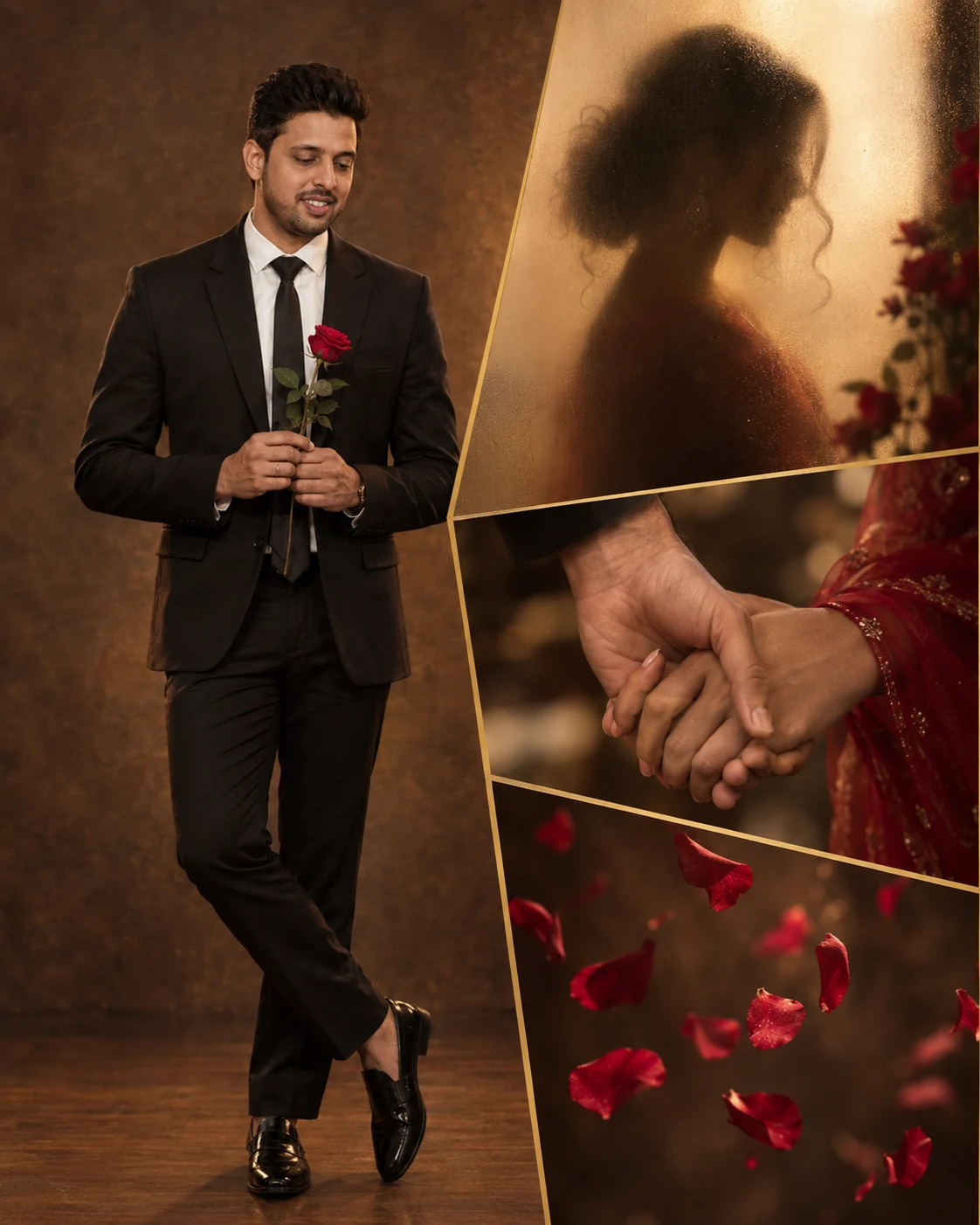
Cinematic Valentine Storyboard Portrait Collage
Create a romantic four-panel Valentine collage featuring a polished portrait, intimate details, red roses and warm editorial lighting.
Using the uploaded photo, create a photorealistic cinematic Valentine portrait collage of the same person, arranged as four connected editorial panels with a refined romantic mood. KEEP - Keep the exact face structure and facial proportions from the uploaded photo, including forehead, eyebrows, eye shape and natural eye colour, nose, lips, cheekbones, jawline, chin, ears, and natural facial asymmetry. Keep the original skin tone, visible pores, fine texture, natural marks, and under-eye detail. Keep the original hairline, hairstyle characteristics, hair density, and facial hair pattern. Keep the person's body proportions, shoulder width, height impression, and overall physical build unchanged. Keep the person clearly recognizable as the same individual across every panel. CHANGE - Change the wardrobe to a [tailored black suit] with a [crisp white shirt] and subtle [black silk tie]. Change the pose to a relaxed full-body stance while holding a single [deep red rose] with both hands. Change the background to a warm studio with [brown textured walls], soft haze, and a dark wood-toned floor. Change the lighting to controlled romantic studio illumination. Change the overall grade to burgundy, warm beige, charcoal and antique-gold tones. SCENE - Make the largest left panel a full-body portrait with the subject looking calmly toward the rose. Add three smaller asymmetrical panels: a woman's silhouette behind frosted glass, an extreme close-up of intertwined hands, and floating red rose petals against the same warm studio environment. Separate panels with thin antique-gold borders and maintain consistent perspective. LIGHT - Use a large soft key light from front-left at approximately 3800K, with gentle warm fill from camera-right. Add subtle rim light around the suit shoulders and hair so the subject remains naturally separated from the background. CAMERA - Shoot the main portrait at 85mm, f/2.8, camera at chest height. Use close-focus compression for the detail panels and shallow depth of field. GRADE - Use warm burgundy and muted beige with antique-gold highlights, controlled blacks, soft highlight roll-off, restrained contrast, and subtle fine film grain. OUTPUT - Create a vertical 4:5 composition at 4096 × 5120 resolution with sharp facial detail and clean panel edges. DO-NOT - no face slimming, no skin whitening, no changed eye colour, no plastic smoothing, no invented jewellery or tattoos.
Photo Guide
- Use a sharp high-resolution photo where the full face and hairline are visible.
- A front-facing or slight three-quarter angle gives the collage better facial consistency.
- Use even daylight so the face can accept the warm studio lighting naturally.
- Keep both eyes, jawline, hairstyle and facial hair unobstructed.
- A simple shirt works best because the suit is added during generation.
- Avoid sunglasses or extreme shadows; they can cause facial drift.
How to Build
- 1Gemini: choose Image Generation and upload one clear reference photo.
- 2Select a 4:5 portrait canvas before generating the collage.
- 3Paste the complete prompt without removing the KEEP section.
- 4Set image quality to the highest available option.
- 5Generate multiple versions and compare facial identity first.
- 6If the first result drifts, regenerate and reinforce the exact KEEP details.
Pro Tips
- Use a neutral expression in the source so the romantic pose stays controlled.
- Choose a photo with visible shoulders so the suit fits the body proportions.
- Keep the hairline clear because small changes can alter identity.
- Use a clean background so the four panels separate without visual clutter.
- Avoid busy clothing in the source so the black suit remains consistent.
Share This Prompt
About the Author
Naziya
Creative AI writer at MFDA, sharing trendy photo-editing prompts and fresh ideas for beautiful, stylish AI images.