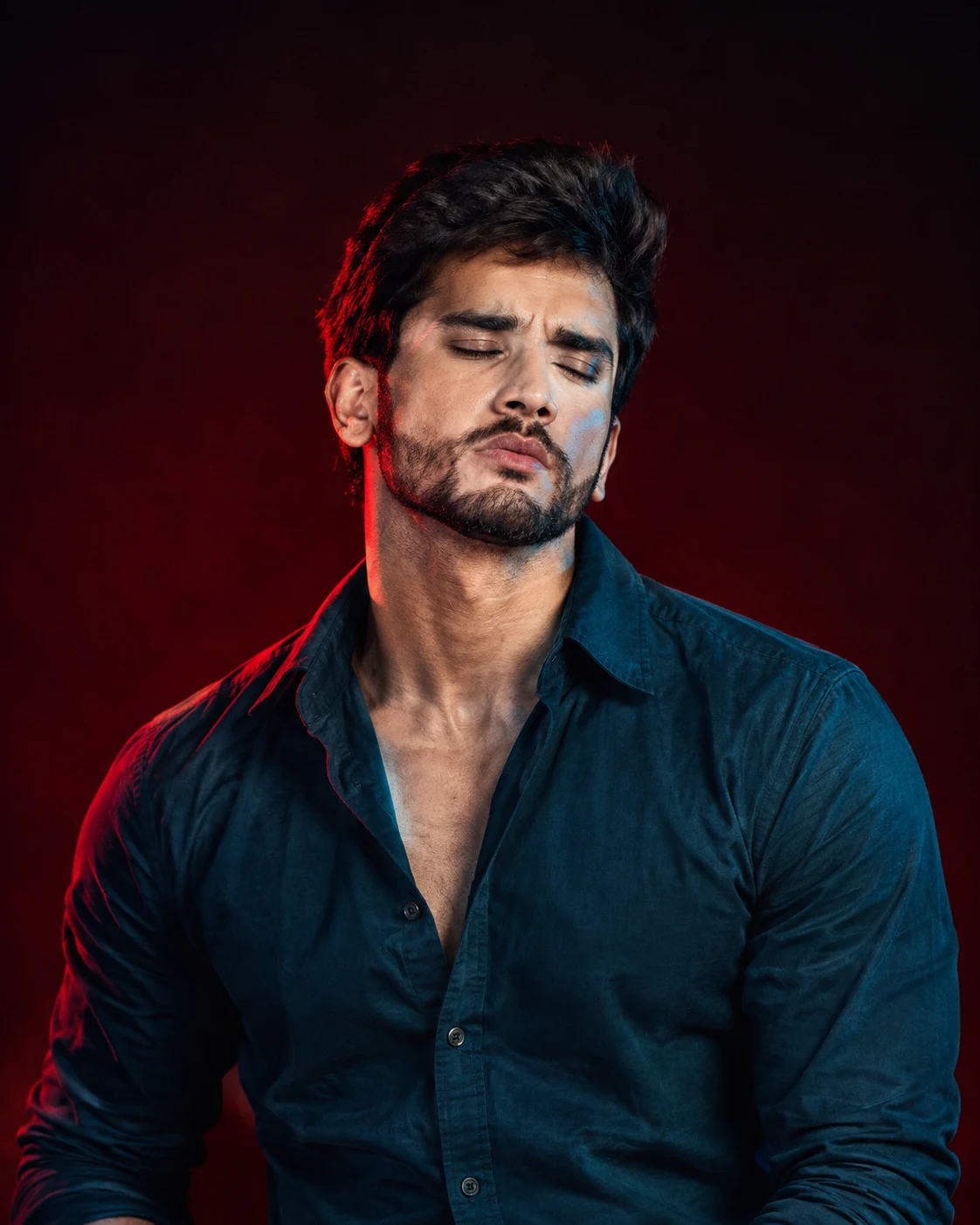
Cinematic Teal and Crimson Studio Portrait
Create a cinematic studio portrait with dramatic teal and crimson lighting, a burgundy backdrop, and your original facial identity preserved.
Using the uploaded photo, create an ultra-realistic cinematic studio portrait of the same person wearing a dark teal-blue button-up shirt with a slightly open collar. Frame the subject from the waist upward, with his head tilted back, chin raised, eyes gently closed, and face turned slightly to the right. His expression should feel calm, confident, and introspective. KEEP — Preserve the exact identity of the person in the uploaded photo. Retain the original face shape, forehead, cheekbones, jawline, chin, nose bridge and tip, lip shape, eye shape and natural eye colour, eyebrow placement, ears, and natural facial asymmetry. Keep the original skin tone and visible skin texture, including pores and natural marks. Preserve the existing hairline, hairstyle characteristics, individual hair texture, facial hair, and natural body proportions, including shoulder width and neck length. Do not replace the face with a generic model or reshape any identifying feature. CHANGE — Change only the wardrobe, pose, studio background, lighting, and colour grade. Dress the subject in a dark teal-blue cotton button-up shirt with realistic fabric texture, natural folds, and a relaxed open collar. Position the head slightly backward and to the right while keeping the neck and shoulders anatomically natural. Use dramatic crimson-red rim lighting and cool teal-blue facial illumination. SCENE — Place the subject in a seamless burgundy-red photography studio. The background should transition gradually from deep wine red behind the shoulders to almost black near the upper edges. Keep it completely free of objects, patterns, text, and visible equipment. The background should remain softly out of focus without visible texture. LIGHT — Place a soft teal-blue key light in front of the subject, slightly to camera-right, so the forehead, nose, cheeks, and shirt receive consistent illumination. Add a controlled crimson-red light from behind on camera-left to outline the hair, ear, neck, and shoulder. Preserve natural facial shadow transitions and realistic skin colour beneath the coloured light. Avoid clipped highlights and completely black facial details. CAMERA — Use an 85mm portrait lens at f/1.8, with the camera positioned at chest height and angled naturally toward the face. Maintain realistic perspective, sharp facial details, individual hair strands, visible shirt stitching, and a softly blurred background. GRADE — Apply a cinematic teal-and-crimson colour grade with deep burgundy shadows, rich blacks, restrained red saturation, cool teal highlights, and subtle film grain. Preserve natural skin texture and realistic contrast rather than applying artificial skin smoothing. OUTPUT — Generate a vertical 4:5 portrait at the highest available resolution, targeting 8K detail where supported. Keep the head, shoulders, and upper torso within the frame, with generous negative space above the head and the subject positioned slightly left of centre. DO NOT slim the face, whiten the skin, change eye colour, alter facial proportions, replace the person's identity, apply plastic skin smoothing, invent jewellery or tattoos, add extra limbs, distort anatomy, introduce text or logos, or create a distracting background.
Photo Guide
- Use a sharp, high-resolution photo with clear facial details.
- Choose a front or slight three-quarter angle with natural proportions.
- Keep the original hairline, ears, jawline, and neck visible.
- A dark teal shirt works well with the burgundy and crimson palette.
- Avoid strong coloured light in the reference photo; it can distort skin tones.
How to Build
- 1Open Gemini or ChatGPT with image generation enabled.
- 2Upload your original photo as the identity reference.
- 3Paste the complete prompt, including KEEP and CHANGE sections.
- 4Choose a vertical 4:5 aspect ratio and the highest quality available.
- 5Generate the image and inspect facial identity, shadows, and shirt details.
- 6If the face drifts, strengthen KEEP instructions and retry with the same photo.
Pro Tips
- Use a sharp reference so the original jawline survives dramatic shadows.
- Keep the eyes gently closed to match the introspective pose.
- Use a plain burgundy background so the crimson rim light stays distinct.
- Keep teal light soft on the face so skin texture remains believable.
- Avoid excessive red saturation so the skin does not appear unnaturally red.
Share This Prompt
About the Author
Naziya
Creative AI writer at MFDA, sharing trendy photo-editing prompts and fresh ideas for beautiful, stylish AI images.