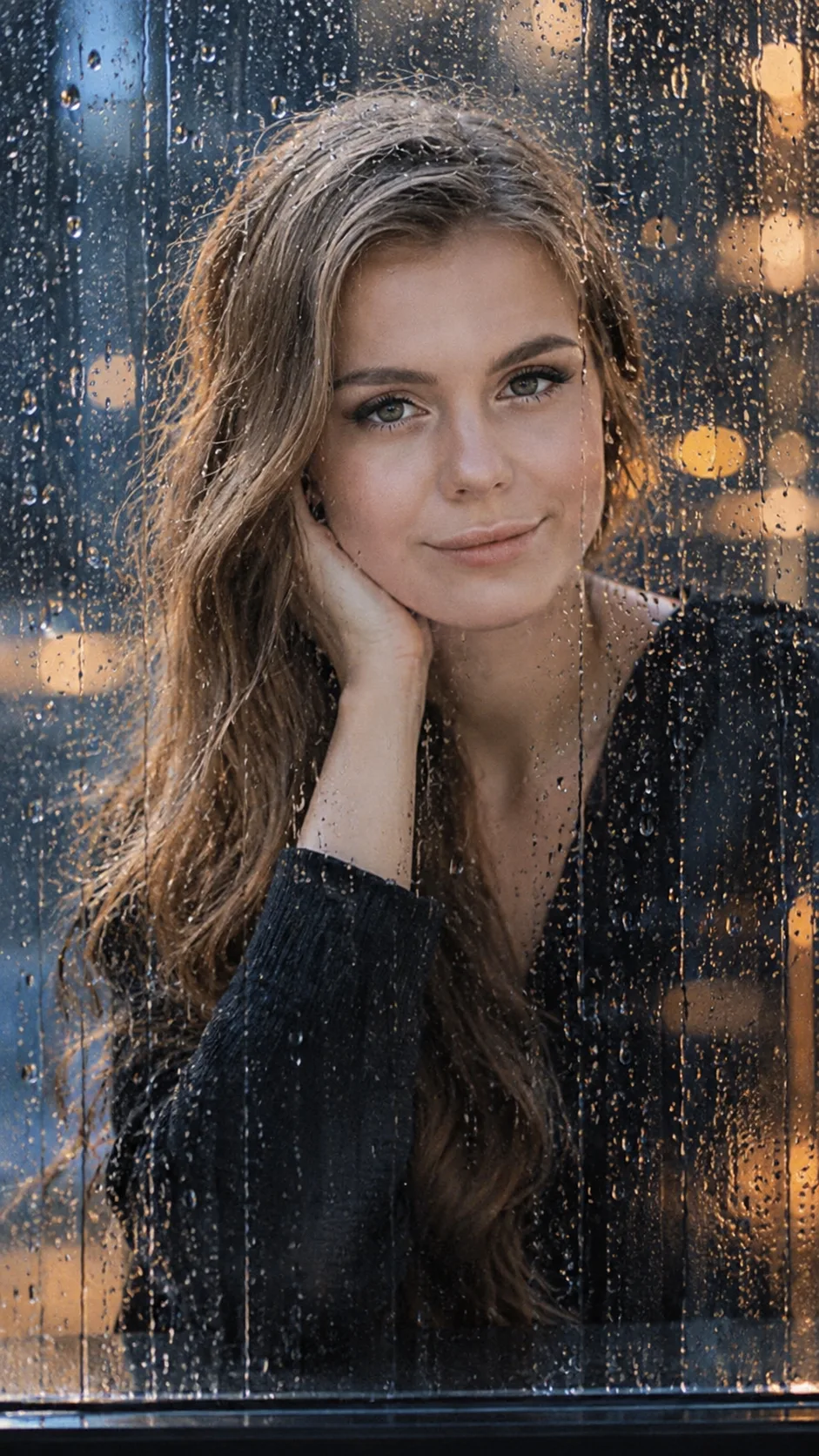
cinematic portrait through rain-covered glass
Create a cinematic portrait through rain-covered glass with sharp, natural eyes, realistic water droplets, cool blue shadows, and warm city lights.
Using the uploaded photo, create a photorealistic cinematic portrait of the same person viewed through a rain-covered glass panel at night, in a vertical 9:16 composition. KEEP — Preserve the person's exact facial identity and recognizable appearance. Keep the original forehead, eyebrow placement, eye shape and natural eye colour, nose bridge and tip, lips, cheek contours, cheekbones, jawline, chin, ears, facial width, and natural facial asymmetry. Retain the original skin tone, visible pores, fine lines, natural marks, and realistic skin texture. Preserve the hairline, hair density, hairstyle, and facial hair where present. Keep the original neck, shoulders, and body proportions. Do not reshape the face or replace any identifying feature. CHANGE — Place a transparent glass panel between the camera and the person. Cover the glass with fine raindrops, narrow water trails, and small patches of condensation. Leave a naturally clear area directly in front of the eyes so the gaze remains sharp and recognizable. Add faint reflections of distant amber city lights across the glass. Keep reflections away from the central facial features. If clothing is visible, use a dark charcoal or deep navy fabric with a natural matte finish. SCENE — Position the person inside a dim urban interior beside a rain-covered window during a rainy night. Behind the glass, show softly blurred city lights in muted amber and pale gold. Keep the background dark blue-grey with no distinct signs, readable text, or distracting objects. The glass must sit visibly in front of the face, with realistic water depth and refraction. LIGHT — Use cool blue window light from the front-left to illuminate the face naturally. Add a weak warm practical light from the distant background. Match the highlights on the forehead, nose, cheeks, and water droplets to their respective light sources. Keep natural shadows beneath the eyebrows and jaw. CAMERA — Use an 85mm portrait lens at f/1.8, camera at eye level, with precise focus on the visible eyes and realistic shallow depth of field. Keep the face correctly proportioned without wide-angle distortion. GRADE — Apply restrained teal-blue shadows, warm amber highlights, moderate contrast, subtle film grain, and natural skin tones. Avoid excessive saturation and artificial glow. OUTPUT — Vertical 9:16 composition, high-resolution 4K output, realistic facial detail, physically plausible glass reflections, and natural photographic depth. DO NOT slim the face, whiten the skin, change eye colour, smooth the skin into plastic, invent jewellery or tattoos, alter age, replace the face, duplicate eyes, distort facial features, obscure both eyes with water, or add artificial rain effects or watermarks.
Photo Guide
- Use a sharp, high-resolution photo with both eyes clearly visible.
- Choose a front-facing or slight three-quarter angle for accurate facial structure.
- Use soft, even lighting so the original skin tone remains easy to preserve.
- Keep the hairline, eyebrows, nose, and jaw unobstructed in the source photo.
- A rainy-night background is optional; the AI creates the glass and city lights.
- Avoid heavily filtered selfies because they reduce realistic skin texture.
How to Build
- 1Open ChatGPT and select image generation or image editing.
- 2Upload a clear portrait photo as the identity reference.
- 3Paste the complete prompt into the same conversation.
- 4Choose a vertical 9:16 composition if aspect-ratio controls are available.
- 5Select the highest available image quality or resolution setting.
- 6Generate the portrait and inspect the eyes, reflections, and facial likeness.
- 7If the result is wrong, regenerate with a specific correction for the failed detail.
Pro Tips
- Choose a photo with visible catchlights so the eyes remain naturally expressive.
- Use a dark outfit to complement the blue-grey rainy-night environment.
- Keep the source face evenly exposed so cool lighting does not alter skin tone.
- Ask for fewer droplets if the glass reflections obscure the eyes.
- Request weaker amber reflections if they overlap the nose or cheek contours.
- Preserve the original eye colour in every correction to prevent identity drift.
Share This Prompt
About the Author
Naziya
Creative AI writer at MFDA, sharing trendy photo-editing prompts and fresh ideas for beautiful, stylish AI images.