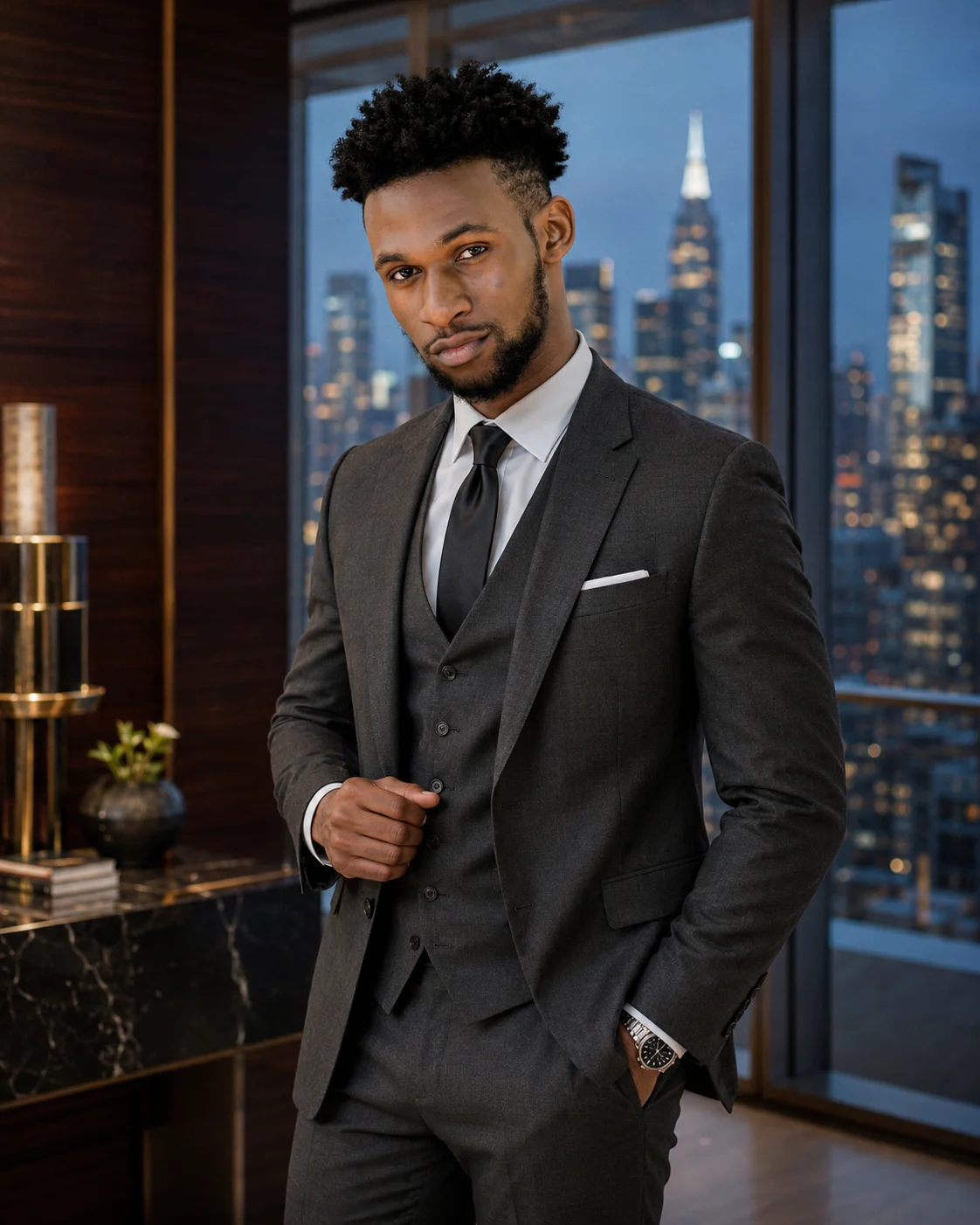
Charcoal Grey Executive Three-Piece Suit Portrait
Create a refined executive fashion portrait in a charcoal-grey three-piece suit, featuring a luxury penthouse skyline, tailored styling and cinematic corporate lighting.
Using the uploaded photo, create an ultra-realistic luxury executive fashion portrait of the same recognizable man, dressed in a precisely tailored charcoal-grey three-piece business suit inside a sophisticated modern penthouse overlooking a metropolitan skyline. Use a vertical 4:5 composition with refined corporate editorial photography. KEEP — Preserve the exact facial identity and natural facial anatomy from the uploaded photograph. Retain the original forehead proportions, eyebrow thickness and placement, eye shape and natural eye colour, nose bridge and tip, lip shape, cheek volume, cheekbones, jawline, chin, ears and natural facial asymmetry. Maintain the original skin tone, authentic complexion, visible pores, natural texture, age and facial expression. Preserve the original hairline, hairstyle, hair density, texture and colour. Retain existing facial hair, including its natural density, outline and length. Keep the original neck structure, shoulder width, body build and natural proportions. Do not replace the face with a generic business model. CHANGE — Dress the subject in a finely tailored charcoal-grey three-piece suit featuring a structured single-breasted jacket, matching five-button waistcoat, sharp notch lapels and precisely pressed trousers. Add a crisp white cotton dress shirt, slim black silk necktie and polished black leather Oxford shoes. Include a discreet folded white pocket square and a premium stainless-steel wristwatch with a dark dial, only if accessories are suitable for the composition. SCENE — Position the subject inside an upscale contemporary penthouse executive lounge during blue hour, approximately 6:15 PM. Floor-to-ceiling glass windows reveal softly illuminated skyscrapers, distant city traffic and a deep blue evening sky. Include dark walnut wall panels, a black marble console and subtle brushed-brass architectural details. Keep the background softly blurred while preserving recognizable architectural depth. POSE — Stand confidently in a relaxed three-quarter position, shoulders naturally aligned, one hand adjusting the jacket near the waistcoat and the other resting inside the trouser pocket. LIGHT — Use soft directional window light from the front-left, balanced with warm interior illumination around 3200K. Maintain natural facial exposure, gentle jawline shadows and controlled highlights across the charcoal wool fabric. CAMERA — Photograph using an 85mm portrait lens at f/1.8, eye-level camera height, medium-full framing from head to upper thighs, with precise facial focus and shallow depth of field. GRADE — Apply sophisticated charcoal, midnight-blue and warm bronze tones, restrained cinematic contrast and natural skin colour. Preserve realistic wool texture without excessive sharpening. OUTPUT — Vertical 4:5 aspect ratio, 8K-resolution appearance, detailed photographic finish, natural anatomy and professional luxury menswear campaign quality. DO NOT — Slim the face, alter facial proportions, whiten the skin, change eye colour, modify the hairline, remove natural facial marks, reshape the jaw, invent jewellery or tattoos, smooth the skin into plastic, distort hands or fingers, introduce incorrect suit details, add text, logos or watermarks.
Photo Guide
- Use a sharp, high-resolution photo with clearly visible facial details.
- Choose a front-facing or slight three-quarter facial angle.
- Use soft, even lighting so the original skin texture remains visible.
- Keep your forehead, hairline, jawline and facial hair unobstructed.
- A neutral indoor photo blends especially well with penthouse lighting.
- Avoid sunglasses or deep shadows covering your eyes.
How to Build
- 1Open Gemini or ChatGPT and select its image generation feature.
- 2Upload one clear photograph of yourself as the identity reference.
- 3Copy the complete PROMPT CONTENT into the prompt box.
- 4Choose a vertical 4:5 image ratio if the tool offers aspect settings.
- 5Select the highest available image quality or resolution.
- 6Generate the portrait and inspect your face against the original.
- 7If the face or suit is incorrect, regenerate with stronger KEEP instructions.
Pro Tips
- Choose a charcoal suit reference rather than a black suit to retain grey tones.
- Keep the shirt bright white so the waistcoat has clear visual separation.
- Use a blue-hour skyline to complement the charcoal and black outfit.
- Keep the watch subtle so it does not compete with facial identity.
- Avoid excessive background blur so the penthouse remains recognizable.
Share This Prompt
About the Author
Naziya
Creative AI writer at MFDA, sharing trendy photo-editing prompts and fresh ideas for beautiful, stylish AI images.