Camera Ke Andar Ek Aur Duniya Fashion Scene
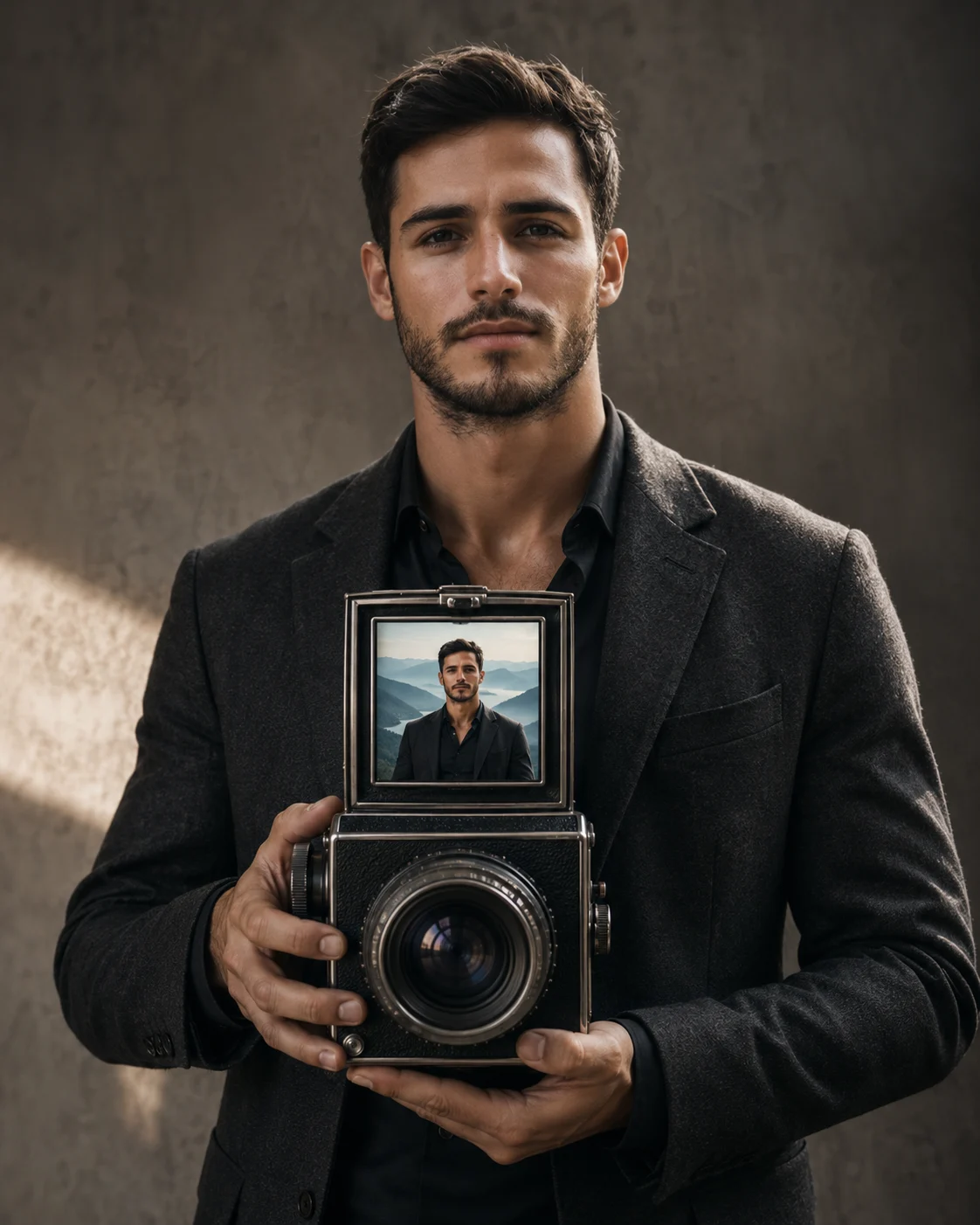
Create a surreal fashion portrait where your uploaded identity holds a vintage camera containing a realistic miniature world of you.
Using the uploaded photo, create an ultra-realistic conceptual fashion photograph in which the person appears to hold a vintage medium-format camera containing another realistic version of themselves inside its open viewfinder. KEEP — Keep the uploaded face structure exactly, including jaw width, cheek shape, nose structure, lip shape, eye shape and eye colour. Keep the original skin tone, natural skin texture, freckles, pores and facial marks. Keep the exact hairline, hairstyle characteristics and facial hair pattern visible in the source photo. Keep the person's natural body proportions, shoulder width, hand structure and overall physical build. The miniature person inside the camera must preserve the same facial identity and body proportions as the main person. CHANGE — Change the wardrobe to a refined charcoal wool blazer over a matte black silk shirt, with realistic fabric folds and no visible logos. Change the pose so the main person holds a vintage medium-format camera vertically with both hands at mid-chest height, keeping all fingers anatomically correct. Change the background to a muted warm-grey studio environment with a softly textured wall. Change the lighting to controlled cinematic side light. Change the colour grade to restrained bronze, charcoal and neutral skin tones. SCENE — Place the main person in a quiet editorial studio during late afternoon, with the camera positioned clearly in front of the torso. The vintage camera should have brushed metal edges, black textured leather covering, a realistic glass lens and visible mechanical details. Inside its open viewfinder, show a miniature version of the same person standing in a completely different world: a misty blue mountain landscape at dawn, with tiny distant peaks behind them. Keep the miniature world sharply readable while the outer studio background falls into a soft blur. LIGHT — Light the main face from camera-left at roughly 45 degrees using a large soft source, creating gentle cheek modelling and a controlled shadow on the opposite side. Add a faint cool reflection from the miniature blue environment onto the camera glass, while keeping the person's skin naturally warm and consistent. CAMERA — Photograph the scene with an 85mm lens at f/2.0, camera positioned at chest height and focused primarily on the person's eyes and camera details. Use realistic depth compression so the face, hands and camera feel physically connected rather than composited. GRADE — Apply a restrained editorial film grade with warm skin, muted charcoal shadows, soft highlight roll-off and moderate contrast. Keep the miniature world slightly cooler than the studio without making it look artificially pasted into the camera. OUTPUT — Create a vertical 4:5 composition at 2048 × 2560 resolution, with the complete camera, hands and upper body visible. DO-NOT — No face slimming, no skin whitening, no changed eye colour, no plastic smoothing, no invented jewellery or tattoos, no distorted fingers, no duplicate faces outside the camera, and no warped camera geometry.
Photo Guide
- Use a sharp 2000px+ photo where your full face is clearly visible.
- Choose a front or slight 15° angle so the jaw and eye shapes stay readable.
- Use even daylight or soft window light; harsh side shadows can distort identity.
- Keep the forehead, hairline, jaw and both hands visible if possible.
- A photo with cropped hands can break the camera-holding pose.
- Avoid sunglasses, heavy filters or blur; they weaken the miniature identity match.
How to Build
- 1Open Gemini and paste the full prompt with your uploaded photo.
- 2Choose image generation and keep the output ratio at 4:5.
- 3Use the uploaded photo as the identity reference, not just a text description.
- 4Ask for 2048×2560 output when the resolution option is available.
- 5Check that the miniature face matches the main face before saving.
- 6If wrong, regenerate and specify which kept facial feature drifted.
Pro Tips
- Use a photo with visible hands so the camera grip stays anatomically correct.
- Keep your hairline visible so the miniature identity matches more reliably.
- Avoid dramatic source lighting so the new 45° face light looks natural.
- Use a neutral outfit in the source so the charcoal wardrobe changes cleanly.
- Keep the camera fully visible so the second world reads as optical depth.
- Regenerate if the viewfinder becomes a flat screen instead of glass.
Share This Prompt
About the Author
Naziya
Creative AI writer at MFDA, sharing trendy photo-editing prompts and fresh ideas for beautiful, stylish AI images.