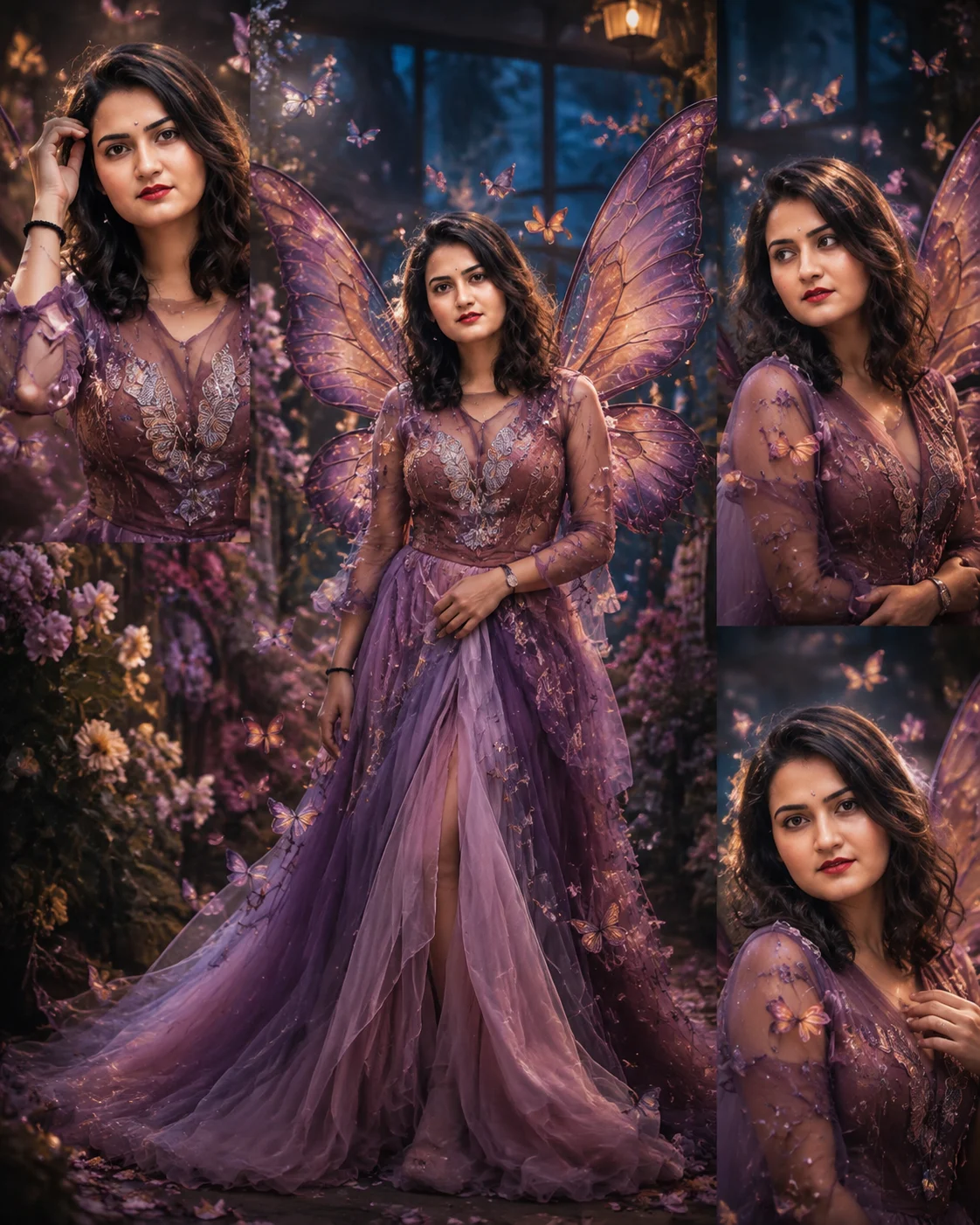
Butterfly Transformation Editorial Portrait
Create a photorealistic fashion portrait where butterfly wings, petals and glowing particles transform around your preserved identity.
Using the uploaded photo, create a photorealistic butterfly transformation fashion editorial while keeping the person clearly recognizable as the same individual. KEEP - Keep the exact face structure from the uploaded photo, including forehead shape, cheek structure, jawline, chin, nose proportions, lip shape, and natural facial asymmetry. Keep the original eye shape and natural eye colour exactly unchanged. Keep the original skin tone, pores, fine texture, freckles, marks, and realistic complexion without whitening or artificial smoothing. Keep the original hairline, natural hair density, hair texture, and recognizable hairstyle characteristics. Keep any existing facial hair exactly as shown if present. Keep the person's original body proportions, shoulder width, limb proportions, and overall recognizable physical build. CHANGE - Change the wardrobe into an elegant couture outfit made from layered translucent chiffon and finely embroidered mesh in deep plum, soft lavender, and muted rose tones. Add delicate butterfly-inspired embroidery along the bodice and sleeves, but keep the outfit refined rather than costume-like. Create large semi-transparent butterfly wings emerging naturally behind the person, with layered lavender, violet, rose, and subtle amber patterns. Add a controlled transformation effect where loose butterfly wings, tiny petals, and luminous particles appear to form around the outer edges of the three surrounding portrait sections. Change the pose to a graceful editorial stance with relaxed shoulders and one hand positioned naturally near the waist. Use a warm cinematic colour grade with controlled contrast and preserved skin tones. SCENE - Place the subject in an enchanted botanical conservatory at blue hour, surrounded by dark green foliage, soft flowering branches, and scattered petals. Build one central full-body portrait with three smaller surrounding close-up views showing different natural expressions. Keep the butterfly transformation visually connected across all four compositions. Use strong foreground and background separation so distant foliage becomes creamy and softly blurred. LIGHT - Use a large warm key light from camera-left at approximately 45 degrees, with a softer neutral fill from camera-right. Add a subtle cool rim light from behind to outline the hair and translucent wings. Keep the light soft enough to create gradual cheek and jaw shadows, with approximately 4300K skin illumination and cooler blue-hour ambience behind the subject. CAMERA - Shoot with an 85mm portrait lens at f/1.8, camera positioned at chest height for the close portraits and slightly below waist level for the central full-body view. Use realistic portrait compression, shallow depth of field, sharp eyes, detailed fabric, and naturally rendered butterfly wing translucency. GRADE - Apply a cinematic editorial grade with muted plum shadows, warm rose highlights, restrained saturation, gentle highlight roll-off, and medium-low contrast. Keep skin colour neutral and detailed rather than applying a beauty filter. OUTPUT - Create a vertical 4:5 composition at 8K resolution with clean anatomical proportions, realistic hands, consistent facial identity, and seamless transitions between the four portrait sections. DO NOT - No face slimming, no skin whitening, no changed eye colour, no plastic smoothing, no invented jewellery or tattoos, no altered body proportions, no duplicate faces, no distorted hands, no extra fingers, no text, and no watermark.
Photo Guide
- Use a sharp photo at least 1500px wide with the full face clearly visible.
- Choose a front or three-quarter angle so both eyes and the jawline remain readable.
- Soft natural window light works best for matching the gentle editorial key light.
- Keep the hairline and shoulders visible; avoid heavy crops around the head.
- A warm-toned original photo blends better with the rose and plum wardrobe.
- Avoid sunglasses or harsh flash because they can break identity and wing lighting.
How to Build
- 1Gemini: choose Create Image, upload the photo, and use 4:5 portrait.
- 2Paste the full prompt after uploading the clearest identity reference.
- 3Ask Gemini to preserve the face before applying the transformation details.
- 4Check that all four portrait views show the same facial identity.
- 5Generate again if the wings cover the eyes, face or important hair details.
- 6If the first result drifts, re-upload a clearer photo and repeat the prompt.
Pro Tips
- Use a photo with visible shoulders so the couture neckline can align naturally.
- Keep both eyes unobstructed so the butterfly effect does not hide identity.
- Choose a photo with soft light so the cool rim light does not look pasted on.
- Avoid busy backgrounds because they can compete with the wing silhouette.
- Keep the original expression relaxed so the four editorial views stay believable.
Share This Prompt
About the Author
Naziya
Creative AI writer at MFDA, sharing trendy photo-editing prompts and fresh ideas for beautiful, stylish AI images.