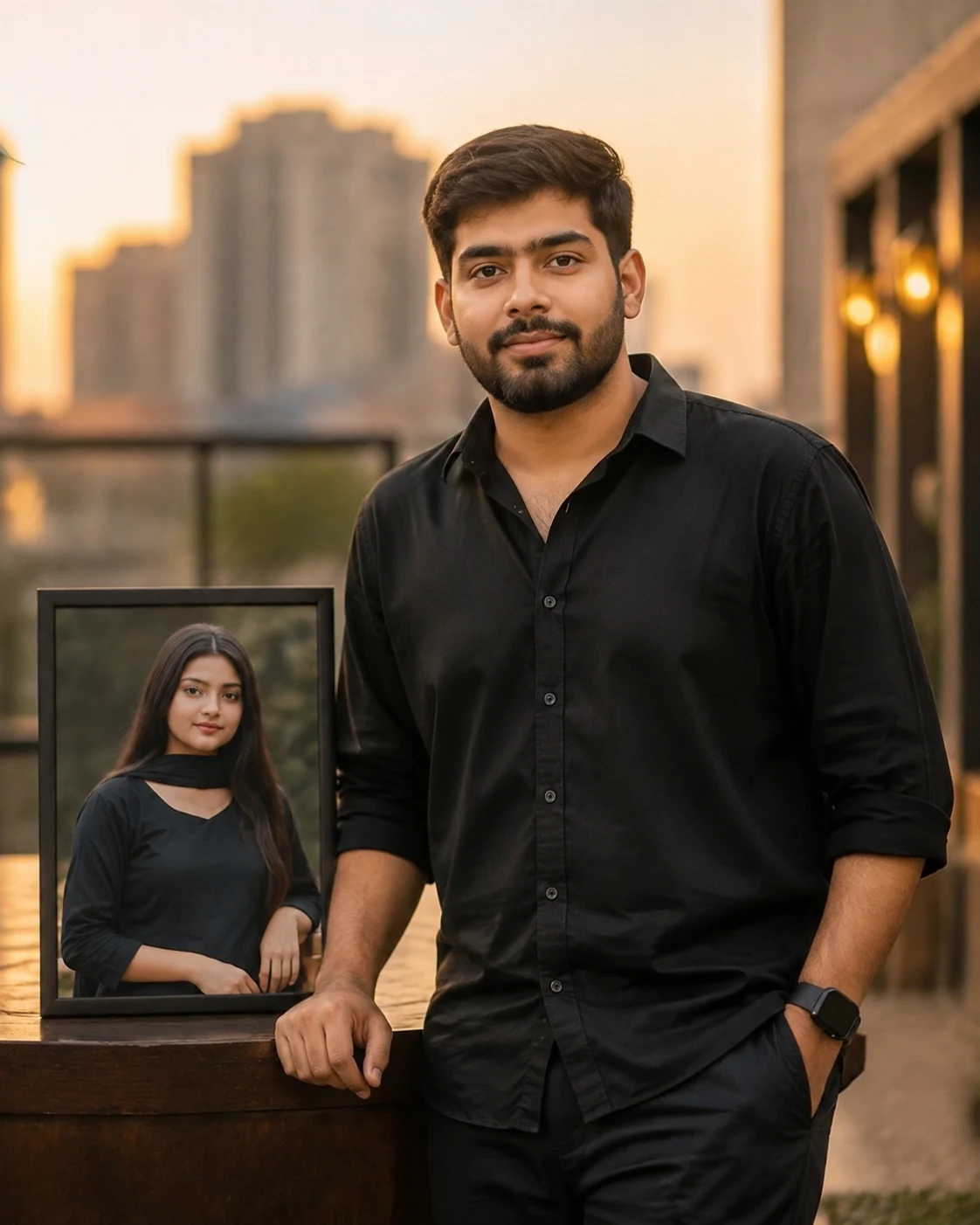
Boy With Girlfriend Photo Stylish Portrait
Create a stylish portrait of the same boy proudly displaying a clear photo of the same girl beside him while both identities stay recognizable.
Using the uploaded photo, create a photorealistic cinematic portrait of the same boy standing alone in the foreground, with the same girl appearing only inside a clearly visible photograph positioned immediately beside him. KEEP - Keep the boy's exact face structure, jawline, nose, lips, cheek shape, eye shape and natural eye colour from his uploaded photo. Keep his original skin tone, pores, fine facial texture, hairline, hairstyle and facial hair exactly as visible. Keep his natural body proportions, shoulder width and overall build. Keep the girl's exact face structure, eye shape and natural eye colour, skin tone and visible skin texture, hairline, hairstyle and facial features from her uploaded photo. Preserve both identities without blending their facial features. CHANGE - Change the boy's clothing to a fitted black shirt with subtle premium fabric texture and dark trousers. Give him a relaxed upright pose with one shoulder slightly angled toward the girl's photograph and a natural, genuinely happy smile. Place the girl's image inside a realistic glossy printed photograph with a thin black border. Do not turn the girl's photograph into a living person. SCENE - Set the boy outdoors on a modern city terrace during golden-hour evening. Behind him, use softly blurred warm architectural lights and distant buildings. The girl's photograph sits vertically beside his upper body, large enough for her face to remain clearly recognizable. LIGHT - Use warm sunlight from the front-left at a low golden-hour angle, with soft fill from the right so the boy's face and the photograph receive believable matching illumination. CAMERA - Shoot at 85mm, f/1.8, camera at chest height, with shallow depth of field and realistic portrait compression. GRADE - Use a warm cinematic grade, natural skin tones, moderate contrast, gentle highlight roll-off and subtle film grain. OUTPUT - Create a vertical 4:5 composition at 4K resolution, keeping the boy fully readable and the girl's photograph unobstructed. DO-NOT - No face slimming, no skin whitening, no changed eye colour, no plastic smoothing, no invented jewellery or tattoos, no second real person, no blending of the girl into the scene.
Photo Guide
- Use sharp, high-resolution photos where both faces are fully visible.
- Choose a front-facing or slight three-quarter boy photo for cleaner identity retention.
- Use even daylight so the boy's facial texture remains visible after editing.
- The girl's face must be unobstructed; cropped eyes or forehead weaken the photo effect.
- Avoid blurry selfies because facial details may drift into the displayed photograph.
- A dark shirt and golden-hour background suit this specific cinematic look.
How to Build
- 1Gemini: upload both photos, then paste the prompt exactly as written.
- 2Choose image generation with the highest available quality setting.
- 3Keep both uploaded photos selected as identity references.
- 4Use a 4:5 portrait ratio if the tool offers aspect-ratio control.
- 5Generate the first version without adding extra style instructions.
- 6If faces drift, re-upload clearer photos and regenerate using the same prompt.
Pro Tips
- Use a boy photo with visible shoulders so the confident pose stays believable.
- Keep the girl's original photo sharp so her printed image stays recognizable.
- Avoid heavy side lighting on the boy so his face does not look pasted on.
- Keep the photograph beside his torso, not behind him, so it reads as physical.
- Use warm evening light consistently so the scene and displayed photo feel connected.
Share This Prompt
About the Author
Naziya
Creative AI writer at MFDA, sharing trendy photo-editing prompts and fresh ideas for beautiful, stylish AI images.