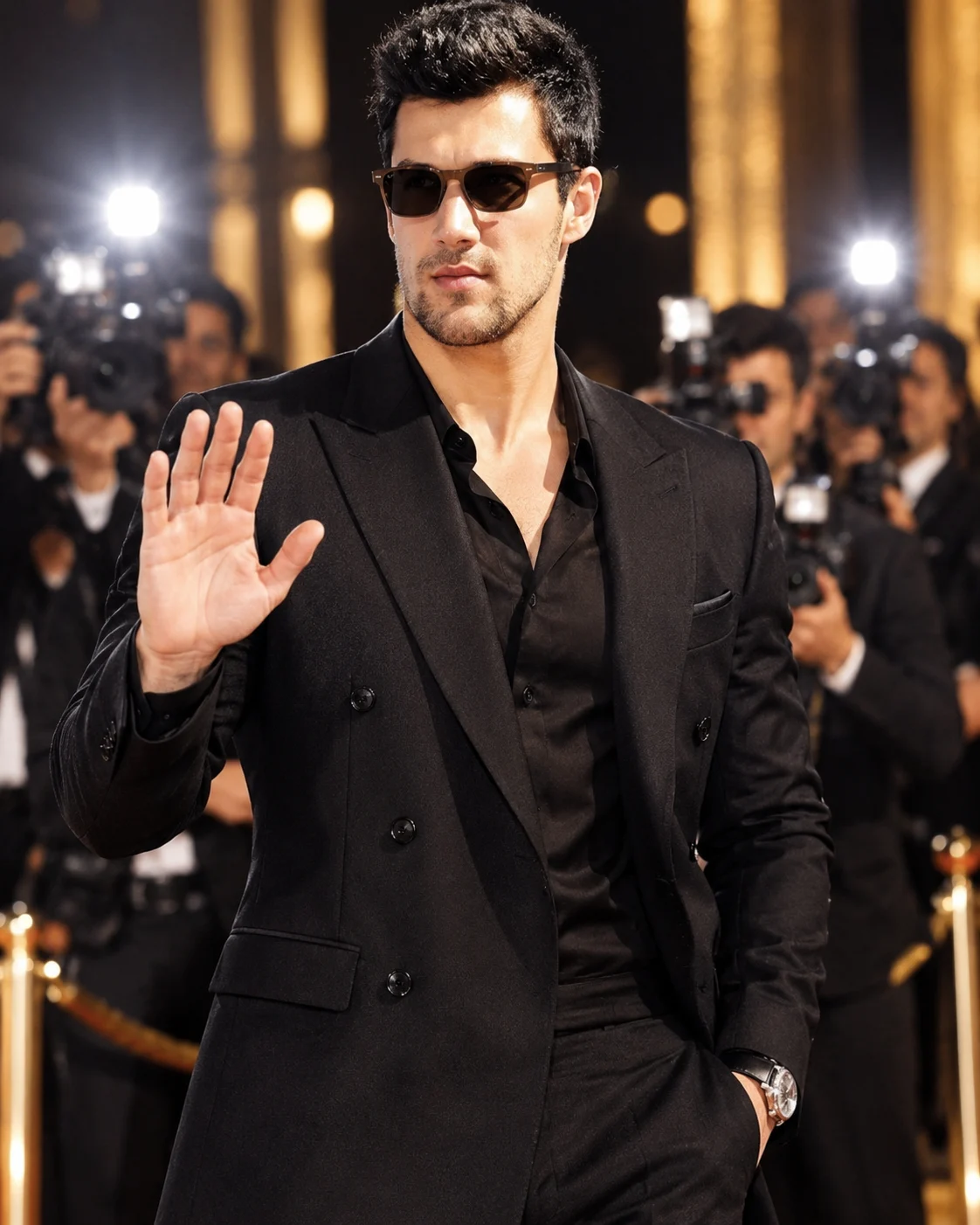
Black Tie Red Carpet Celebrity Paparazzi Portrait
Create a realistic red-carpet celebrity arrival portrait with a tailored black suit, paparazzi camera flashes and your original facial identity preserved.
Using the uploaded photo, create a photorealistic red-carpet celebrity arrival portrait of the same recognizable man attending an exclusive nighttime fashion premiere, with a vertical 4:5 composition. KEEP — Preserve the exact facial identity and natural appearance of the person in the uploaded photograph. Retain the original forehead width and shape, eyebrow thickness and placement, eye shape and natural eye colour, nose bridge and tip, lip shape, cheek volume, cheekbone position, jawline, chin, ears and natural facial asymmetry. Maintain the original skin tone, visible pores, fine lines, facial marks and age. Preserve the existing hairline, hair density, natural hair texture, hairstyle and facial hair, if present. Keep the original neck, shoulder width, body proportions and natural height relationship. Do not reconstruct, beautify or reinterpret the face. CHANGE — Dress the subject in a precisely tailored midnight-black double-breasted suit made from fine matte wool, featuring structured shoulders, sharp notch lapels and clean front buttons. Underneath, use an open-neck black silk shirt with a subtle natural sheen. Add a slim silver wristwatch only if appropriate to the visible wrist. Fit the clothing naturally to the subject's original body proportions. Give him elegant black rectangular sunglasses. Raise one hand slightly in a relaxed greeting toward the photographers, keeping the fingers anatomically correct and naturally positioned. SCENE — Place him at the entrance of an exclusive black-carpet fashion premiere after sunset. Behind him, show photographers holding professional DSLR cameras with large lenses, several bright camera flashes, blurred event guests and sophisticated black-and-gold event decorations. Keep all branding abstract without readable logos. LIGHT — Use direct frontal paparazzi flash slightly above camera height, with realistic highlights across the forehead, cheeks, sunglasses and suit lapels. Add subtle warm ambient lighting from the event entrance. Maintain consistent facial illumination and natural shadows. CAMERA — Shoot at eye level using an 85mm lens at f/2.0, with a centered waist-up composition, sharp facial focus and softly blurred background. GRADE — Apply a refined black-and-gold colour grade, deep neutral blacks, controlled highlights, natural skin tones and realistic editorial contrast. OUTPUT — Vertical 4:5 aspect ratio, 8K resolution, detailed fabric texture and authentic nighttime celebrity event photography. DO NOT slim the face, whiten the skin, change eye colour, smooth natural pores, alter age, replace facial features, change body proportions or invent jewellery, tattoos or accessories.
Photo Guide
- Use a sharp, high-resolution photo with clearly visible facial details.
- Choose a front-facing or slightly angled photograph at eye level.
- Use even facial lighting so the original features remain identifiable.
- Keep the forehead, hairline, ears and jawline clearly visible.
- A black or neutral outfit helps match the red-carpet styling.
- Heavy sunglasses, face filters or blurry source photos cause identity drift.
How to Build
- 1Open Gemini or ChatGPT and select its image generation feature.
- 2Upload one clear photograph of the person you want to preserve.
- 3Copy the complete prompt content into the image generation box.
- 4Choose a 4:5 portrait aspect ratio and the highest available quality.
- 5Generate the image with the uploaded photo as the identity reference.
- 6If the face changes, regenerate using stronger identity preservation.
Pro Tips
- Choose a photo with visible natural skin texture to retain facial detail.
- Keep the original hairline visible so the hairstyle does not drift.
- Use a front-facing reference to improve facial symmetry and likeness.
- Avoid sunglasses in the source photo so the generated eyewear fits naturally.
- Keep the original shoulder width so the tailored suit fits realistically.
- Use a sharp source image to prevent facial distortion under flash lighting.
Share This Prompt
About the Author
Naziya
Creative AI writer at MFDA, sharing trendy photo-editing prompts and fresh ideas for beautiful, stylish AI images.