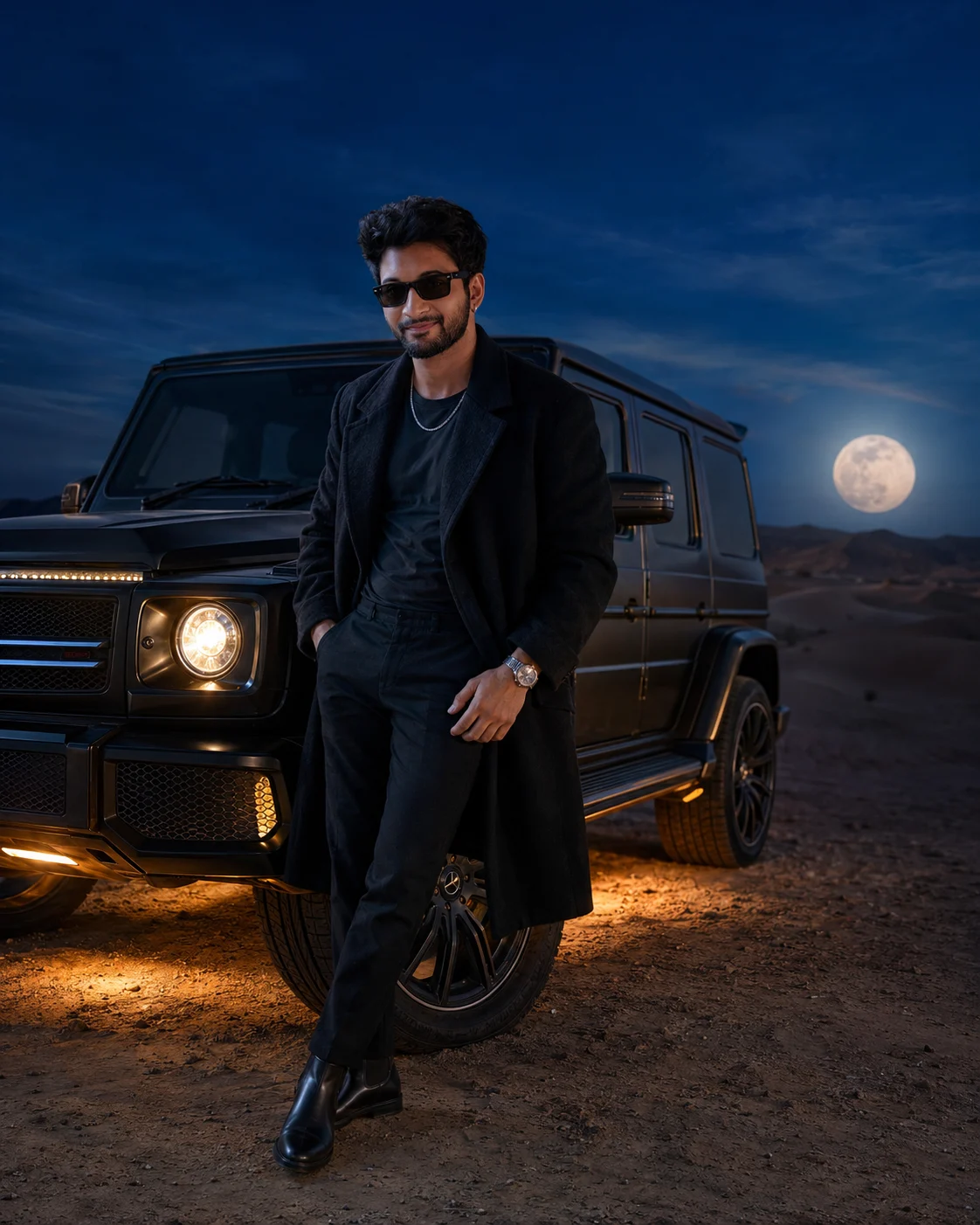
Black Luxury Desert Cinematic SUV Portrait
Create a cinematic full-body desert portrait with your identity preserved, a matte-black luxury SUV, blue-hour lighting, and premium editorial styling.
Using the uploaded photo, create a hyper-realistic full-body cinematic portrait of the same man beside a premium matte-black luxury SUV in a desert at deep blue hour. KEEP: Keep the exact facial structure, eye shape and natural eye colour, skin tone and visible skin texture, hairline, facial hair, and body proportions from the uploaded photo. Keep his recognizable identity, natural facial asymmetry, nose, lips, jawline, cheek structure, and apparent age unchanged. Do not reinterpret his face to match a model. CHANGE: Change the wardrobe to a long oversized black trench coat with visible woven fabric texture, a charcoal fitted cotton T-shirt, tailored black trousers, black leather boots, black rectangular sunglasses, a silver chain necklace, and a luxury metal wristwatch. Change the pose so he leans casually against the SUV's front quarter panel, with one leg slightly forward and both hands relaxed. Change the setting to a vast dark-sand desert with large dunes, a deep cobalt-blue sky, subtle violet near the horizon, and a large glowing full moon low behind the SUV. Add warm golden headlights and a concentrated amber underbody glow reflecting on dusty ground. SCENE: Place the SUV at a three-quarter angle, with the man clearly separated from its bodywork. Keep distant dunes softly compressed and blurred while the man and vehicle remain crisp. Show sparse fine dust only around the SUV's lower area. LIGHT: Use warm headlights as frontal low-level fill while cool moonlight comes from behind, creating a natural blue rim along the man's shoulders and hair. Keep facial illumination balanced so his skin does not look pasted into the scene. CAMERA: Use a full-frame camera with a 35mm lens at f/2.8, positioned around chest height with a subtle low-angle perspective. Keep the entire body and shoes inside the frame. GRADE: Use a controlled teal-and-gold colour grade, deep shadows, restrained highlights, realistic contrast, subtle film grain, and natural automotive reflections. OUTPUT: Generate a vertical 4:5 composition at 4096 × 5120 resolution with sharp facial detail and realistic fabric fibers. DO-NOT: no face slimming, no skin whitening, no changed eye colour, no plastic smoothing, no invented jewellery or tattoos, no altered body proportions, no fake moon, no floating lights, no distorted SUV, no extra limbs, no malformed hands, no text or watermark.
Photo Guide
- Use a sharp daylight portrait with enough resolution to show your hairline.
- Face the camera or stay within a slight three-quarter angle.
- Keep your full head, hairline, facial hair, and shoulders unobstructed.
- A daylight reference blends better with the cool blue-hour desert scene.
- Avoid sunglasses or heavy shadows covering your eyes in the source photo.
- A blurry, low-resolution selfie is most likely to cause face drift.
How to Build
- 1Gemini: upload one clear face photo, then paste the prompt unchanged.
- 2Choose image generation and keep the output at a vertical 4:5 ratio.
- 3Upload only one identity reference to reduce competing facial features.
- 4Generate once, then compare the jawline, eyes, hairline, and body proportions.
- 5If wrong, regenerate with the same photo and specify the drifting feature.
Pro Tips
- Use a straight-on source so the jawline stays consistent between generations.
- Choose a photo with natural skin texture so blue-hour light does not over-smooth it.
- Keep facial hair visible so the model does not redraw the beard or moustache.
- Use a full-body source when possible so proportions remain closer to the original.
- Avoid strong indoor lighting because it conflicts with the cool moon rim light.
Share This Prompt
About the Author
Naziya
Creative AI writer at MFDA, sharing trendy photo-editing prompts and fresh ideas for beautiful, stylish AI images.