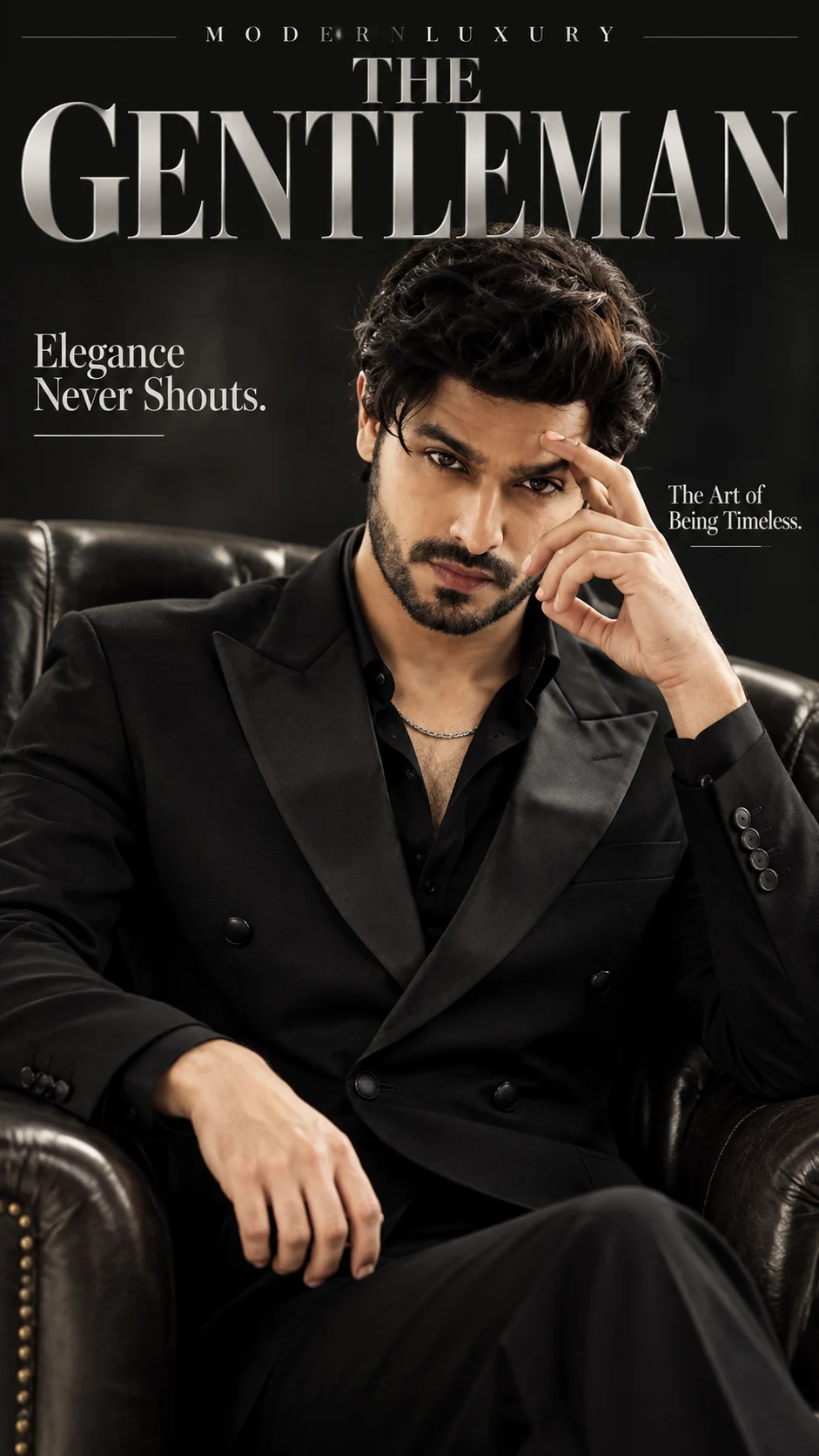
Black Double-Breasted Suit Luxury Gentleman Portrait
Create a refined black-tie editorial portrait with a tailored double-breasted suit, dark leather seating and dramatic charcoal studio lighting.
Using the uploaded photo, create a photorealistic luxury men's fashion magazine cover featuring the same recognizable man in a black double-breasted suit, seated in a dark leather armchair. KEEP — Preserve the original facial identity and natural facial geometry exactly. Retain the forehead height, facial width, cheekbone placement, jawline, chin shape, nose bridge and tip, lip contours, eyebrow shape, and original eye shape and colour. Keep the natural skin tone, pores, fine lines, marks and texture without retouching. Preserve the original hairline, hairstyle, hair density, texture and colour. Retain facial hair exactly as shown, including its natural edges and density. Keep the original neck, shoulder width, body proportions and apparent age. Do not reconstruct, blend or substitute facial features. CHANGE — Replace the clothing with a precisely tailored black double-breasted wool suit featuring structured shoulders, six covered front buttons and narrow satin peak lapels. Add a black silk shirt with the top buttons open, a fine silver chain and a restrained luxury wristwatch. Position him in a deep charcoal leather armchair, with one hand adjusting a visible cufflink and the other resting naturally on the chair arm. SCENE — Place him in a dark charcoal photography studio at night. Use a seamless matte-black background with subtle tonal separation behind the shoulders. Keep the background uncluttered and softly out of focus. His gaze should meet the camera with a composed, natural expression. LIGHT — Use a large diffused softbox positioned 45 degrees to the front-left, slightly above eye level. Add gentle frontal fill to retain facial detail and a narrow rear light to separate the black suit from the background. Use neutral 5000K lighting. CAMERA — Shoot at 85mm, f/2, ISO 100, with the camera at seated chest height. Keep the face and cufflink sharp while allowing the background to fall into soft blur. GRADE — Apply a restrained charcoal-black and neutral-silver colour grade, controlled highlights, deep shadows and natural skin colour. Avoid crushed facial shadows. OUTPUT — Vertical 9:16 composition, high-resolution 4K quality. Design a polished magazine cover with a large metallic-silver serif title "THE GENTLEMAN" across the top, small spaced text "MODERN LUXURY" above it, and two balanced cover lines: "Elegance Never Shouts." and "The Art of Being Timeless." Keep all typography clear of the face. DO NOT — Slim the face, whiten the skin, change eye colour, smooth skin into plastic, alter body proportions, invent tattoos or add unrequested jewellery. Never change the person's identity.
Photo Guide
- Use a sharp, original photo with at least 1024px resolution.
- Choose a straight-on or slight three-quarter facial angle.
- Even frontal daylight helps retain natural facial detail.
- Keep the hairline, jaw, neck and shoulders fully visible.
- A black outfit in the source may reduce useful clothing separation.
- Avoid heavily filtered photos or sunglasses that hide the eyes.
How to Build
- 1Open ChatGPT or Gemini and select its image generation feature.
- 2Upload one clear photo of the person whose identity must remain unchanged.
- 3Paste the complete prompt into the image generation field.
- 4Choose a vertical 9:16 aspect ratio and the highest available resolution.
- 5Generate the image with the uploaded photo as the identity reference.
- 6If the face drifts, retry with a clearer photo and strengthen the KEEP instructions.
Pro Tips
- Use a photo with visible eyes so the original eye shape stays accurate.
- Choose a source with visible shoulders to guide the seated composition.
- Avoid strong beauty filters so natural skin texture survives.
- Keep the source expression neutral for a composed editorial result.
- Use a well-lit face photo so the charcoal shadows do not hide facial detail.
Share This Prompt
About the Author
Naziya
Creative AI writer at MFDA, sharing trendy photo-editing prompts and fresh ideas for beautiful, stylish AI images.