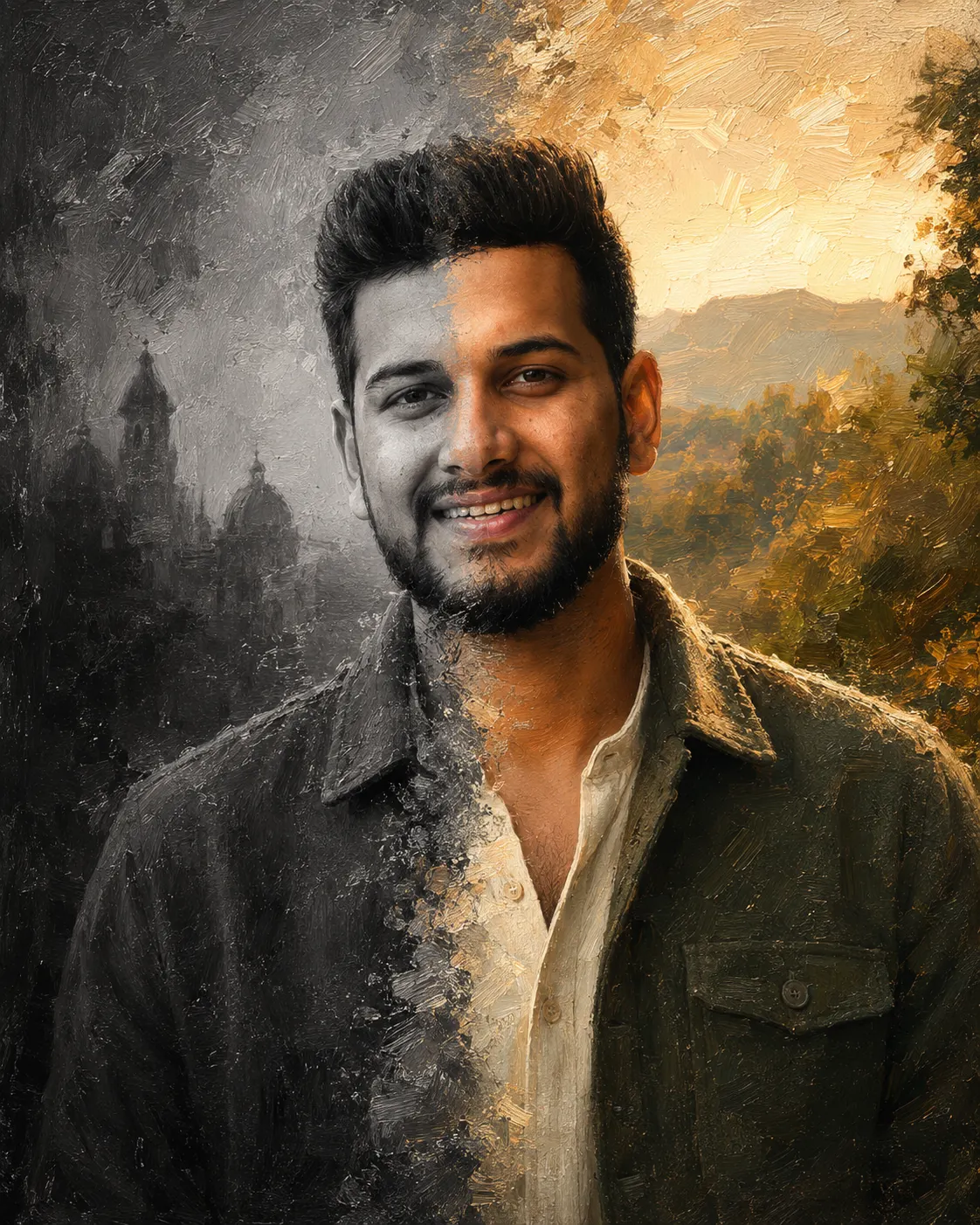
Black and White to Colour Oil Portrait
Create a realistic painted boy portrait transitioning from thoughtful monochrome into warm colour, with textured clothing, sunlight, and natural identity.
Using the uploaded photo, create a vertical cinematic painted portrait of the same boy transitioning from monochrome artwork into richly coloured oil painting. KEEP - Keep the boy’s exact identity from the uploaded photo, including face structure, eye shape and eye colour, natural skin tone and texture, eyebrows, nose, lips, cheek structure, jawline, hairline, hairstyle characteristics, facial hair if visible, and natural facial asymmetry. Keep his original body proportions, shoulder width, neck length, and recognizable physical features unchanged on both sides of the portrait. The grayscale and colour versions must clearly be the same person, with facial proportions matching the uploaded photo precisely. CHANGE - Change the wardrobe, pose, background, lighting, and colour treatment. Dress him in a textured dark olive-green wool overshirt over a simple cream cotton shirt. Create two connected versions of the same portrait: the left side is monochrome, thoughtful, and distant; the right side is warm, colourful, confident, and subtly smiling. Make the transition look like real oil paint gradually gaining colour across the face, clothing, and background rather than creating two separate people. SCENE - Place him against a textured artist’s studio backdrop with visible painted brush marks and a softly blurred wall behind him. The monochrome side should contain charcoal-grey tones and faint architectural shapes, while the colour side opens into a warm outdoor setting during late afternoon with softly blurred foliage and distant hills. LIGHT - Use soft sunlight entering from the upper-right on the colour side, creating warm highlights along the cheek, forehead, and hair. Keep the monochrome side under softer neutral illumination so the facial shadows remain consistent across the transition. Use a warm 4800K appearance on the colour side. CAMERA - Use an 85mm lens at f/2.8, camera positioned at chest height, with natural portrait compression and shallow depth of field. Keep both eyes sharply detailed and the transition edge naturally integrated. GRADE - Use graphite-like blacks and restrained contrast on the monochrome side, transitioning into earthy amber, olive, cream, and muted gold on the colour side. Preserve realistic skin texture beneath subtle oil-brush detail. OUTPUT - Create a vertical 4:5 composition at 2048 × 2560 resolution. DO-NOT slim the face, whiten the skin, change eye colour, plastic-smooth the skin, alter body proportions, invent jewellery or tattoos, create a different person, duplicate facial features, add text, logos, or watermarks.
Photo Guide
- Use a sharp photo at least 1200px wide for stable facial texture.
- A front-facing or slight three-quarter portrait gives the cleanest split.
- Soft daylight helps the painted sunlight blend into the colour side.
- Keep both eyes, forehead, jawline, and hairline clearly visible.
- Avoid black-and-white filters on the source; the prompt creates that effect.
How to Build
- 1Gemini: upload the photo and choose image generation at 4:5 ratio.
- 2Paste the complete prompt without removing the KEEP or CHANGE sections.
- 3Set image quality to the highest available resolution.
- 4Keep reference strength high if Gemini provides an identity control.
- 5If the transition looks wrong, regenerate while preserving the same source photo.
Pro Tips
- Use a neutral source background so the painted split stays visually controlled.
- Keep the face evenly exposed so grayscale shadows do not alter its shape.
- Choose a source with visible hair texture so the colour transition feels painted.
- Avoid strong source filters so natural skin texture survives the oil treatment.
- Keep the colour transition across clothing too, so both worlds feel connected.
Share This Prompt
About the Author
Naziya
Creative AI writer at MFDA, sharing trendy photo-editing prompts and fresh ideas for beautiful, stylish AI images.