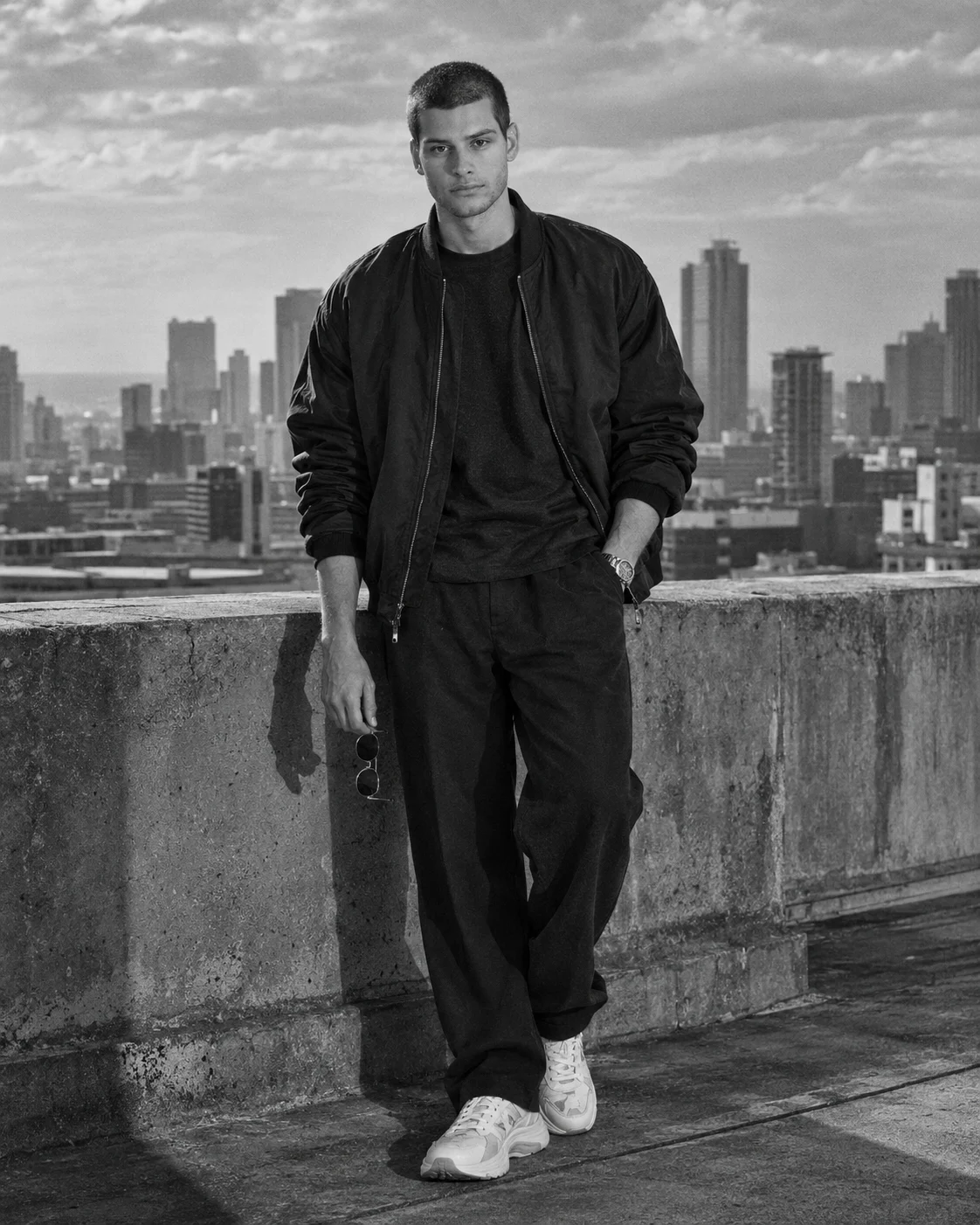
Black and White Rooftop Menswear Editorial Portrait
Create a cinematic black-and-white rooftop fashion portrait with an oversized bomber jacket, dramatic city views, natural shadows and preserved facial identity.
Using the uploaded photo, create a photorealistic black-and-white menswear editorial portrait of the same man standing beside a concrete rooftop ledge above a modern city, in a vertical 4:5 composition. KEEP — Preserve the man's exact recognizable facial identity, including forehead shape, eyebrow placement, eye shape and natural eye colour, nose bridge and tip, lips, cheeks, cheekbones, jawline, chin, ears, facial width and natural asymmetry. Retain his original skin tone, age, visible pores, fine skin texture, natural marks, hairline, hairstyle and facial hair pattern. Keep his original body proportions, shoulder width, neck length, arm shape and natural hand anatomy. His face must remain clearly recognizable, with realistic skin texture and no changes to his defining features. CHANGE — Dress him in an oversized matte-black nylon bomber jacket with subtle folds, a dark textured cotton T-shirt, loose straight-leg black trousers, chunky white sneakers and a simple metal wristwatch. Pose him standing naturally near the concrete ledge, with one hand inside his trouser pocket and the other holding round sunglasses beside his thigh. Let a gentle breeze move the jacket slightly without distorting his body or clothing. SCENE — Place him on a modern urban rooftop in the late afternoon, with concrete ledges, minimal rooftop structures and a distant city skyline behind him. Keep the skyline softly out of focus while preserving enough architectural detail to establish the location. Leave open cloudy sky above the buildings for a spacious editorial composition. LIGHT — Use directional late-afternoon daylight from the upper left, creating defined highlights along his face, jacket shoulders and cheekbones. Keep natural shadow detail on the opposite side of his face. Match the face lighting to the rooftop environment so the subject does not appear pasted into the scene. CAMERA — Shoot a full-body portrait using a 35mm lens at f/2.8, with the camera positioned slightly below waist height and tilted upward only enough to emphasize the architecture. Keep the face sharp, the body proportions natural and the distant skyline gently blurred. GRADE — Apply high-contrast black-and-white processing with deep blacks, controlled highlights, textured midtones and subtle 35mm film grain. Preserve detail in the black jacket and trousers without crushing their fabric texture. OUTPUT — Vertical 4:5 aspect ratio, high-resolution 2048 × 2560 pixels, realistic facial detail, natural anatomy and editorial-quality finish. DO NOT slim the face, whiten the skin, change eye colour, smooth skin into plastic, invent jewellery or tattoos, alter facial hair, distort hands, exaggerate muscles or replace the man's identity.
Photo Guide
- Upload a sharp, high-resolution photo with the full face clearly visible.
- Use an eye-level or slightly low-angle photo with natural body proportions.
- Choose even daylight so facial shadows blend with the rooftop lighting.
- Keep the original hairstyle, hairline and facial hair clearly visible.
- A dark outfit helps, but avoid photos where black clothing hides body shape.
- Avoid blurry faces or strong filters that erase natural skin texture.
How to Build
- 1Open ChatGPT and select its image generation feature.
- 2Upload one clear photo of the person whose identity must be preserved.
- 3Paste the complete prompt into the image generation message.
- 4Choose a vertical 4:5 composition and the highest available image quality.
- 5Generate the portrait and inspect the face, hands, jacket and skyline.
- 6If the first result is wrong, request a correction naming only the failed details.
Pro Tips
- Use a front-facing reference photo so the jawline stays consistent.
- Choose a photo with visible shoulders to preserve natural body proportions.
- Keep the sunglasses in one hand so they do not cover facial features.
- Request softer skyline blur if rooftop details disappear behind the subject.
- Ask for deeper fabric midtones if the black bomber loses its texture.
Share This Prompt
About the Author
Naziya
Creative AI writer at MFDA, sharing trendy photo-editing prompts and fresh ideas for beautiful, stylish AI images.