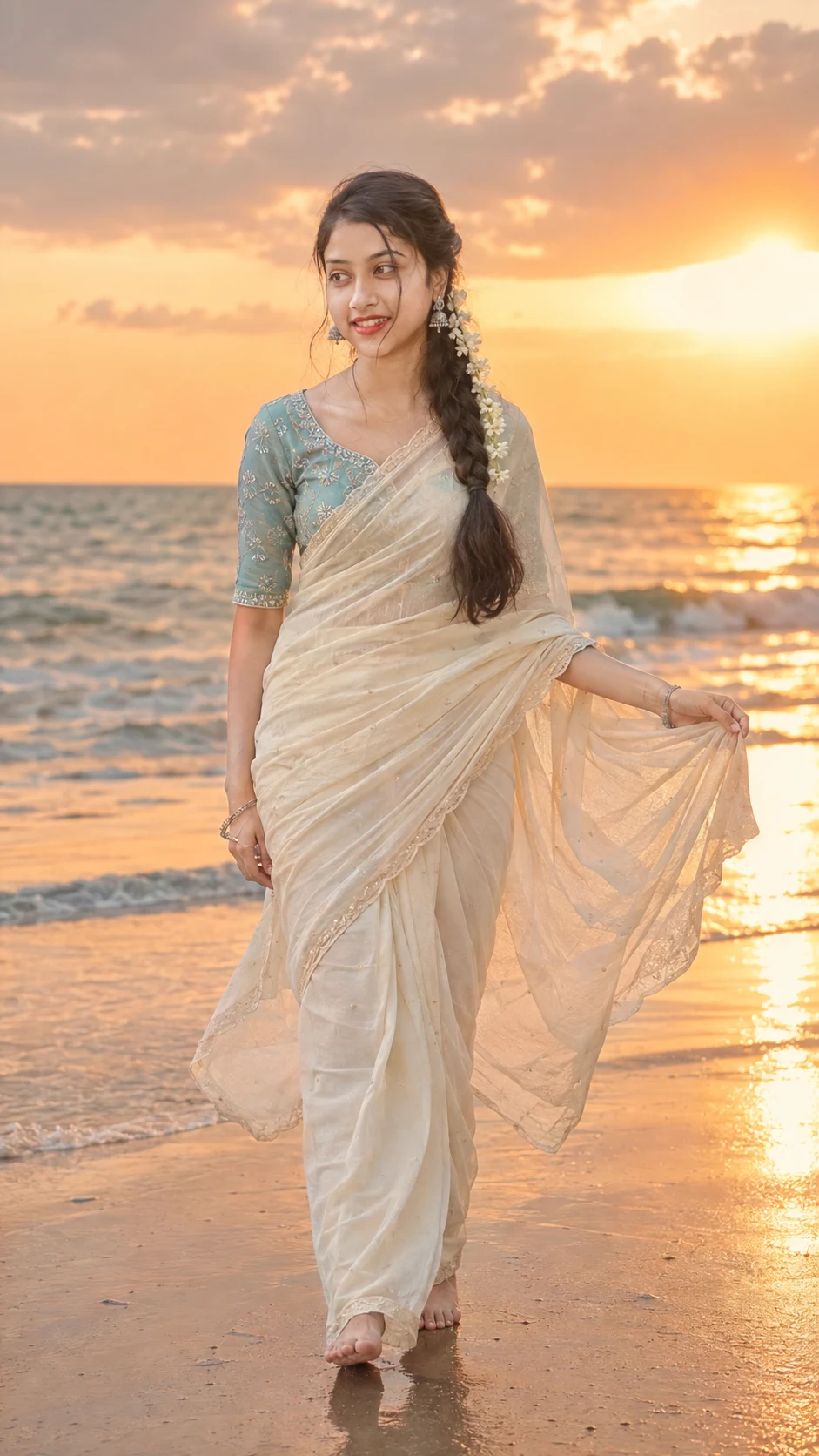
Beach Sunset Saree Portrait With Natural Identity
Create a natural beach sunset portrait in an ivory saree while preserving the uploaded face, skin texture, body proportions, and real identity.
Using the uploaded photo, create a photorealistic full-body beach sunset portrait of the same person while preserving their real identity. KEEP - Keep the exact face structure from the uploaded photo, including forehead shape, jawline, cheekbones, nose, lips, chin, and overall facial proportions. Keep the exact eye shape, natural eye colour, eyelid structure, eyebrow shape, and authentic gaze characteristics. Keep the original skin tone, undertone, pores, fine lines, marks, and natural skin texture. Keep the original hairline, natural facial hair if present, and recognizable hair density and texture. Keep the person’s real body proportions, shoulder width, waist structure, limb length, and overall physique. Do not reshape the person to match a different model. CHANGE - Change the wardrobe to a flowing ivory saree made from lightweight fabric with visible natural folds, paired with a muted turquoise embroidered blouse. Add delicate oxidized silver earrings and slim silver bangles. Style the existing hair into a long braid decorated with small white flowers without changing the hairline. Change the pose to a relaxed barefoot walking position on wet sand, with one hand naturally holding the saree edge as the sea breeze moves the fabric. Change the expression to a calm, peaceful look directed toward the horizon. Change the setting, lighting, and colour grade to the specified beach-sunset scene. SCENE - Place the person on a quiet shoreline during late golden-hour sunset. Show shallow ocean waves, reflective wet sand, soft dramatic clouds, and a warm horizon behind them. Keep the person sharply defined while the distant water and clouds have gentle natural background blur. LIGHT - Use warm low-angle sunlight coming from behind and slightly to one side, creating a subtle rim along the braid, shoulders, and saree edge. Keep soft warm fill light on the visible face so facial details remain naturally exposed rather than silhouetted. CAMERA - Use an 85mm portrait lens at f/2.8, camera positioned around chest height, with realistic full-body perspective and moderate compression. Keep the horizon naturally level and avoid wide-angle body distortion. GRADE - Use warm golden highlights, restrained turquoise tones, natural skin colour, moderate contrast, soft highlight roll-off, and subtle cinematic film grain without crushing shadow detail. OUTPUT - Create a vertical 9:16 composition at 4K resolution, keeping the complete person and feet visible with comfortable space around the walking figure. DO-NOT - No face slimming, no skin whitening, no changed eye colour, no plastic smoothing, no invented jewellery or tattoos, no altered body proportions, and no artificial facial features.
Photo Guide
- Use a sharp, high-resolution photo where the full face is clearly visible.
- A daylight or outdoor photo blends better with the warm beach lighting.
- Keep the forehead, hairline, eyes, nose and jaw unobstructed.
- A front or slight three-quarter angle works best for identity matching.
- Avoid heavy filters; they can weaken real skin texture and facial landmarks.
- The biggest problem is a heavily shadowed face with unclear eyes.
How to Build
- 1Open Gemini and choose its image generation or editing mode.
- 2Upload one clear identity photo with the face fully visible.
- 3Paste the complete prompt without removing the KEEP section.
- 4Choose a vertical 9:16 output if the tool offers aspect-ratio controls.
- 5Generate the image and compare the face against the uploaded photo.
- 6If the first result is wrong, regenerate while stressing the KEEP list.
Pro Tips
- Use an outdoor source photo so the sunset colour feels physically believable.
- Choose a photo showing both eyes clearly so their shape survives the edit.
- Keep natural skin texture visible so the warm grade does not create plastic skin.
- Use a full-body source when possible so proportions remain consistent.
- Avoid sunglasses or hair covering the forehead so the identity anchors stay clear.
Share This Prompt
About the Author
Naziya
Creative AI writer at MFDA, sharing trendy photo-editing prompts and fresh ideas for beautiful, stylish AI images.