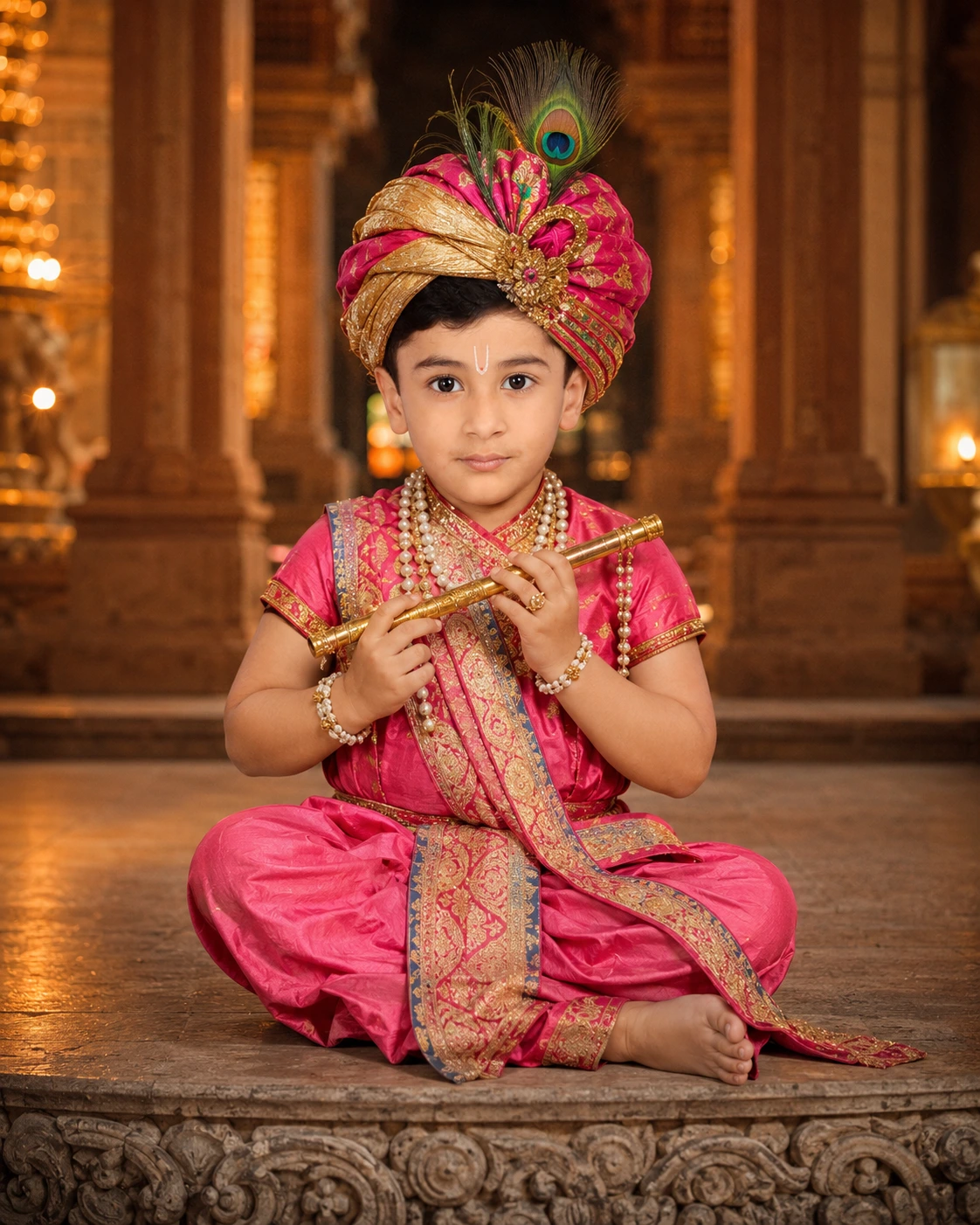
Baby Krishna gemini img editing prompts
Create a photorealistic baby Krishna portrait that preserves the child’s face and body while adding pink-gold clothing, peacock feathers and temple light.
Using the uploaded photo, create an ultra-realistic editorial portrait of the same baby dressed as Krishna inside a richly detailed Indian temple. KEEP - Keep the baby's exact face structure, bone shape, natural jawline, nose and lip shape, eye shape and original eye colour, eyebrow shape, hairline and natural hair texture, and any visible facial hair. Keep the baby's natural skin tone and visible texture, including pores, freckles, moles, scars and fine lines where present, with the same tone across the face, neck, arms and hands. Keep the exact body proportions, height, build and weight, shoulder width, waist and hip proportions, arm and leg length, hand size and finger shape. Keep the baby's apparent age, natural expression and every real feature visible in the uploaded photo. Preserve any existing glasses, piercings, tattoos or birthmarks exactly rather than replacing them. CHANGE - Dress the baby in a vibrant pink silk-and-gold traditional Krishna outfit, with realistic woven fabric, embroidered gold borders and natural folds caused by the baby's posture. Add a colourful traditional turban with carefully arranged peacock feathers. Place a small golden flute naturally in the baby's hands without changing finger count or hand anatomy. Add only the specified pearl necklaces, bracelets and rings, keeping their scale appropriate for a baby. Add a small traditional forehead marking only if it does not cover existing facial features. Use a calm seated pose suitable for the baby's real body proportions. SCENE - Place the baby inside a detailed Indian temple during early evening, with carved stone pillars, warm lamps and softly visible architectural details behind them. Keep the temple background moderately blurred so the baby remains the sharpest subject. LIGHT - Use warm directional temple light from the upper-left at approximately 3200K, with softer neutral fill from the front. Place natural contact shadows beneath the baby and wherever clothing touches the seat so the body does not appear to float. CAMERA - Use an 85mm lens at f/2.8 from the baby's chest height, framing the full seated body with enough space around the turban and feet. GRADE - Apply realistic skin colour, warm gold highlights, restrained pink saturation, moderate contrast and fine cinematic grain across the entire frame. Match focus falloff, grain and colour treatment across the baby, clothing and temple. OUTPUT - Create a vertical 4:5 image at 2048 × 2560 pixels with the complete seated body visible. DO-NOT - No slimming the face or body, no adding muscle, no changing height, no whitening or tanning skin, no smoothing skin into plastic, no changing eye colour, no erasing moles scars or freckles, no adding jewellery makeup or tattoos that are not in the photo, no changing the number or shape of fingers.
Photo Guide
- Use a sharp 1200px+ photo showing the baby's full seated body if possible.
- Choose a straight or slight three-quarter angle so the face and body stay readable.
- Soft daylight works best so the temple's warm lighting can be added naturally.
- Keep the baby's hands, feet, hairline and full facial area visible.
- Avoid cropped headshots because the model may invent the baby's body and proportions.
How to Build
- 1Gemini: upload the photo and paste the complete prompt.
- 2Choose image generation/editing in the Gemini image mode.
- 3Use a 4:5 portrait ratio and the highest available resolution.
- 4Compare the face, hands, height and body proportions with the source photo.
- 5Check that the flute, jewellery and peacock feathers look physically attached.
- 6If wrong, ask Gemini to regenerate while repeating the full identity keep-list.
Pro Tips
- Use a full-body source so the Krishna outfit follows the real body proportions.
- Keep both hands visible so the flute does not distort finger shape.
- Use soft daylight in the source so warm temple light stays believable.
- Keep the forehead clear so the added marking does not cover real features.
- Repeat the identity lock if the face or body starts drifting between edits.
Share This Prompt
About the Author
Mina
**AI Prompt Engineer at MFDA.** I design precise, creative prompts for AI image generation, photo editing, portraits, fashion, and visual storytelling.