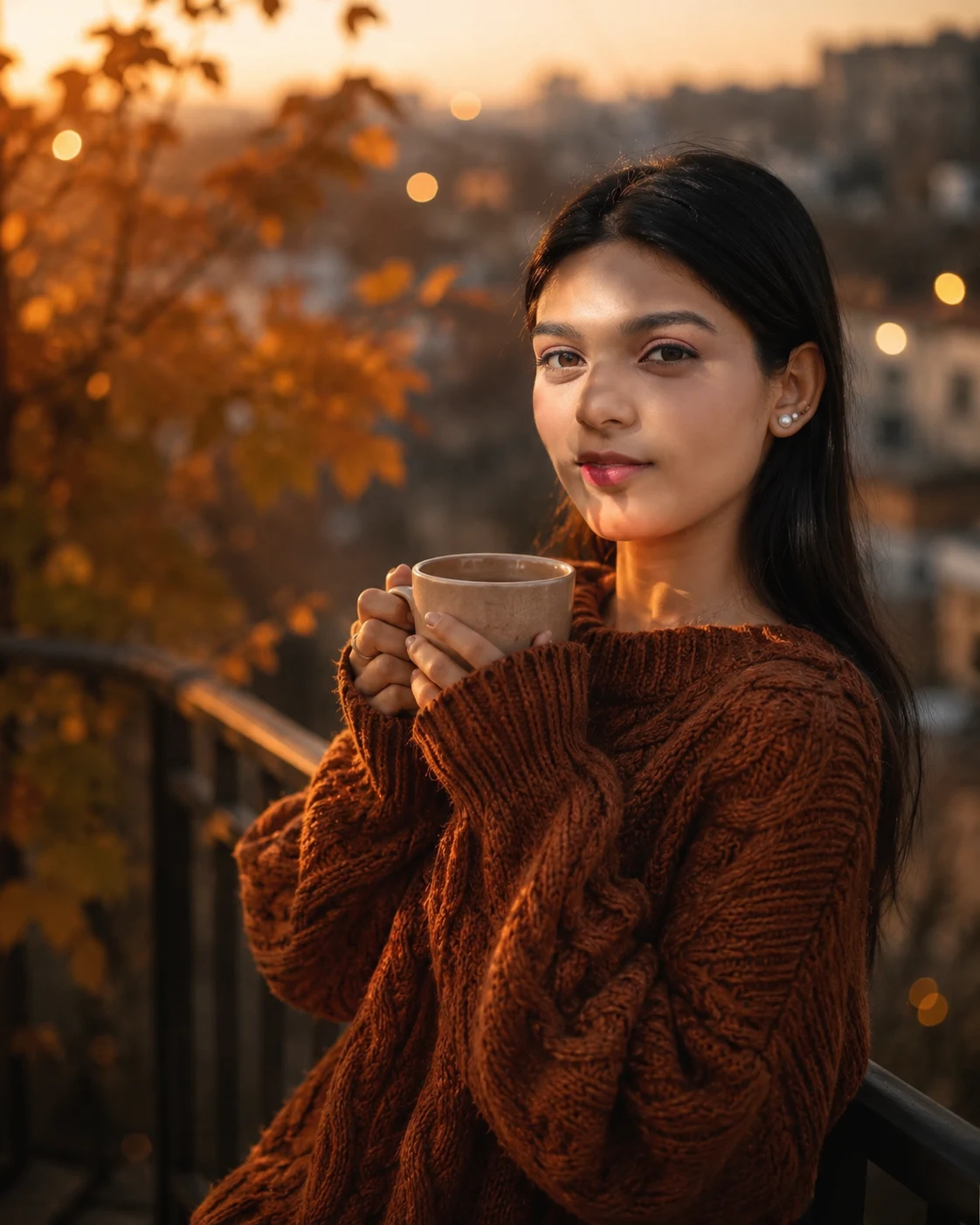
Autumn Balcony Cozy Sweater Cinematic Portrait
Create a cozy autumn balcony portrait with a rust-brown cable-knit sweater, warm sunset lighting, a ceramic coffee cup, and cinematic amber tones.
Using the uploaded photo, create a photorealistic vertical 4:5 autumn balcony portrait of the same person, wearing an oversized rust-brown cable-knit sweater and holding a warm ceramic coffee cup with both hands. KEEP — Preserve the exact facial identity and recognizable structure from the uploaded photo, including forehead proportions, eyebrow placement, eye shape and original eye colour, nose bridge and tip, lip shape, cheek volume, cheekbones, jawline, chin, ears, facial width, and natural asymmetry. Retain the original skin tone, realistic pores, fine skin texture, natural marks, and authentic age. Keep the original hairline, hair density, texture, colour, and visible hairstyle. Preserve facial hair exactly as shown, including its density, outline, and length. Maintain the original body proportions, shoulder width, neck length, and natural hand structure. Do not replace the person with a generic fashion model. CHANGE — Dress the subject in an oversized rust-brown wool cable-knit sweater with clearly defined braided stitches, thick ribbed cuffs, and a relaxed neckline. Position the subject on an autumn balcony, holding a matte beige ceramic coffee cup with both hands at chest height. Keep the pose relaxed, with shoulders slightly angled and the gaze directed softly toward the camera or just off-camera. Add golden autumn foliage, distant city lights, and a subtle veil of evening mist. SCENE — Set the portrait during late golden hour, just before sunset. Place softly blurred amber leaves along the balcony edges, with distant rooftops and tiny warm city lights behind the subject. Keep the face, sweater texture, and hands sharply defined while the background falls into creamy optical bokeh. LIGHT — Use warm directional sunlight from the left-front side, around 3800–4500K in appearance, illuminating the face and raised knit stitches. Add a gentle golden rim along the hair and outer shoulder. Keep shadows consistent with the light direction and retain detail on the darker side of the face. CAMERA — Shoot with an 85mm portrait lens at f/1.8, camera positioned at chest height, using close mid-chest-to-head framing. Maintain natural facial perspective and realistic hand proportions. GRADE — Apply muted amber, caramel, and earthy brown tones, soft highlight roll-off, moderately deep shadows, restrained saturation, and subtle fine film grain. Preserve natural skin colour without excessive orange tint. OUTPUT — Generate a vertical 4:5 image at 2048 × 2560 pixels or the closest available high-resolution setting. DO NOT slim or reshape the face, whiten the skin, change eye colour, smooth away natural skin texture, alter body proportions, distort fingers, invent jewellery or tattoos, or introduce artificial facial features.
Photo Guide
- Upload a sharp, high-resolution photo with the full face clearly visible.
- Choose a front-facing or slight three-quarter angle to preserve facial proportions.
- Use even natural light so the original skin tone remains easy to match.
- Keep the hairline, ears, and visible facial hair unobstructed.
- A warm daylight source blends better with the golden autumn lighting.
- Avoid heavily filtered selfies because they can cause facial identity drift.
How to Build
- 1Open ChatGPT or Gemini and select an image-generation feature.
- 2Upload your clearest photo as the identity reference.
- 3Paste the complete prompt, keeping the KEEP section unchanged.
- 4Choose portrait orientation and a 4:5 aspect ratio.
- 5Select the highest available image quality or resolution setting.
- 6Generate the portrait and compare the face with your uploaded photo.
- 7If the face changes, regenerate using the same reference and reinforce KEEP.
Pro Tips
- Choose a photo with visible hair edges so sunset rim lighting looks natural.
- Use a clear view of both hands to reduce finger and cup-holding errors.
- Keep the original face angle close to the requested pose to reduce face drift.
- Choose a photo with neutral white balance so amber grading stays controlled.
- Preserve the sweater's cable-knit pattern to make the wool texture look realistic.
Share This Prompt
About the Author
Naziya
Creative AI writer at MFDA, sharing trendy photo-editing prompts and fresh ideas for beautiful, stylish AI images.