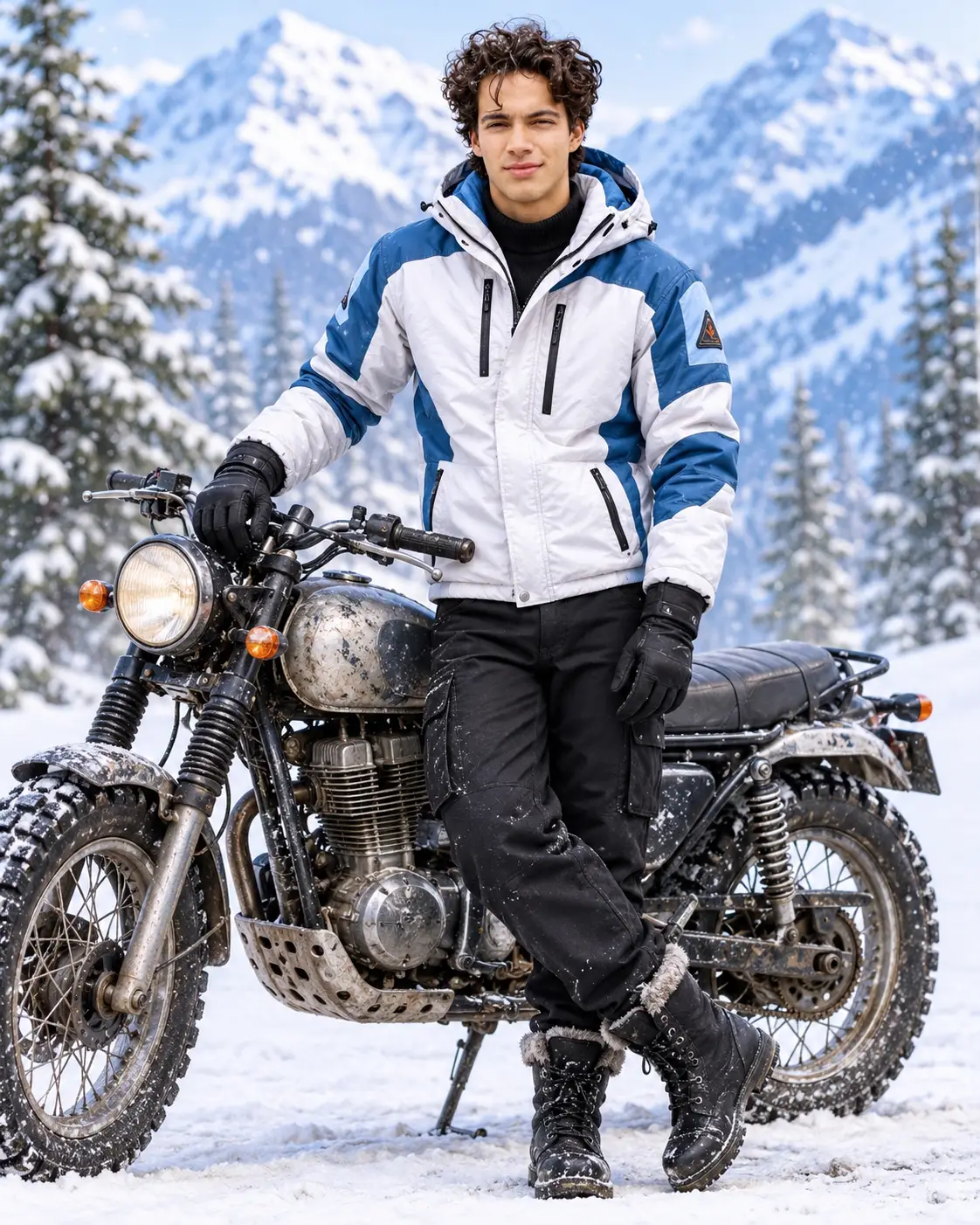
Arctic Explorer Snow Motorcycle Adventure Portrait
Transform your uploaded photo into a detailed 3D animated arctic explorer beside a rugged snow motorcycle in a frozen mountain landscape.
Using the uploaded photo, create a premium stylized 3D animated full-body character portrait of the same recognizable person standing beside a rugged snow expedition motorcycle in a frozen alpine mountain landscape. KEEP — Preserve the exact facial identity and natural anatomy of the person in the uploaded photograph. Retain the original forehead shape, eyebrow thickness and placement, eye shape and natural eye colour, nose bridge and tip, lip shape, cheek volume, cheekbone structure, jawline, chin, ears and natural facial asymmetry. Maintain the original skin tone, visible pores, natural skin texture, age and distinctive facial marks. Preserve the original hairline, hair density, hairstyle, hair texture and facial hair. Keep the original neck, shoulder width, body proportions and recognizable physical build. The finished character must clearly resemble the uploaded person, even with stylized 3D rendering. CHANGE — Replace the original clothing with a premium white-and-ice-blue insulated winter expedition jacket featuring quilted nylon panels, thick padded sections, a high protective collar, realistic stitching and matte black zippers. Add black thermal cargo trousers with reinforced knee panels, insulated black leather gloves and dark fur-lined snow boots. Introduce a confident full-body standing pose with one hand resting naturally on the motorcycle handlebar and the other relaxed beside the body. SCENE — Position the character beside a rugged vintage snow expedition motorcycle with a weathered metallic fuel tank, round headlight, thick snow tires, exposed mechanical components and a black leather seat. Set the scene on a frozen alpine mountain trail during early morning, with snow-covered pine trees, distant icy peaks and light snowfall. Keep the motorcycle clearly visible behind and beside the character, with moderate background depth blur. LIGHT — Use soft, cool daylight entering from the upper left, balanced with gentle frontal fill light at approximately 6000K. Maintain consistent illumination across the face, winter clothing and motorcycle. CAMERA — Shoot at 85mm, f/2.8, at chest height, using a vertical full-body composition. GRADE — Apply icy blue and silver tones, controlled contrast, clean white snow highlights and subtle cinematic shadows. OUTPUT — Vertical 4:5 aspect ratio, full-body framing from head to boots, complete motorcycle visibility, high-resolution 8K-quality 3D rendering. DO NOT slim the face, whiten the skin, change eye colour, alter facial proportions, apply plastic smoothing, replace the original identity or invent jewellery, tattoos or facial accessories.
Photo Guide
- Use a sharp, high-resolution photo with clearly visible facial details.
- Choose a front-facing or slight 3/4 angle with both eyes visible.
- Use evenly lit daylight so the face blends into the cool snow lighting.
- Keep the original hairstyle, hairline and facial hair clearly visible.
- Avoid heavy shadows or coloured lighting that distort natural skin tones.
- A clear face matters most; sunglasses can hide essential identity details.
How to Build
- 1Open Gemini and select the image generation feature with photo upload.
- 2Upload your original portrait as the identity reference.
- 3Copy the complete prompt content into the prompt box.
- 4Choose a 4:5 vertical image ratio and the highest available quality.
- 5Generate the image with the uploaded photo retained as reference.
- 6Check facial identity, motorcycle details and full-body framing.
- 7If the result looks wrong, refine the specific issue and regenerate.
Pro Tips
- Choose a photo with visible eyebrows so the stylized face retains its identity.
- Keep the forehead and hairline unobstructed to prevent hairstyle drift.
- Use a neutral expression so the animated smile remains recognizable.
- Choose a photo with visible shoulders to preserve natural body proportions.
- Keep the motorcycle behind the character so its wheels remain visible.
Share This Prompt
About the Author
Naziya
Creative AI writer at MFDA, sharing trendy photo-editing prompts and fresh ideas for beautiful, stylish AI images.