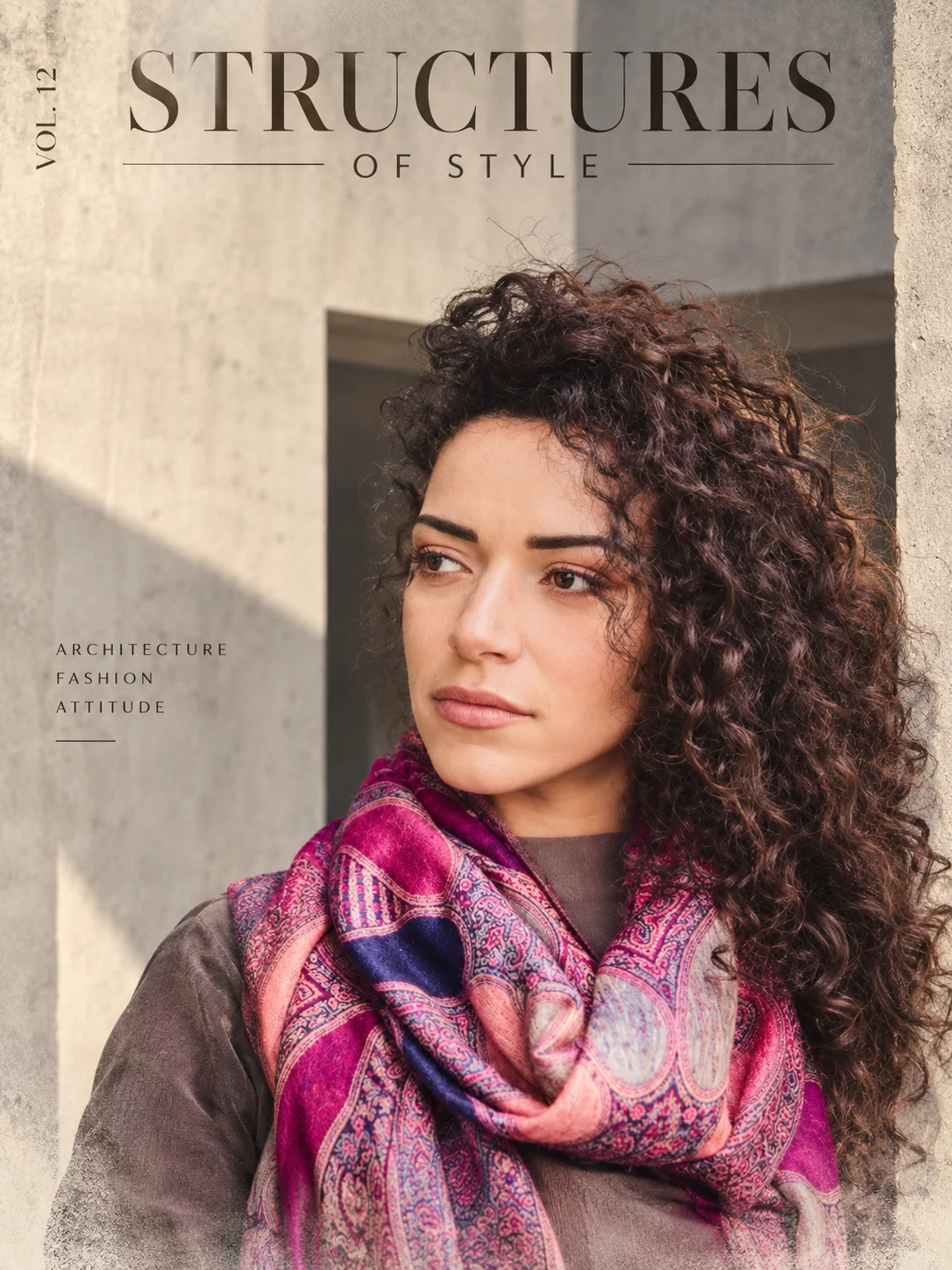
Architectural Brutalist Fashion Editorial Portrait
Turn your photo into a minimalist architectural fashion poster with concrete textures, stone-beige geometry, realistic shadows, and preserved facial identity.
Using the uploaded photo, create a photorealistic architectural fashion editorial poster featuring the same recognizable person against a minimalist brutalist concrete setting, in a vertical 3:4 composition. KEEP — Preserve the person's exact facial identity, original face shape, forehead, eyebrows, eye shape and natural eye colour, nose bridge and tip, lips, cheeks, cheekbones, jawline, chin, ears, natural facial asymmetry, original skin tone, pores, fine skin texture, hairline, hairstyle, and facial hair where present. Maintain the original neck, shoulders, body proportions, and recognizable physical appearance. Keep the person's original pose and clothing unchanged. Do not reconstruct or beautify the face. CHANGE — Replace the existing background with a pale concrete-grey architectural environment. Introduce one large rectangular slab in muted stone beige, with a narrow vertical opening and a recessed charcoal-grey surface that suggests realistic architectural depth. Position the person in the lower half of the composition, allowing the shoulders or silhouette to overlap the slab's edges. Add a subtle mineral-paper texture and dry-brush fading along the lower boundary of the extracted scene. Keep the face and clothing sharply defined. SCENE — Place the subject in an open brutalist architectural courtyard during late-afternoon daylight. Behind the person, use monolithic concrete planes, clean vertical lines, and a single recessed opening. Keep the architectural surfaces detailed but visually quiet, with only mild background softness. Preserve believable spatial relationships and avoid adding unrelated structures. LIGHT — Use directional sunlight from the upper left, producing soft-edged shadows across the concrete and consistent illumination on the face. Choose neutral daylight around 5200K, retaining natural skin colour and realistic shadow detail. The face must match the scene's light direction. CAMERA — Use an 85mm portrait lens at f/2.8, with the camera at chest height and a natural perspective. Keep facial proportions undistorted, the eyes in sharp focus, and the architectural background gently separated from the subject. GRADE — Apply restrained stone-grey, warm beige, and charcoal tones, moderate contrast, natural highlights, and subtle fine-grain texture. Maintain realistic concrete pores, fabric weave, and authentic skin detail. OUTPUT — Generate a high-resolution vertical 3:4 editorial poster. Include small, correctly spelled typography reading "STRUCTURES OF STYLE" near the upper edge, with a discreet vertical issue number. Keep text away from the face and preserve generous negative space. DO NOT slim the face, whiten the skin, change eye colour, smooth skin into plastic, invent jewellery or tattoos, alter body proportions, replace facial features, or add exaggerated 3D effects.
Photo Guide
- Upload a sharp, high-resolution photo with the face clearly visible.
- Choose a front-facing or three-quarter angle to preserve facial structure.
- Use even daylight or soft directional light for natural facial shadows.
- Keep the shoulders and clothing visible for a convincing architectural cutout.
- A pale concrete background in the source photo is helpful but not required.
- Avoid heavily filtered selfies because facial details may drift during reconstruction.
How to Build
- 1Open ChatGPT and select the image-generation feature.
- 2Upload one clear photo of yourself as the identity reference.
- 3Paste the complete prompt into the image-generation message.
- 4Request a vertical 3:4 composition with high image quality.
- 5Generate the poster and inspect the face, clothing, and concrete geometry.
- 6If the result is wrong, regenerate with a correction specifying what to preserve.
Pro Tips
- Use a photo with visible shoulders so the slab overlap looks intentional.
- Keep the original clothing unchanged to strengthen identity consistency.
- Choose soft directional light so the face matches the concrete shadows.
- Use a simple pose so the architectural geometry remains the focal point.
- Check the spelling of "STRUCTURES OF STYLE" because AI text can distort.
- Regenerate only the incorrect elements when the face or proportions drift.
Share This Prompt
About the Author
Naziya
Creative AI writer at MFDA, sharing trendy photo-editing prompts and fresh ideas for beautiful, stylish AI images.