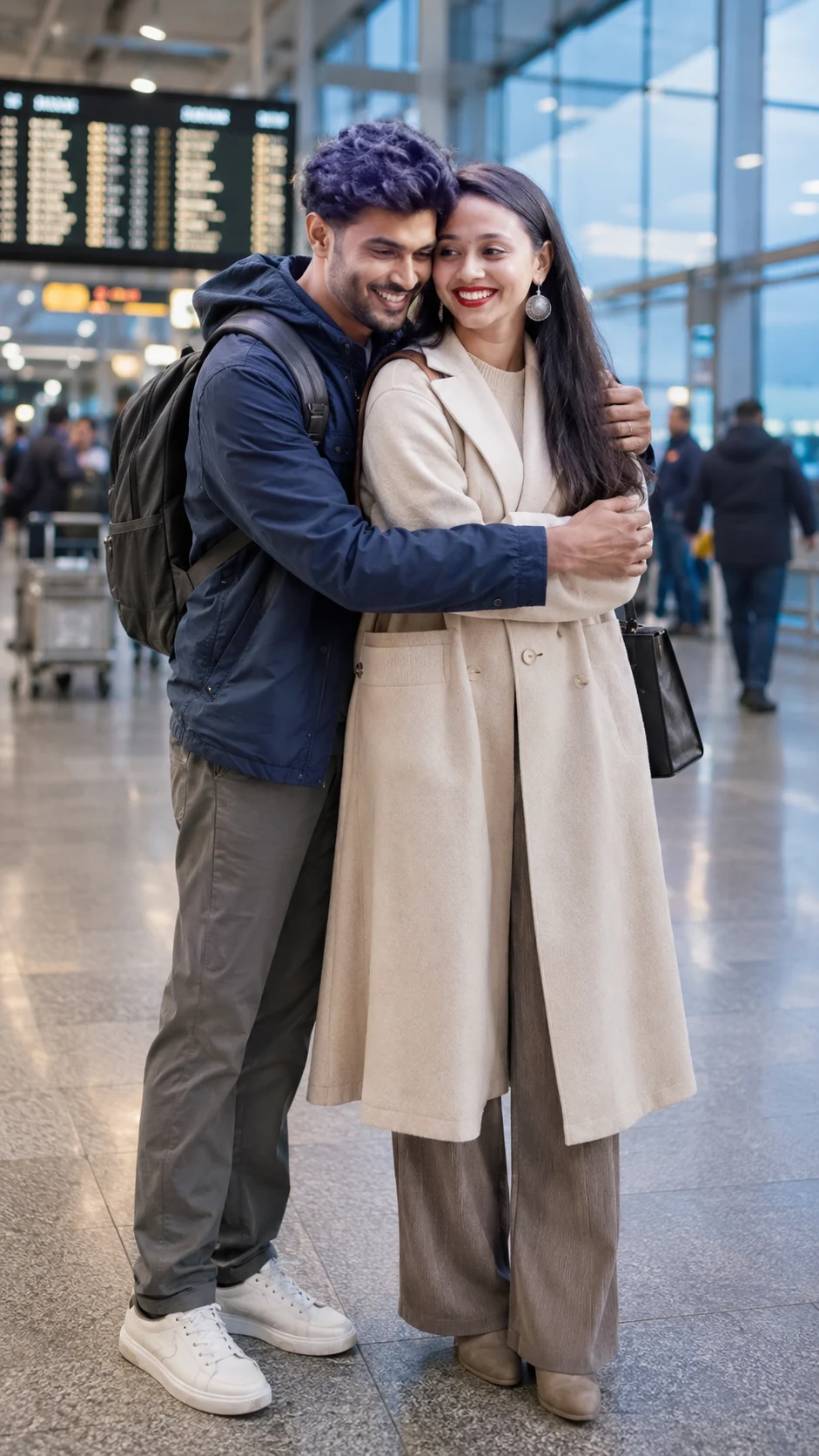
Airport Reunion Couple Portrait Prompt
Create a cinematic airport reunion portrait that preserves your identity while adding realistic travel styling, warm terminal light, and emotional couple posing.
Using the uploaded photo, create a photorealistic vertical 9:16 emotional airport reunion portrait of the uploaded person meeting their partner after a long journey. KEEP - Preserve the uploaded person's exact facial identity and facial structure from the uploaded photo, including forehead shape, eyebrow placement, eye shape and natural eye colour, nose bridge and tip, lips, cheeks, cheekbones, jawline, chin, ears, facial width, and natural facial asymmetry. Keep the original skin tone, visible pores, fine texture, natural marks, authentic age, hairline, hair density, natural hair texture and natural hair colour. Keep facial hair exactly as shown if present. Preserve the person's natural body proportions, shoulder width, height relationships and realistic hands. Do not replace the face or turn the person into a generic model. CHANGE - Dress the uploaded person in a sophisticated oversized cream wool-blend coat over a neutral beige knit sweater, straight-leg trousers and ankle boots, with a compact dark travel bag. Dress the partner in a dark navy cotton-blend jacket, muted trousers and a simple backpack. Change the pose to a natural reunion embrace, with the partner's arms around the uploaded person while both faces remain clearly visible. SCENE - Place them inside a modern airport terminal during early evening, beside large floor-to-ceiling glass windows. Include softly blurred departure boards, luggage carts, polished flooring and distant travellers behind them. Keep the background recognisable as an airport but strongly separated from the couple. LIGHT - Use warm overhead terminal lighting mixed with cool daylight entering through the glass windows from the side. Let the same soft side light fall across both faces so skin, coat edges and hair have matching illumination. CAMERA - Shoot at 35mm, f/2.0, camera at chest height, with natural perspective and moderate background compression. Keep both people sharp while allowing distant signs and travellers to fall into soft blur. GRADE - Use restrained cinematic contrast, warm skin tones, slightly cool shadows and subtle fine film grain inspired by modern documentary travel photography. OUTPUT - Vertical 9:16 composition, high resolution, realistic skin and fabric detail, with both people framed from head to below the knees. DO-NOT - No face slimming, no skin whitening, no changed eye colour, no plastic smoothing, no invented jewellery or tattoos, no facial hair changes, no distorted hands, no extra fingers, no duplicate people, and no artificial-looking airport elements.
Photo Guide
- Use a sharp, high-resolution photo where the full face and hairline are visible.
- A front or slight three-quarter angle works best for the reunion embrace.
- Use even daylight or soft window light so the airport lighting blends naturally.
- Keep the eyes, nose, jawline and hairline unobstructed by sunglasses or heavy shadows.
- A travel setting is optional, but a clear face photo gives cleaner identity matching.
- Avoid heavily filtered selfies because plastic texture can carry into the result.
How to Build
- 1ChatGPT: upload a clear face photo and paste the prompt unchanged.
- 2Choose a 9:16 portrait output at the highest available resolution.
- 3Keep the reference image strength high enough to preserve facial structure.
- 4Use the full-body or upper-body reference if body proportions matter.
- 5Generate the first version with natural lighting before adding stronger grading.
- 6If the result is wrong, fix the face or pose in a new run, not the whole prompt.
Pro Tips
- Use a window-lit source photo so the airport side light matches naturally.
- Keep the forehead and hairline visible so identity remains stable during the embrace.
- Choose a photo with visible shoulders so the coat fits the real body shape.
- Avoid extreme selfie angles because they can distort the 35mm perspective.
- Keep the partner's face slightly turned so the uploaded face stays prominent.
Share This Prompt
About the Author
Naziya
Creative AI writer at MFDA, sharing trendy photo-editing prompts and fresh ideas for beautiful, stylish AI images.