Top 5 Boy Breakup Sad Image Prompts 2026

If you want a realistic boy breakup sad image, the biggest difference comes from the scene around the person, not from simply making the face look sad. I tested these looks with details such as rainy windows, empty streets, muted clothing and low evening light. Each card is designed around a different heartbreak mood, so you can choose something that fits your original photo. These work best when you want the person to remain recognizable rather than turning the result into a generic AI character. You’ll get five options here, from a quiet indoor portrait to a cinematic rainy street scene.
Before you start
Use a clear front-facing or three-quarter photo where your face isn't covered. A natural daylight photo works better than a heavily filtered selfie. For Gemini, upload the original image at its highest available quality and avoid screenshots when possible.
Photo: clear face, visible hairline, minimal filters
Tool: Google Gemini image generation
Aspect ratio: 4:5 for Instagram-style portraits
Best clothing: simple cotton shirt, denim jacket or plain T-shirt
Rainy Window Heartbreak Portrait
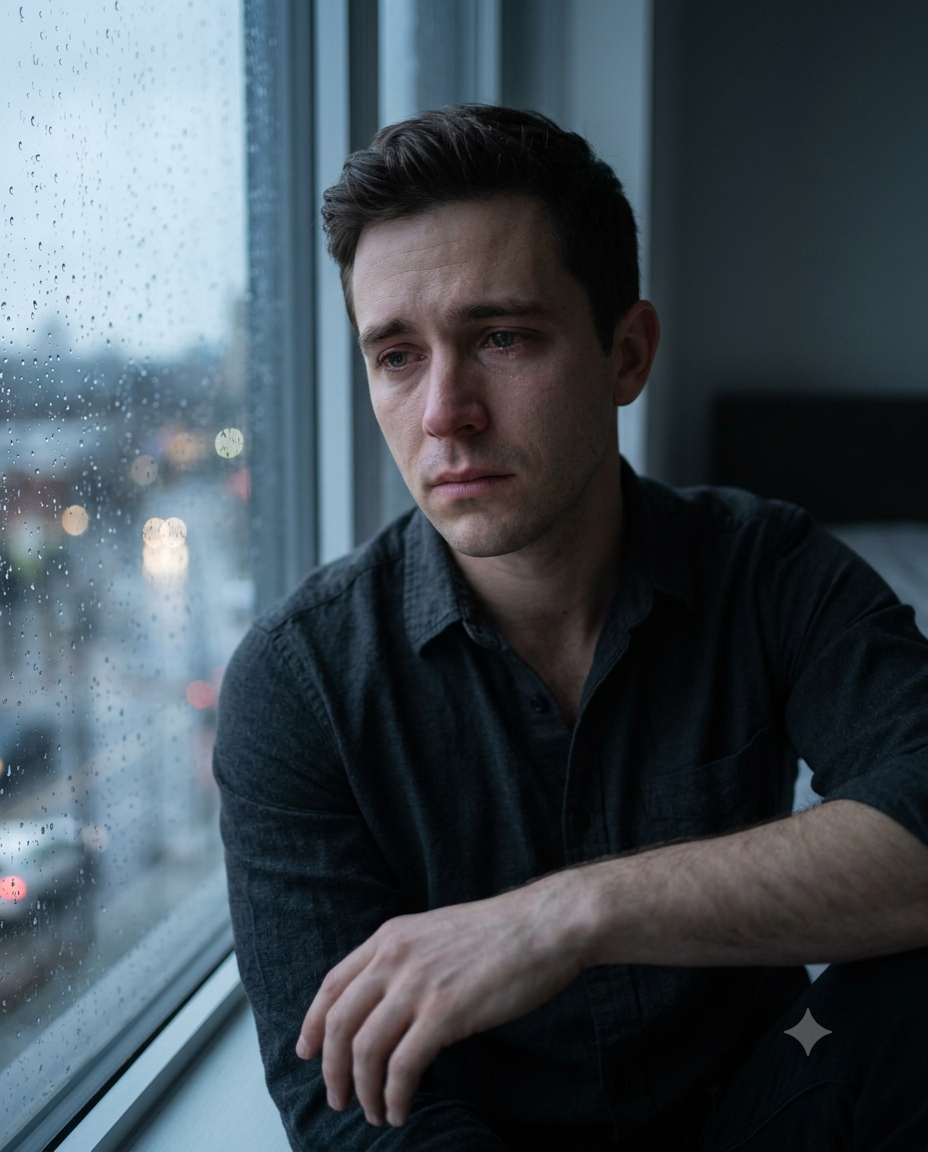
This look gives you a quiet, personal breakup scene rather than an exaggerated crying pose. It suits close-up and waist-up photos particularly well. The key detail is the rainy glass between the subject and the outside world; it creates emotion without requiring unnatural facial expressions. A dark cotton shirt also helps keep attention on the face.
The Prompt
Using the uploaded photo, create a realistic emotional breakup portrait of the same person sitting beside a rain-covered window on a quiet evening. KEEP - Keep the exact face structure from the uploaded photo, including forehead shape, jawline, cheek structure, nose, lips, chin, and natural facial proportions. Keep the original eye shape, eye colour, eyelid structure, eyebrow position, and natural gaze. Keep the original skin tone, visible pores, fine texture, small marks, and natural facial details without whitening or artificial smoothing. Keep the existing hairline, hair density, hairstyle, and natural facial hair exactly as visible in the reference. Keep the person's real body proportions, shoulder width, neck length, hand size, and overall build. The person must remain clearly recognizable as the same individual. CHANGE - Change the wardrobe to a simple dark charcoal cotton shirt with natural fabric folds and no logos, jewellery, or decorative patterns. Change the pose to a relaxed seated position beside the window, with shoulders slightly lowered and one hand resting naturally near the lap. Change the background to a dim bedroom with a rain-covered glass window and subtle reflections. Change the lighting to soft evening window light, with gentle shadows across the face. Use a muted blue-grey colour grade with restrained contrast and slightly desaturated surroundings. SCENE - Place the subject beside a large rain-covered window during blue hour, shortly after sunset. Show blurred rain droplets on the glass, faint city lights outside, and a dark interior behind the subject. Keep the background softly blurred so the face remains the sharpest element. LIGHT - Light the face primarily from the window on the subject's left side. Use soft, diffused cool daylight around 6000K, with gentle falloff across the opposite cheek. Keep the shadow direction consistent with the window so the face does not look pasted into the room. CAMERA - Photograph at 85mm, f/1.8, camera positioned at chest height, with natural portrait compression and shallow depth of field. Keep the eyes sharply focused while allowing the rain and distant lights to fall softly out of focus. GRADE - Apply a subtle cinematic blue-grey grade, low saturation, moderate contrast, natural skin colour, and restrained highlight roll-off. Keep skin realistic rather than applying a glossy beauty filter. OUTPUT - Create a vertical 4:5 portrait at 2048 × 2560 pixels, with enough space around the shoulders and window while keeping the face prominent. DO-NOT - No face slimming, no skin whitening, no changed eye colour, no plastic smoothing, no invented jewellery or tattoos, no altered jawline, no exaggerated crying, and no artificial facial expression.
✦ Curated by MFDA
Lonely Night Walk Through the City
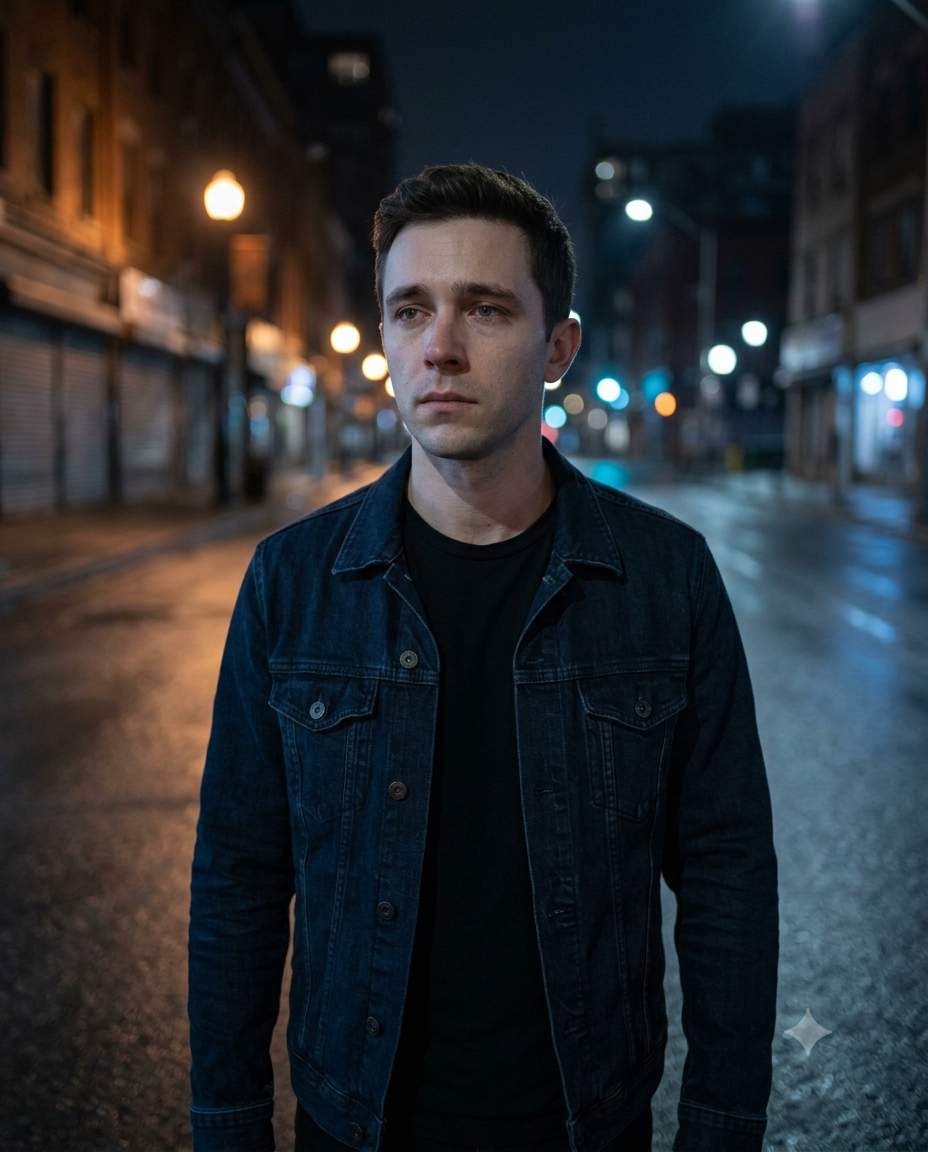
For a more cinematic result, use the lonely-night street concept. It works especially well with photos where your body and shoulders are clearly visible because the final composition gives you room to walk naturally. Wet pavement, distant streetlights and a 35mm-style perspective make the scene feel photographed rather than digitally assembled.
The Prompt
Using the uploaded photo, create a realistic cinematic breakup portrait of the same person walking alone through a quiet city street at night after an emotional breakup. KEEP - Keep the exact face structure from the uploaded photo, including forehead shape, jawline, cheekbones, nose, lips, chin, and natural facial proportions. Keep the original eye shape, eye colour, eyelids, eyebrows, and natural gaze. Keep the original skin tone and visible skin texture, including pores, small marks, fine facial details, and natural variation. Keep the existing hairline, hairstyle, hair density, and facial hair exactly as visible in the reference. Keep the person's real body proportions, shoulder width, neck length, arm length, hand size, and overall build. Preserve the person's recognizable identity even while changing the scene, pose, clothing, and lighting. CHANGE - Change the wardrobe to a dark navy denim jacket over a plain black cotton T-shirt, with realistic denim texture and natural fabric folds. Change the pose to a slow, natural walking position with slightly lowered shoulders and a restrained, distant expression. Change the background to an empty urban street with wet asphalt, closed storefronts, soft reflections, and scattered warm streetlights. Change the lighting to mixed cool ambient night light and controlled warm light from nearby street lamps. Apply a muted cinematic colour grade with deep blue shadows and restrained warm highlights. SCENE - Place the subject on a quiet city street around 10:30 PM after recent rainfall. Wet asphalt should reflect distant amber streetlights and cool blue signage. Keep buildings and background pedestrians extremely soft and unobtrusive, with the subject clearly separated from the environment. LIGHT - Use a soft cool ambient light from the front-left at approximately 4300K, combined with a weaker warm streetlight from the rear-right around 3000K. Keep the warm rim light visible only along the jacket edge and hair, while the face remains naturally shaped by the frontal light. CAMERA - Photograph at 35mm, f/2.0, camera positioned at chest height while following the subject at walking distance. Use moderate perspective without stretching the face or limbs, with realistic background compression and controlled motion. GRADE - Use a restrained cinematic blue-and-amber grade, medium contrast, slightly lowered saturation, deep but detailed shadows, and soft highlight roll-off. OUTPUT - Create a vertical 4:5 image at 2048 × 2560 pixels, keeping the full upper body and enough street environment visible around the subject. DO-NOT - No face slimming, no skin whitening, no changed eye colour, no plastic smoothing, no invented jewellery or tattoos, no exaggerated crying, no distorted hands, and no altered body proportions.
✦ Curated by MFDA
Rooftop Sunset After a Breakup
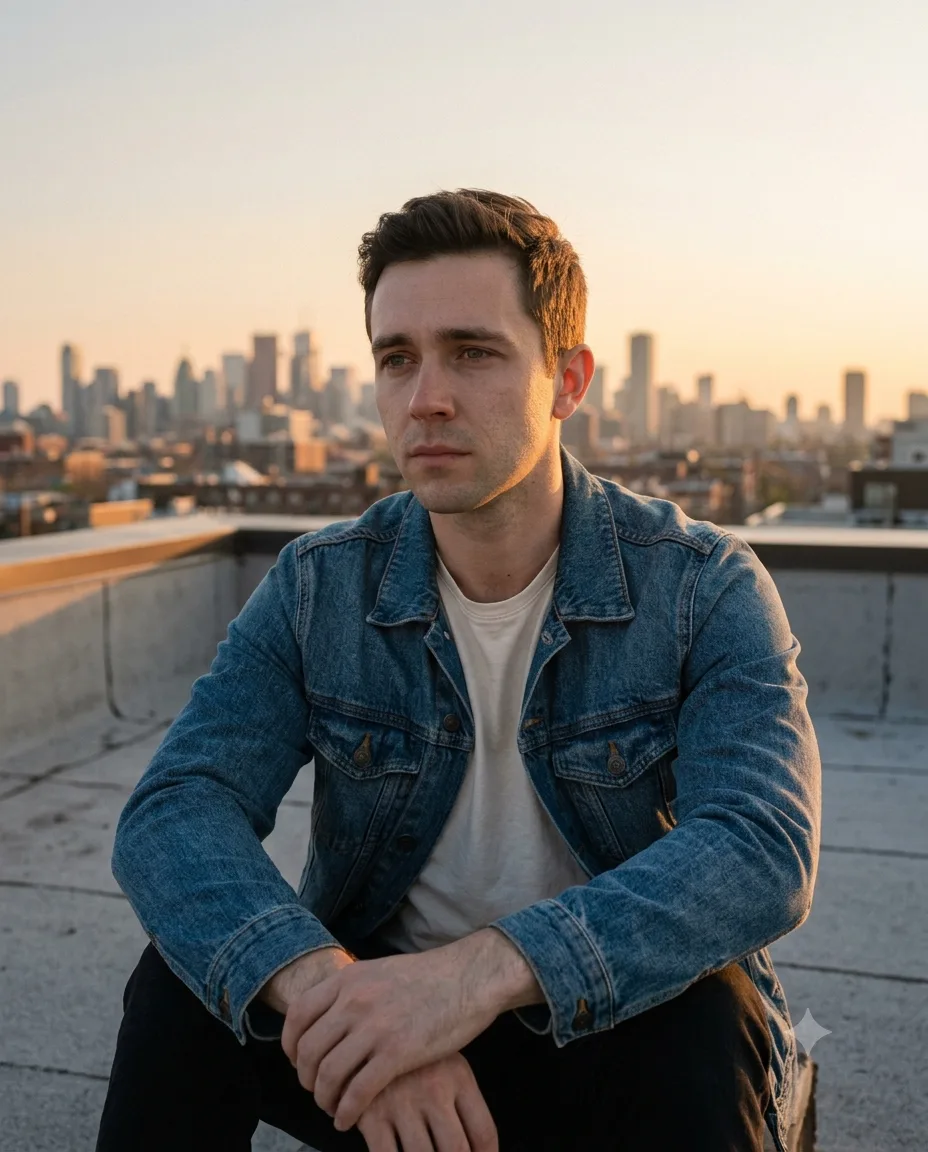
This version is softer and more reflective. Instead of making the subject look devastated, it captures the feeling of sitting alone after an emotional day. Warm sunset light works well with medium and darker skin tones, while a simple denim jacket gives the image some texture. Keep the expression subtle; an overly dramatic face can make the result look artificial.
The Prompt
Using the uploaded photo, create a realistic reflective breakup portrait of the same person sitting alone on a quiet rooftop during sunset. KEEP - Keep the exact face structure from the uploaded photo, including forehead shape, jawline, cheek structure, nose, lips, chin, and natural facial proportions. Keep the original eye shape, eye colour, eyelids, eyebrows, and natural gaze. Keep the original skin tone and visible skin texture, including pores, small marks, fine lines, and natural facial details. Keep the existing hairline, hairstyle, hair density, and facial hair exactly as visible in the reference. Keep the person's real body proportions, shoulder width, neck length, arm length, hand size, and overall build. Preserve the person's recognizable identity even when changing the pose, clothing, setting, and lighting. CHANGE - Change the wardrobe to a medium-blue denim jacket over a plain off-white cotton T-shirt. Keep realistic denim weave, natural creases, slightly worn edges, and believable fabric weight. Change the pose to a relaxed seated position with elbows resting loosely on the knees and hands naturally positioned, avoiding theatrical crying. Change the background to an open concrete rooftop with a low parapet wall and distant city buildings. Change the lighting to warm sunset illumination from the front-left, with soft shadows and a gentle golden rim along the hair and jacket. Apply a warm, slightly faded cinematic grade. SCENE - Place the subject on a rooftop around 6:15 PM during golden hour, shortly before sunset. Show a pale orange-to-blue sky behind the subject, with distant buildings softened by atmospheric haze. Keep the skyline moderately blurred at approximately f/2.8 depth of field so the subject remains dominant without completely removing the rooftop setting. LIGHT - Use warm directional sunlight from the front-left at approximately 4800K, softened by the low sun angle. Add weak cool ambient fill from the open sky on the right side of the face. Keep shadows gentle and physically consistent across the forehead, nose, cheeks, and jaw. CAMERA - Photograph at 50mm, f/2.2, camera positioned slightly above seated chest height. Use natural perspective, moderate background separation, and sharp focus on both eyes without excessive facial compression. GRADE - Apply a warm sunset colour treatment with natural skin tones, medium-low contrast, soft highlights, slightly muted blues, and subtle film-like grain. Keep the orange sunlight believable rather than turning the entire image orange. OUTPUT - Create a vertical 4:5 portrait at 2048 × 2560 pixels, showing the head, torso, hands, denim jacket, rooftop edge, and sunset skyline. DO-NOT - No face slimming, no skin whitening, no changed eye colour, no plastic smoothing, no invented jewellery or tattoos, no exaggerated crying, no altered body proportions, and no artificial smile.
✦ Curated by MFDA
Old Photograph and Dark Room Scene
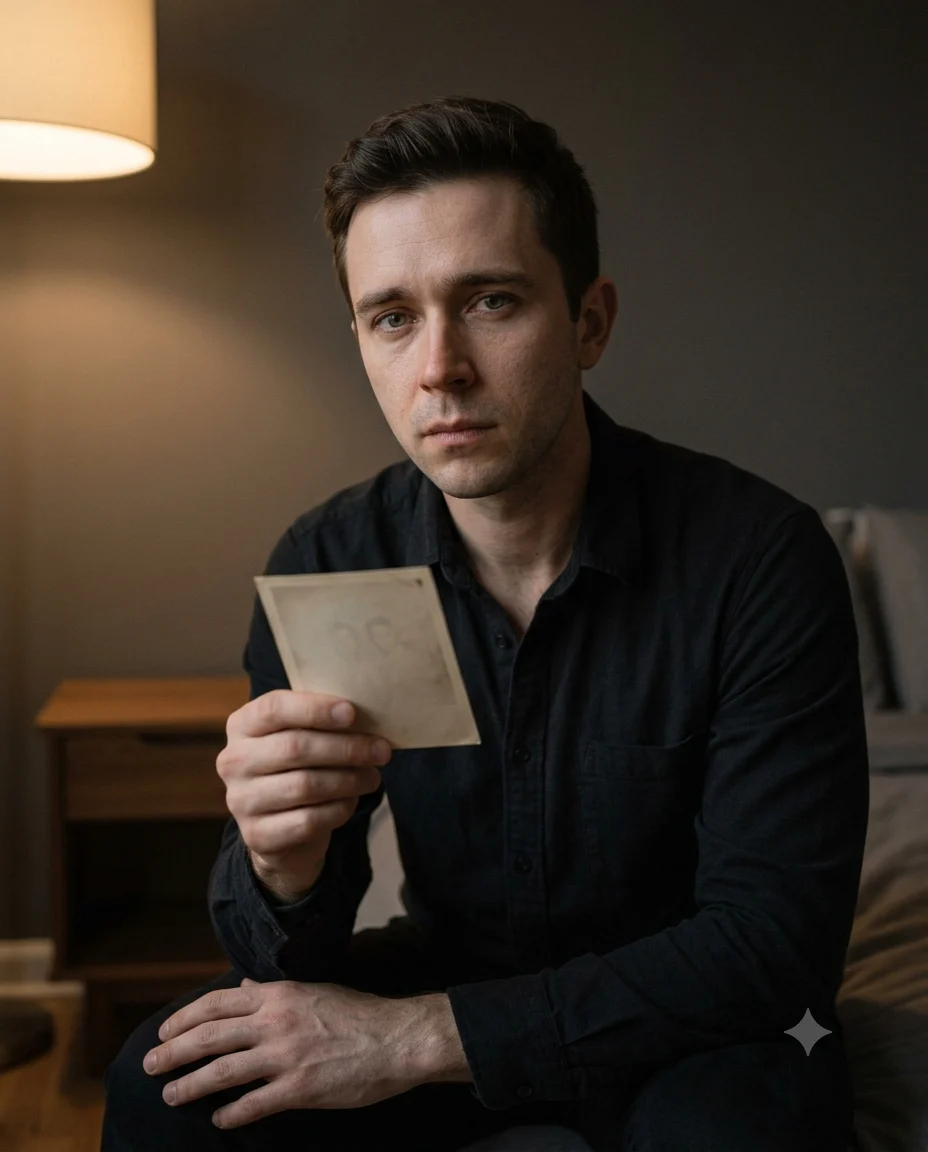
Here the story is told through an object: an old photograph held in the subject's hands. The setup suits portraits where you want a more intimate, emotional composition. A plain black or charcoal shirt keeps the frame restrained. The single detail to watch is the photograph—it can become distorted, so a simple rectangular photo works better than a detailed one.
The Prompt
Using the uploaded photo, create a realistic intimate breakup portrait of the same person sitting alone in a dim private room while holding [a simple old rectangular photograph]. KEEP - Keep the exact face structure from the uploaded photo, including forehead shape, jawline, cheek structure, nose, lips, chin, and natural facial proportions. Keep the original eye shape, eye colour, eyelids, eyebrows, and natural gaze. Keep the original skin tone and visible skin texture, including pores, fine lines, small marks, and natural facial details. Keep the existing hairline, hairstyle, hair density, and facial hair exactly as visible in the reference. Keep the person's real body proportions, shoulder width, neck length, arm length, hand size, and overall build. Preserve the person's recognizable identity even when changing the clothing, pose, room, and lighting. CHANGE - Change the wardrobe to [a plain charcoal-black cotton shirt] with a soft matte texture and natural folds. Change the pose to a seated position with the torso slightly turned toward the camera, one hand holding the photograph near the chest and the other resting naturally on the thigh. Change the background to a dark neutral wall, a simple wooden side table, and a softly blurred interior. Change the lighting to one controlled warm practical light from the left side, with gentle shadow falloff across the face. Apply a muted charcoal, brown, and warm-grey colour grade. SCENE - Place the subject indoors around 9:00 PM in a quiet bedroom or private sitting room. The old photograph should be a simple rectangular print with a slightly aged paper texture, held naturally between the fingers. Keep the photograph readable as an object but do not invent detailed faces inside it. Blur the wall and furniture at approximately f/2.0 while keeping the subject's face and hands sharp. LIGHT - Use a soft warm key light from the upper-left at approximately 3200K, positioned slightly in front of the face. Add only weak ambient fill from the room so the right side of the face retains natural shadow. Keep the photograph slightly brighter than the shirt but darker than the face. CAMERA - Photograph at 85mm, f/2.0, camera positioned at seated chest height. Use natural portrait compression, shallow depth of field, sharp focus on the eyes and fingers, and gentle separation between the subject and background. GRADE - Use muted warm-brown and charcoal tones, medium-low contrast, controlled highlights, deep but detailed shadows, and subtle film grain. Keep the skin tone neutral and realistic rather than applying a brown filter over the face. OUTPUT - Create a vertical 4:5 portrait at 2048 × 2560 pixels, showing the head, upper torso, both hands, photograph, and enough room background to establish the setting. DO-NOT - No face slimming, no skin whitening, no changed eye colour, no plastic smoothing, no invented jewellery or tattoos, no altered body proportions, no distorted fingers, and no detailed invented faces inside the photograph
✦ Curated by MFDA
Standing Alone in Heavy Rain
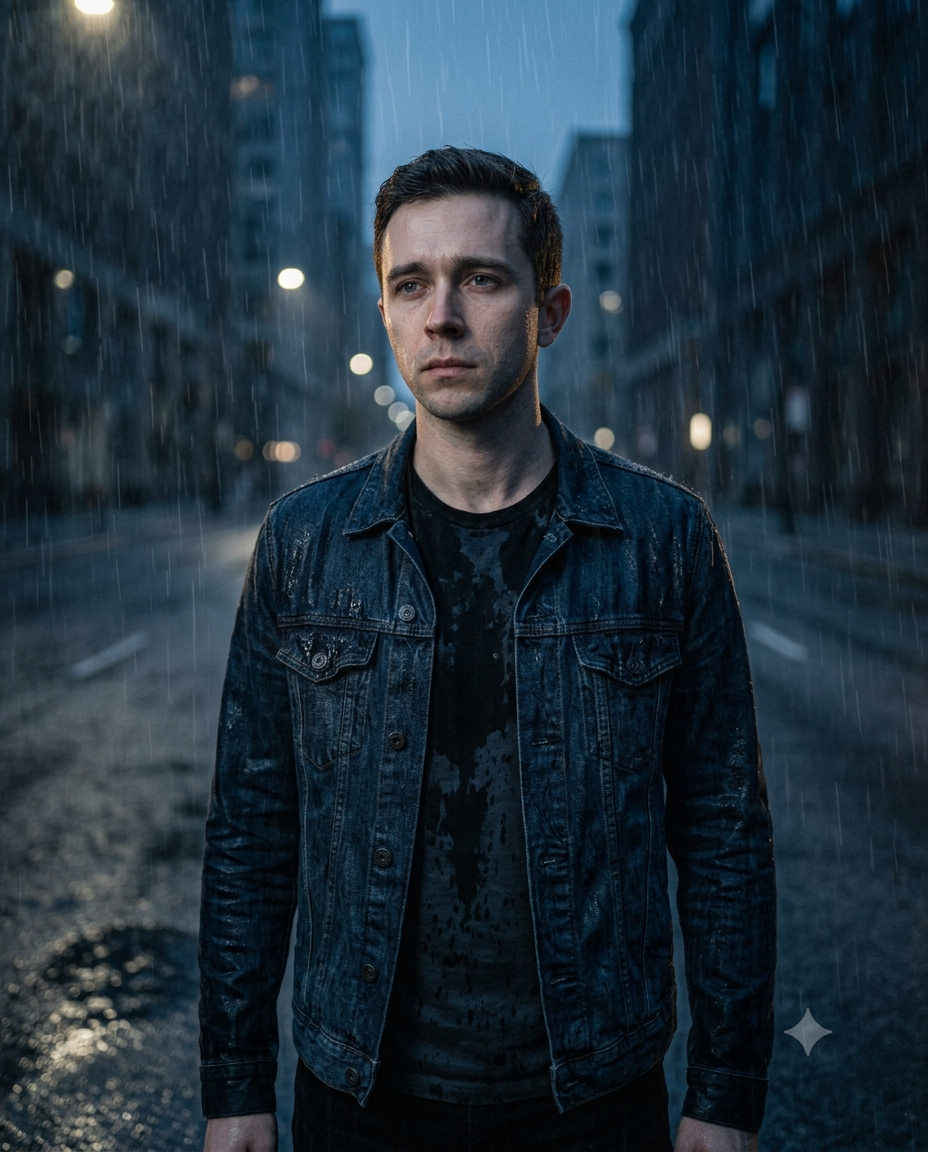
Choose this one when you want a stronger heartbreak aesthetic. An empty road, wet clothing and falling rain create a dramatic frame while keeping the person as the main subject. A dark denim jacket or plain shirt works particularly well. This concept can struggle with glasses and complicated hairstyles, so start with a clean reference photo.
The Prompt
Using the uploaded photo, create a realistic dramatic breakup portrait of the same person standing alone in heavy rain on an empty urban road at night. KEEP - Keep the exact face structure from the uploaded photo, including forehead shape, jawline, cheek structure, nose, lips, chin, and natural facial proportions. Keep the original eye shape, eye colour, eyelids, eyebrows, and natural gaze. Keep the original skin tone and visible skin texture, including pores, small marks, fine lines, and natural facial details. Keep the existing hairline, hairstyle, hair density, and facial hair exactly as visible in the reference. Keep the person's real body proportions, shoulder width, neck length, arm length, hand size, and overall build. Preserve the person's recognizable identity even though the pose, clothing, environment, and lighting are changed. CHANGE - Change the wardrobe to a dark indigo denim jacket over a plain black cotton T-shirt. Make the denim visibly wet, with darker saturated areas, small water droplets, and realistic fabric weight. Change the pose to standing still with both arms relaxed naturally at the sides, shoulders slightly lowered, and a restrained distant expression. Change the background to an empty asphalt road with shallow puddles, distant streetlights, and dark buildings. Change the lighting to cool overhead rain light with subtle warm streetlamp highlights. Apply a deep blue-grey cinematic grade. SCENE - Place the subject outdoors on an empty city road around 11:00 PM during heavy rainfall. Show visible rain streaks in front of and behind the subject, wet asphalt reflecting small amber streetlights, and distant buildings softened into darkness. Keep the background heavily blurred while retaining enough road detail to establish the rainy setting. LIGHT - Use soft cool ambient light from above and slightly in front at approximately 5000K. Add a weaker warm streetlight from the rear-left at approximately 3000K, creating a narrow highlight along the wet jacket and hair. Keep the face primarily shaped by the cool frontal light so the facial structure remains readable. CAMERA - Photograph at 50mm, f/2.0, camera positioned at chest height approximately two metres from the subject. Use natural perspective, moderate compression, shallow depth of field, and sharp focus on the face while rain drops nearer the lens remain softly blurred. GRADE - Use a dark blue-grey colour treatment, medium-high contrast, cool shadows, controlled amber highlights, and subtle film grain. Keep skin tones natural and avoid turning the face blue. OUTPUT - Create a vertical 4:5 portrait at 2048 × 2560 pixels, showing the full head, torso, both arms, wet jacket, road reflections, and enough rainfall around the subject. DO-NOT - No face slimming, no skin whitening, no changed eye colour, no plastic smoothing, no invented jewellery or tattoos, no altered body proportions, no distorted hands, and no exaggerated crying.
✦ Curated by MFDA
How to use these in Gemini
Open Gemini and start an image-generation conversation.
Upload a clear photo of yourself.
Add one prompt card from this article below the uploaded image.
Ask Gemini to preserve the person's identity and generate the requested scene.
Check the face, hands, clothing and background before accepting the result.
If the first result is wrong, tell Gemini exactly what changed—such as “restore my original face shape and eye shape”—and generate another variation.
Getting better results
Use a 4:5 ratio for portrait posts because it gives enough vertical space for the body and environment without making the face too small.
Choose a photo taken in soft daylight because harsh flash can make the generated skin and shadows harder to match.
Wear a plain shirt in the reference photo because logos and complicated patterns are more likely to be altered.
Keep your original hairstyle visible because covered or cropped hair gives the model less information about your actual appearance.
Use a three-quarter photo for walking scenes because the model can understand the shoulder and body position more accurately.
Avoid sunglasses in the source photo because they hide eye shape, which is one of the strongest identity details.
Generate one scene at a time because changing the background, clothing and pose repeatedly in one request can cause more identity drift.
When the result comes out wrong
What went wrong | Why it happens | What to change |
|---|---|---|
Face looks like a different person | The model prioritizes the new cinematic scene over the reference identity | Re-upload the clearest original photo and explicitly ask it to preserve facial structure |
Skin looks plastic | Excessive smoothing or cinematic retouching has been applied | Request natural pores, visible skin texture and minimal retouching |
Hands look wrong | Hands are difficult when holding objects or interacting with rain | Use a simpler pose with hands relaxed or partly outside the frame |
Lighting looks pasted on | The new light direction doesn't match the reference face | Specify one light source and ask for shadows consistent with that direction |
Clothes change unexpectedly | The model interprets the scene independently from the source clothing | State the exact fabric and garment, such as a dark cotton shirt |
Background overwhelms the face | Too much environmental detail competes with the subject | Ask for a shallow depth of field and keep the subject as the visual focus |
FAQ
Does this work with any photo?
Not equally well. A sharp photo with the whole face visible gives Gemini much more information to preserve your appearance. Blurry selfies, extreme side profiles, sunglasses and heavy beauty filters can produce weaker identity matching. For the best starting point, use a natural daylight portrait without aggressive editing.
Why does Gemini change my face?
Image models can reinterpret facial features when they concentrate on the requested pose, lighting or cinematic style. Identity preservation isn't perfect. A clear reference photo helps, and you should explicitly request that the original facial structure, eyes, nose, lips and skin texture remain unchanged.
Can I use these images commercially?
That depends on the tool's current terms, your source photo rights and how the final image is used. If you're creating paid ads, product promotions or website assets, check Gemini's current terms and any applicable image or likeness rights before publishing. Don't assume every AI-generated image is automatically cleared for commercial use.
Is Gemini free for creating these images?
Gemini has offered image-generation features under different plans and limits, and availability can change. Your account may have different access or generation limits from another user's account. Check the image-generation option shown in your own Gemini account before planning a large batch of images.
How do I get a different variation?
Keep the same reference photo and change only the part you want to vary. For example, switch a rainy night street to a foggy morning road while keeping the person's face, clothing and body proportions unchanged. Smaller changes usually make it easier to retain identity.
Can I use my own photo with these prompts?
Yes, these concepts are designed around an uploaded personal photo. Start with an image where your face is clearly visible. If the generated person doesn't resemble you closely enough, don't immediately change everything; first improve the reference photo and reinforce the identity-preservation instruction.
Which prompt should I try first?
Start with the rainy-window portrait if your source photo is mainly a face or upper-body shot. It requires less complicated body positioning than the walking or photograph-holding scenes. If you have a clear full-body photo, the rainy street concept gives you more room for a cinematic composition.
Closing
Try the rainy-window version first if you want a believable emotional portrait with minimal posing. Once you get a face match you like, test the rooftop or night-street variation using the same source photo. Keeping the reference consistent makes it much easier to compare the different breakup moods.
About the Author
Naziya
Creative AI writer at MFDA, sharing trendy photo-editing prompts and fresh ideas for beautiful, stylish AI images.