ChatGPT Photo Editing Prompts for Boys :- Try This Free ChatGPT Prompts Now
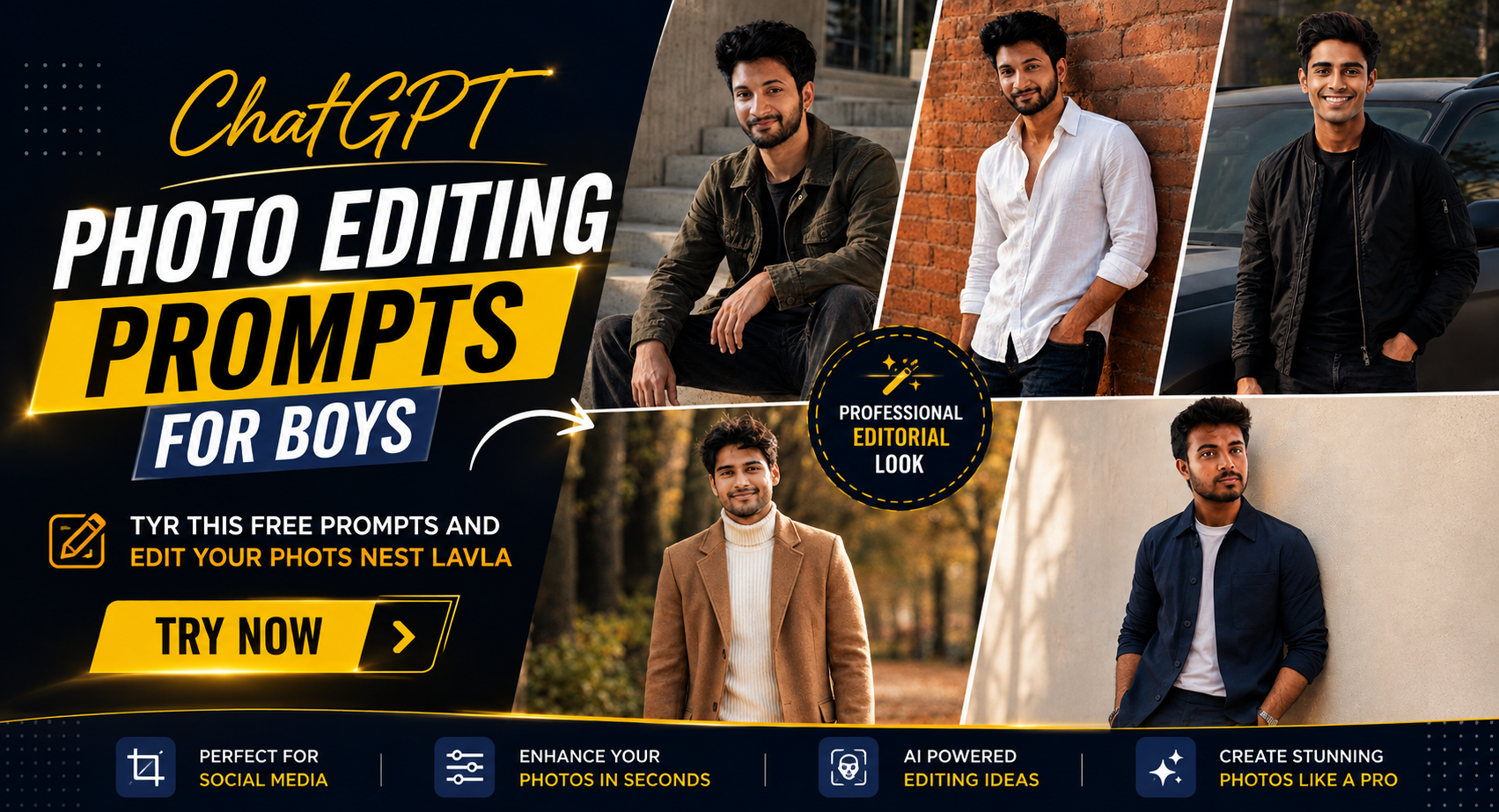
If you want your next profile picture to look more like a proper fashion photograph than a routine selfie, these ChatGPT Photo Editing Prompts for Boys give you five different directions to try.
ChatGPT Photo Editing Prompts for Boys
You get an urban street portrait, a linen-and-brick setup, a darker car shot, a relaxed overcoat scene, and a clean editorial frame. While testing the looks, I found that the reference photo mattered more than adding extra cinematic language. A clear face in soft daylight held its shape better than a heavily edited selfie. The prompts are also specific about clothing, camera feel, lighting, and pose, so you're not leaving every creative decision to the model.
Before you start for ChatGPT Photo Editing Prompts for Boys
Your starting photo should show your face clearly from the front or a slight three-quarter angle. Natural window light or open shade works better than coloured LEDs because the original skin tone is easier to preserve. For Instagram feed images, 4:5 gives you useful vertical space; 3:4 also works well when you want more of the outfit visible.
Photo: clear face, visible eyes and jawline, little or no beauty filter.
Tool: ChatGPT image generation or image editing with your uploaded reference photo.
Aspect ratio: 4:5 for Instagram feed posts, or 3:4 for fuller portraits.
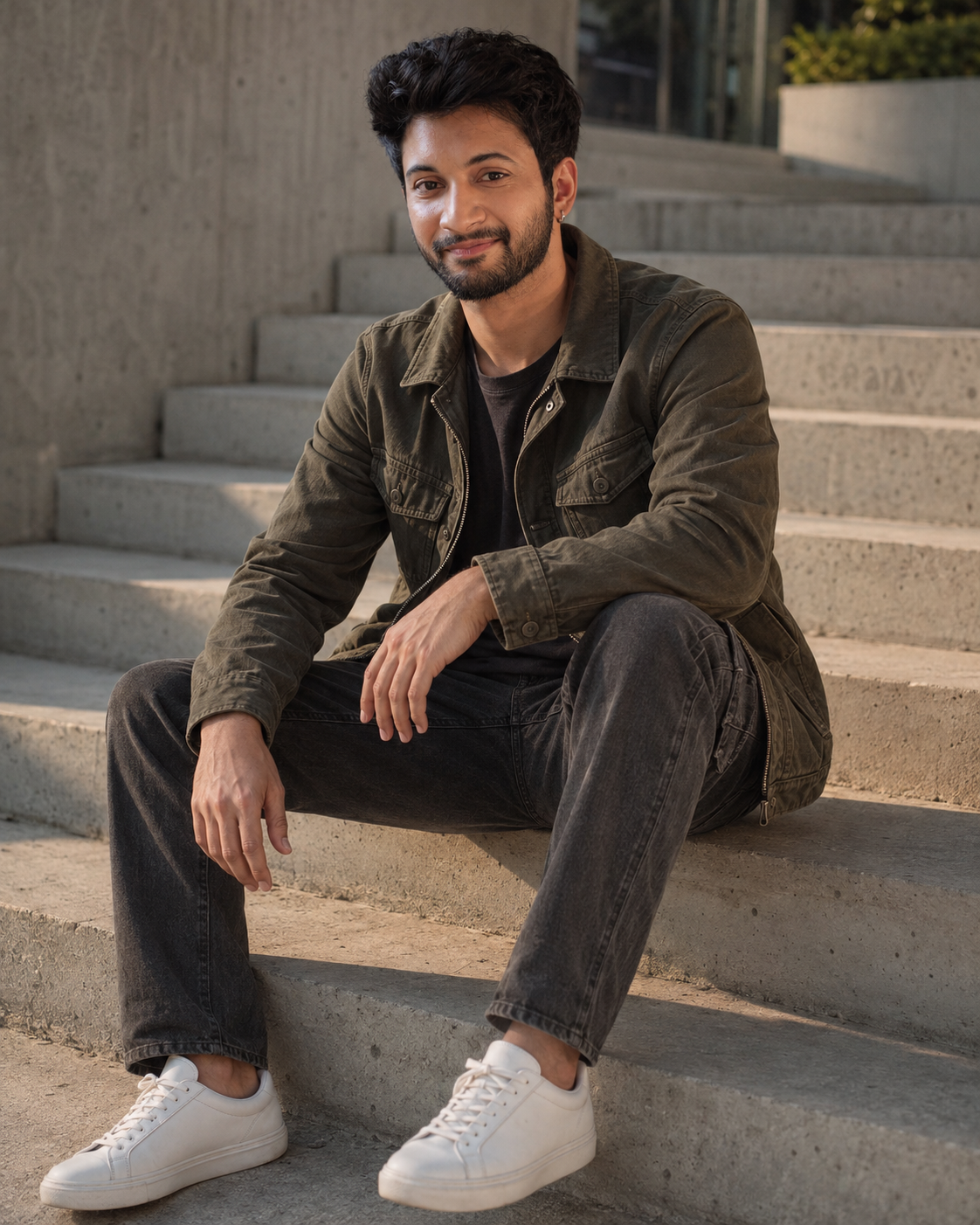
Olive cargo outfit on concrete steps with soft afternoon light
This is the easiest look to start with if you want a casual fashion portrait. The olive cargo jacket, charcoal jeans, white sneakers, and concrete setting keep the frame masculine without making it look over-styled. Soft afternoon light is the important part. It gives the face enough definition while leaving the background slightly quieter.
The Prompt
Using the uploaded photo, create a realistic casual fashion portrait of the same person seated naturally on concrete steps in a masculine olive cargo outfit. KEEP: Keep the subject’s exact face structure, eye shape and eye colour, skin tone and visible skin texture, hairline, natural facial hair, and body proportions from the uploaded photo. Preserve the jawline, cheek structure, nose shape, lips, ears, natural facial asymmetry, and recognizable identity. Keep the natural hair density and facial-hair pattern unchanged. Do not reinterpret the person as a different model. CHANGE: Dress the subject in an olive-green cargo jacket made from matte cotton twill, a plain dark neutral top underneath, charcoal-gray straight-fit jeans with natural denim creasing, and clean white low-top sneakers with a simple leather or canvas finish. Change the pose to a relaxed seated position on concrete steps, with the torso slightly angled, shoulders loose, one forearm resting naturally on a knee, and the other hand relaxed. Keep the expression calm and understated. SCENE: Place the subject outdoors on broad raw-concrete steps in the late afternoon. Use muted gray concrete, subtle surface texture, and a quiet urban architectural background. Keep distant background elements softly blurred but still recognizable as concrete and modern surroundings. LIGHT: Use soft afternoon daylight coming from the front-left at a low angle, with gentle warm highlights on the face and jacket. Keep shadows soft enough to preserve facial detail while giving the clothing visible depth. CAMERA: Use an 85mm lens at f/2.2 from slightly above seated eye level, maintaining natural proportions and moderate background compression. GRADE: Apply a muted editorial grade with olive, charcoal, concrete gray, and warm skin tones. Use moderate contrast, restrained saturation, and subtle film grain. OUTPUT: Render a vertical 4:5 composition at 8K resolution with sharp facial detail and realistic fabric texture. DO NOT: no face slimming, no skin whitening, no changed eye colour, no plastic smoothing, no invented jewellery or tattoos.
✦ Curated by MFDA
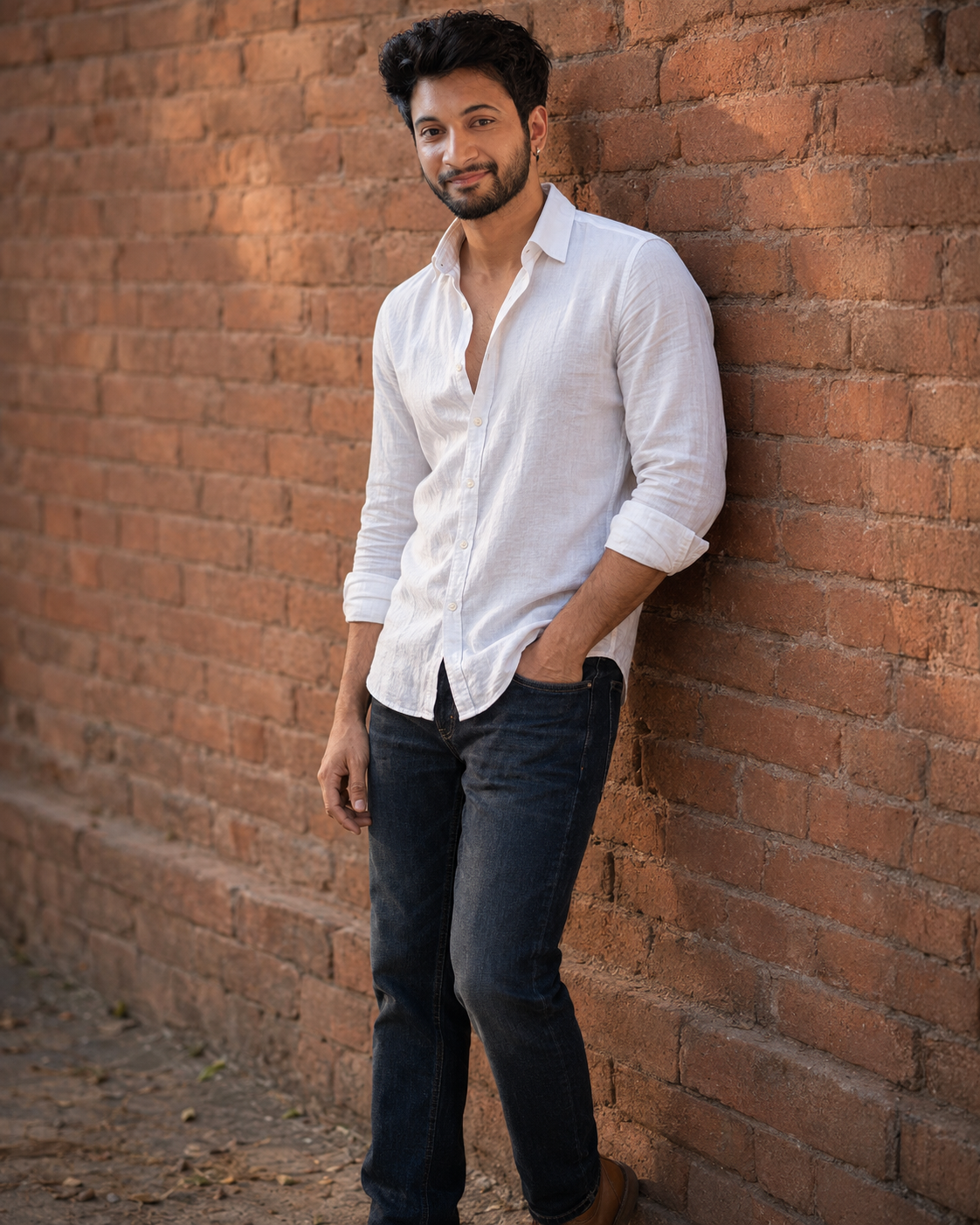
White linen shirt against a warm terracotta brick wall
A white linen shirt gives this portrait a lighter feel than the darker streetwear options. You get rolled sleeves, dark denim, tan footwear, and an old brick wall with warm afternoon tones. This works particularly well for a simple Instagram profile image because the clothing adds interest without competing with the face.
The Prompt
Using the uploaded photo, create a realistic casual fashion portrait of the same person standing against a warm terracotta brick wall in soft afternoon light. KEEP: Keep the exact face structure, eye shape and eye colour, skin tone and visible skin texture, hairline, natural facial hair, and body proportions from the uploaded photo. Preserve the original jawline, cheekbones, nose, lips, ears, natural facial asymmetry, and recognizable identity. Keep the person's natural hair density and facial-hair pattern unchanged. The uploaded face is the identity reference, not a suggestion for a new model. CHANGE: Dress the subject in a relaxed white linen button-down shirt with visible natural fabric texture and sleeves rolled neatly to the forearms. Leave the upper buttons casually open without exposing excessive skin. Pair it with dark indigo straight-fit denim jeans and simple tan leather footwear. Keep accessories minimal so the white shirt and face remain the visual focus. Change the pose to a relaxed standing position with the body slightly angled toward the camera, shoulders loose, and one hand resting naturally near a trouser pocket. SCENE: Place the subject outdoors beside an aged terracotta brick wall with uneven brick texture and warm red-orange tones. Make the wall recognizable but softly blurred behind the subject. Set the scene in late afternoon, when the warmer surroundings complement the neutral white shirt. LIGHT: Use soft natural afternoon light from the front-left, with gentle warmth on the skin and shirt. Keep shadows soft beneath the chin and around the shirt folds, avoiding harsh direct sunlight. CAMERA: Use an 85mm lens at f/2.2 from chest height, with natural perspective and moderate background compression. Keep the face sharply focused while allowing the brick texture to fall gradually out of focus. GRADE: Use warm editorial color grading with terracotta, cream, dark indigo, and tan tones. Apply moderate contrast, restrained saturation, and subtle film grain while keeping skin colour accurate. OUTPUT: Create a vertical 4:5 portrait at 8K resolution with realistic skin pores, linen fibers, denim texture, and natural depth of field. DO NOT: no face slimming, no skin whitening, no changed eye colour, no plastic smoothing, no invented jewellery or tattoos.
✦ Curated by MFDA
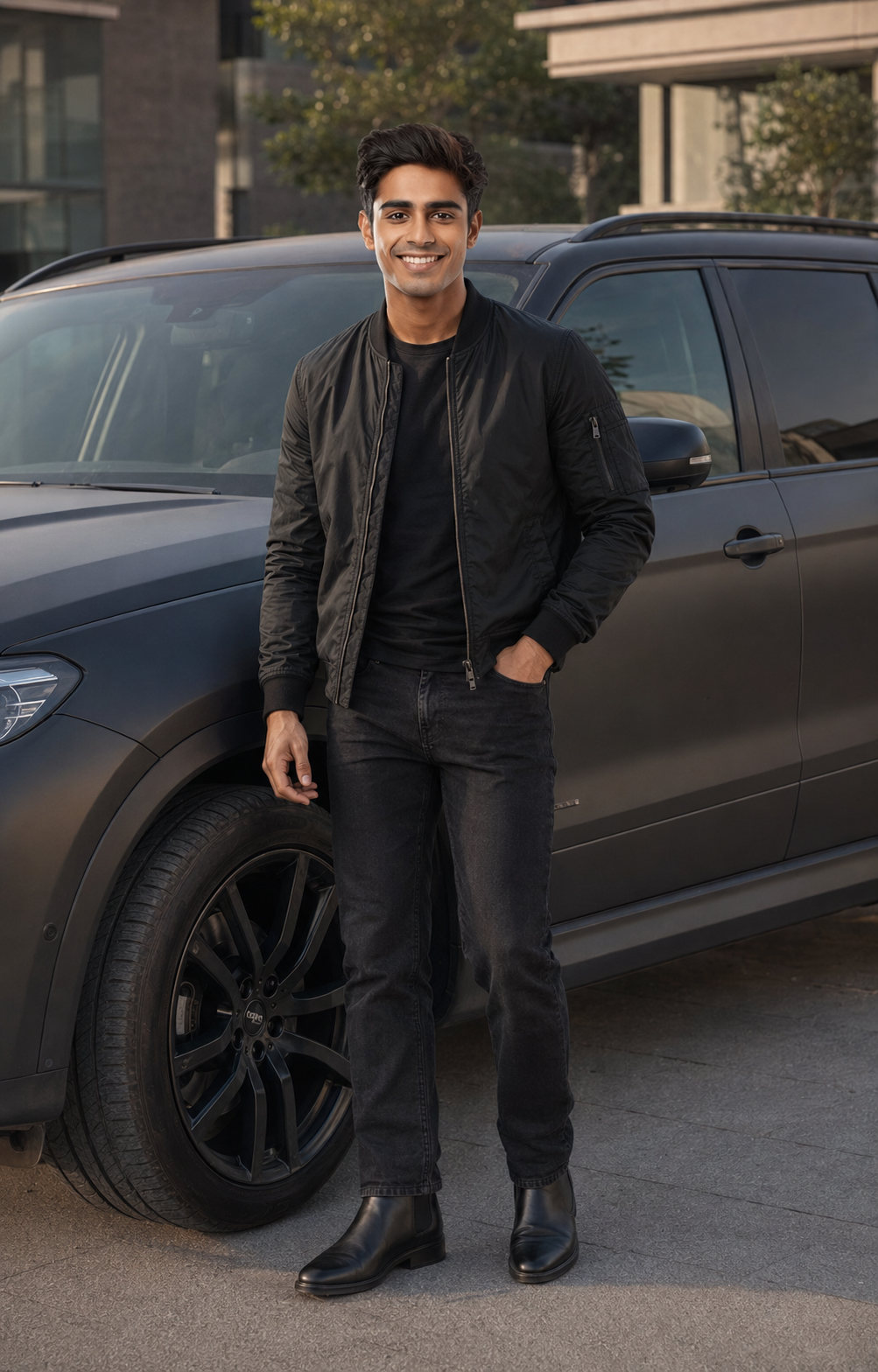
Black bomber jacket beside a matte charcoal SUV
For a more serious look, use the car setup. The black bomber, dark jeans, Chelsea boots, and matte charcoal vehicle create a restrained palette that suits a confident expression. A 35mm camera feel keeps enough of the vehicle in the frame while still giving the subject visual priority. Sunglasses can weaken face matching, so they're best avoided if identity is your main concern.
The Prompt
Using the uploaded photo, create a realistic cinematic fashion portrait of the same person standing beside a matte charcoal SUV in a restrained dark streetwear setting. KEEP: Keep the exact face structure, eye shape and eye colour, skin tone and visible skin texture, hairline, natural facial hair, and body proportions from the uploaded photo. Preserve the original jawline, cheekbones, nose, lips, ears, natural facial asymmetry, and recognizable identity. Keep the person's natural hairline, hair density, facial-hair pattern, and age appearance unchanged. Use the uploaded face as the strict identity reference rather than creating a similar-looking model. CHANGE: Dress the subject in a clean black bomber jacket made from matte nylon or technical fabric, worn naturally over a plain dark crew-neck shirt. Add dark charcoal or black straight-fit jeans and black leather Chelsea boots with a low-profile sole. Keep accessories minimal and avoid anything that competes with the face. Change the pose to a confident standing position beside the vehicle, with the shoulders relaxed, torso slightly angled toward the camera, one hand resting naturally near a pocket, and the other relaxed. SCENE: Place the subject beside a matte charcoal-gray SUV in a quiet modern outdoor setting. Keep the SUV clearly recognizable behind and beside the subject without letting it dominate the frame. Use late afternoon or early evening daylight with a softly blurred architectural background and visible vehicle contours. LIGHT: Use soft directional daylight from the front-left, producing controlled highlights along the cheek, jacket shoulder, and SUV bodywork. Keep the light neutral-warm, with soft shadows under the chin and jacket folds so the face remains naturally dimensional. CAMERA: Use a 35mm lens at f/2.8 from chest height, keeping enough of the SUV visible while maintaining natural body proportions. Focus sharply on the subject and allow the distant background to soften gradually. GRADE: Apply a restrained cinematic grade using black, charcoal, muted gray, and natural skin tones. Use moderate contrast, low saturation, deep but detailed shadows, and subtle film grain. OUTPUT: Create a vertical 4:5 composition at 8K resolution with realistic skin pores, jacket texture, leather detail, and natural vehicle reflections. DO NOT: no face slimming, no skin whitening, no changed eye colour, no plastic smoothing, no invented jewellery or tattoos.
✦ Curated by MFDA
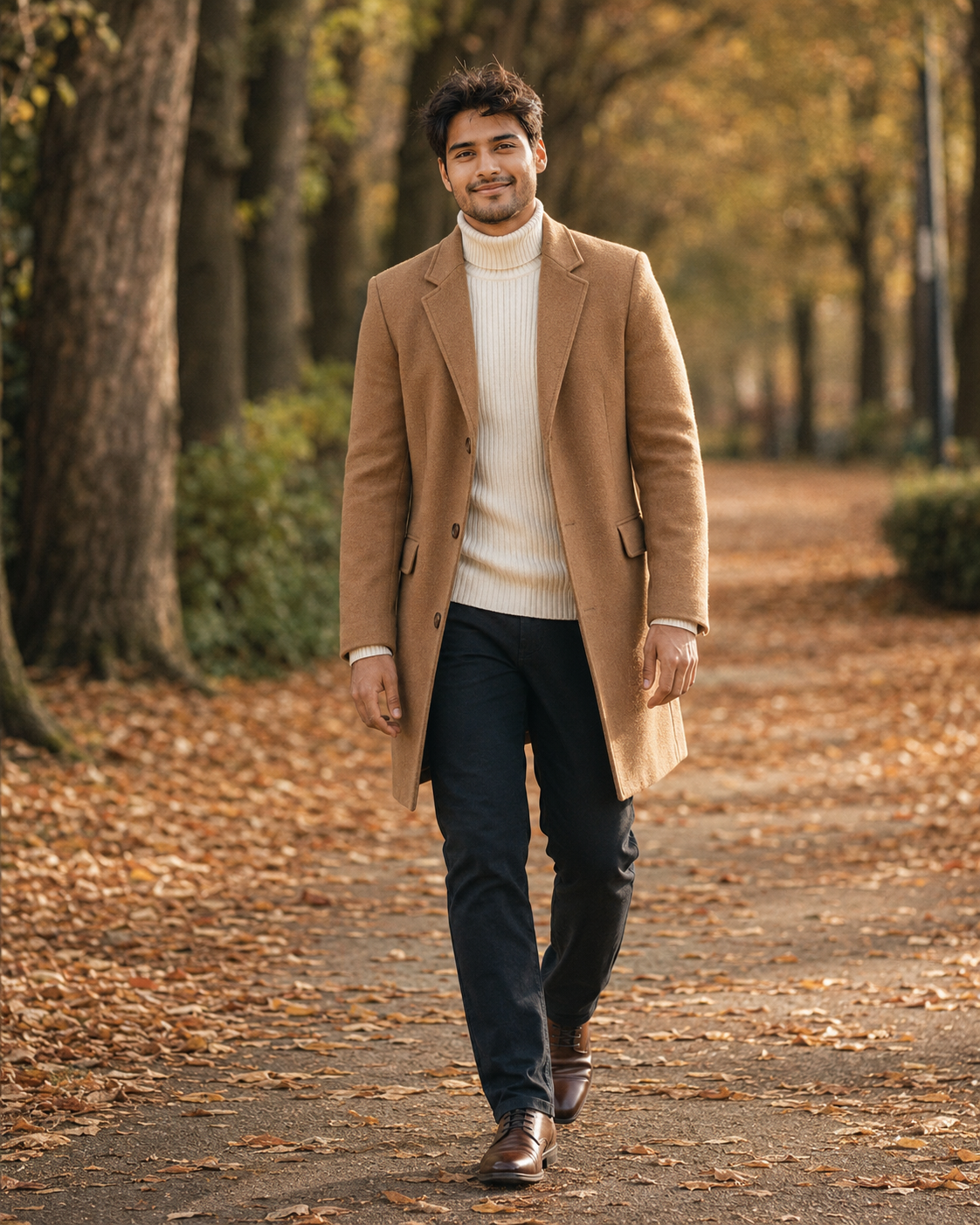
Camel overcoat and cream knitwear on a tree-lined path
This one moves away from streetwear and gives you a softer winter-fashion portrait. The camel overcoat and cream ribbed turtleneck work naturally with dry leaves and filtered daylight. A walking pose also helps the image feel less staged, although full-body generations can make hands and shoes less reliable than tighter crops.
The Prompt
Using the uploaded photo, create a realistic winter fashion portrait of the same person walking along a quiet tree-lined path covered with dry leaves. KEEP: Keep the exact face structure, eye shape and eye colour, skin tone and visible skin texture, hairline, natural facial hair, and body proportions from the uploaded photo. Preserve the original jawline, cheekbones, nose, lips, ears, natural facial asymmetry, age appearance, and recognizable identity. Keep the natural hair density and facial-hair pattern unchanged. The uploaded face must remain the primary identity reference throughout the generation. CHANGE: Dress the subject in a tailored camel-brown wool overcoat with a clean structured shoulder line and natural wool texture. Underneath, use a cream ribbed turtleneck knit with visible vertical ribbing and a soft woven finish. Add dark straight-fit trousers and understated brown leather shoes. Change the pose to a natural walking step, with the torso relaxed, shoulders slightly lowered, one leg moving forward, and arms hanging naturally with realistic hand placement. SCENE: Place the subject on a tree-lined outdoor path during a cool late-afternoon autumn setting. Use dry brown and golden leaves scattered across the ground, with tall trees forming a soft corridor behind the subject. Keep distant trees and foliage recognizable but blurred enough to separate them from the coat. LIGHT: Use filtered afternoon daylight passing through the trees from the front-left. The light should be soft and slightly warm, creating gentle highlights on the camel wool and cream knit while leaving smooth shadows beneath the chin and coat folds. Avoid harsh direct sunlight. CAMERA: Use an 85mm lens at f/2.2 from chest height, with the camera aligned naturally to the walking subject. Keep the face and upper coat sharply focused while allowing the distant path and trees to fall into creamy optical blur. GRADE: Apply a muted autumn editorial grade using camel, cream, brown, olive, and warm beige tones. Use moderate contrast, restrained saturation, warm highlights, slightly cool shadows, and subtle film grain. OUTPUT: Create a vertical 4:5 composition at 8K resolution with realistic wool fibers, knit ribbing, dry leaves, skin pores, and natural depth of field. DO NOT: no face slimming, no skin whitening, no changed eye colour, no plastic smoothing, no invented jewellery or tattoos.
✦ Curated by MFDA
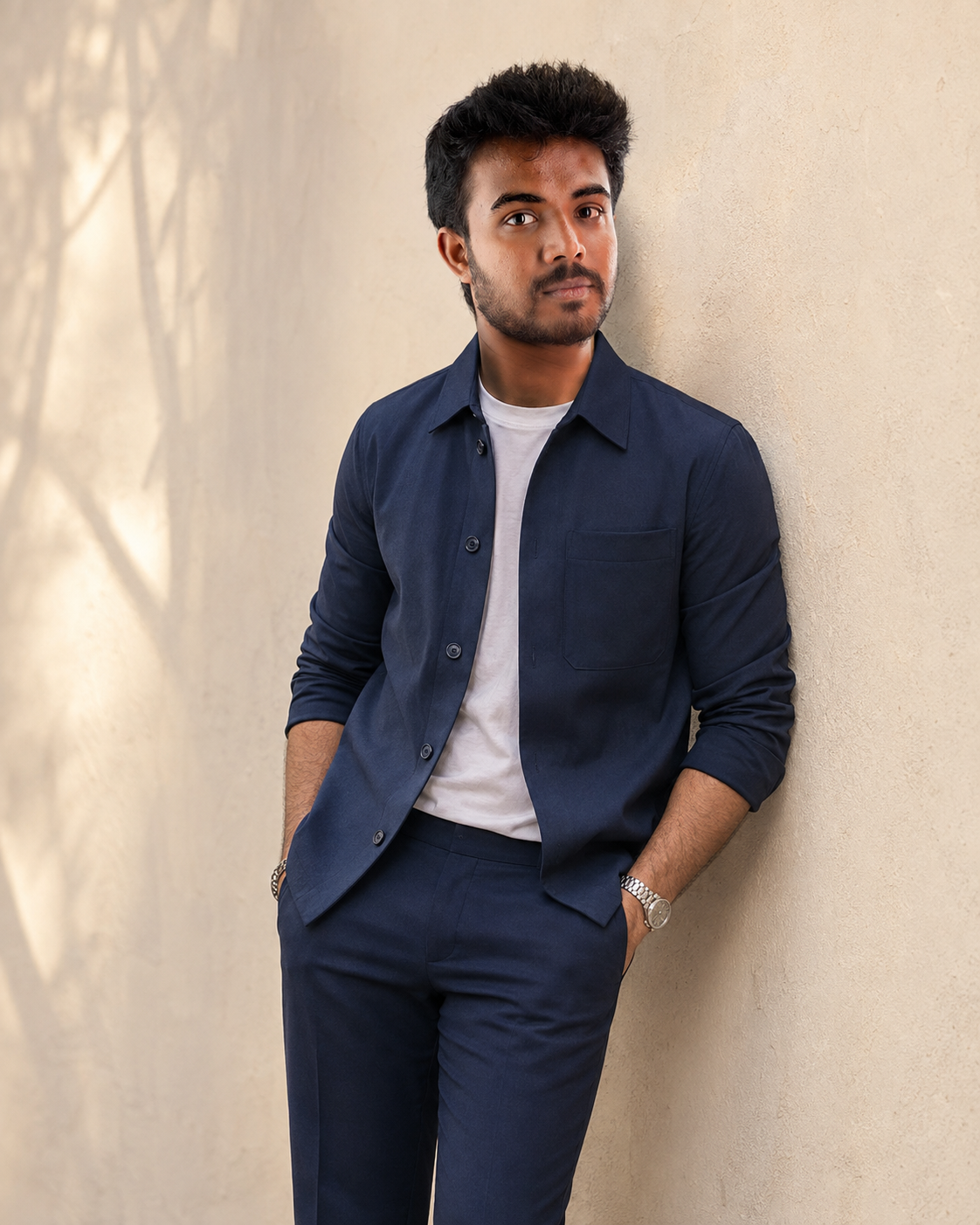
Navy co-ord outfit against a minimalist plaster wall
If you prefer a clean fashion-editorial result, this is the most controlled setup of the five. The navy co-ord, white sneakers, silver accessories, and warm off-white wall keep the colour palette narrow. One-directional daylight is doing most of the work here, so you don't need dramatic shadows or artificial-looking effects.
The Prompt
Using the uploaded photo, create a clean fashion-editorial portrait of the same person wearing a navy co-ord outfit against a warm off-white plaster wall. KEEP: Keep the person’s exact face structure, eye shape and eye colour, eyebrow shape, nose, lips, jawline, cheek structure, natural facial asymmetry, skin tone and visible skin texture. Keep the original hairline, natural hair density and facial hair exactly as shown. Preserve the person’s body proportions, shoulder width, hand proportions and recognizable physical features. The uploaded face is the strict identity reference and must remain recognizable. CHANGE: Change the wardrobe to a tailored navy co-ord set with a clean, contemporary silhouette, paired with crisp white sneakers and restrained silver accessories. Change the setting to a minimalist warm off-white plaster wall. Use a relaxed standing fashion pose with natural shoulders and an easy posture. Replace the original lighting with soft one-directional daylight and apply a restrained editorial colour grade. SCENE: Place the subject beside the warm plaster wall in late afternoon daylight. Keep the wall close enough to show its subtle plaster texture while remaining visually quiet. Use a shallow background blur so the subject stays dominant without making the wall disappear. LIGHT: Use daylight coming from one side at roughly 45 degrees, slightly above eye level. Keep the light broad and soft, with gentle shadow definition across the cheek, nose and jaw. Use a neutral-warm colour temperature around 5200K so the navy fabric remains accurate while the wall feels warm. CAMERA: Use an 85mm lens at f/2.0, camera positioned at chest height. Frame from mid-thigh upward with mild compression and natural body proportions. GRADE: Use warm neutral whites, deep controlled navy, moderate contrast and restrained saturation. Keep skin tones natural with subtle film-like softness. OUTPUT: Create a vertical 4:5 image at 2048 × 2560 resolution with realistic fabric texture and natural skin detail. DO-NOT: no face slimming, no skin whitening, no changed eye colour, no plastic smoothing, no invented jewellery or tattoos.
✦ Curated by MFDA
If You like my above ChatGPT Photo Editing Prompts for Boys so pls share all above ChatGPT Prompts with your friends and family members. So they can easily edit their Photos using ChatgGPT prompts
How to use these in ChatGPT
Open ChatGPT and start a conversation with the image-generation or image-editing feature available to your account.
Upload your reference photograph before giving the editing request.
Paste one prompt card and let ChatGPT use the uploaded image as the identity reference.
Keep the requested aspect ratio in the prompt, especially if you're creating a 4:5 Instagram post or 9:16 vertical content.
Inspect the face, hands, clothing, skin texture, and background after generation.
If the first result misses something, ask for one specific correction while telling ChatGPT to preserve the existing face, pose, clothing, and composition.
Getting better results :-
Take your reference photo beside a window or in open shade around late afternoon because even lighting gives the model cleaner information about your actual skin tone.
Use a 4:5 frame for Instagram feed portraits because it leaves enough room for a jacket, shoulders, and upper-body pose without forcing a very wide crop.
If the face changes, fix the identity instruction first instead of immediately changing the hairstyle or outfit; otherwise you won't know what caused the drift.
Keep one main clothing colour in the scene because an olive jacket, charcoal jeans, and white sneakers are easier to render consistently than several competing colours.
After a strong generation, request only one variation at a time, such as a different background or jacket colour, so the successful face and composition are easier to retain.
Avoid heavy filters on the reference image because artificial smoothing removes the pores and small facial details that help ChatGPT recognise the person.
For the car scene, keep the vehicle mostly secondary because asking for an elaborate luxury setting can make the background sharper than the person.
When the result comes out wrong
What went wrong | Why it happens | What to change |
|---|---|---|
Your face looks noticeably different | The reference doesn't provide enough clean facial detail or the edit introduces too much new styling | Upload a clearer reference and reinforce the original face shape, eyes, nose, lips, jaw, and skin tone |
Skin looks overly smooth | The model interprets fashion language as a polished beauty treatment | Ask for visible pores, fine hairs, natural texture, and no beauty retouching |
Fingers or hands look strange | Walking poses, pockets, and crossed arms increase hand complexity | Simplify the hand position and keep both hands clearly visible |
The light looks artificial | Several competing light sources can create inconsistent shadows | Specify one main light direction and softer ambient fill |
Clothes look distorted | Detailed fabrics, accessories, and layered garments require more object consistency | Reduce unnecessary accessories and specify the main fabric and garment shape |
Background takes attention away from you | Busy streets, cars, signs, or architecture introduce too many competing details | Simplify the background and ask for the subject to remain the sharpest area |
FAQ
Do ChatGPT Photo Editing Prompts for Boys work with any photo?
They can work with many photos, but not every reference produces equally reliable results. A clear face with natural lighting is a much better starting point than a blurry selfie, sunglasses photo, or heavily filtered image. If your source is weak, changing the prompt alone may not completely solve identity problems.
Why does ChatGPT change my face when editing a photo?
ChatGPT can alter facial details when the reference is unclear or the requested scene changes the camera angle, lighting, expression, or hairstyle significantly. Tell it to preserve your facial structure and natural asymmetry, then use a sharp reference. Don't add several face-related changes in the same revision.
Can I use these ChatGPT Photo Editing Prompts for Boys commercially?
The prompts themselves can be adapted for commercial projects, but image rights depend on the tool's current terms and the source material you use. If another person's face appears in the reference, get the necessary permission. For advertising or client work, check the current ChatGPT terms before publishing.
Is ChatGPT free for photo editing?
Access depends on the ChatGPT plan and the image features currently available to your account. Some image capabilities may have usage limits or different access levels. You can use the wording of these prompts as your editing instructions, but check your own ChatGPT interface to see which image features are available.
How can I make a different version without losing my face?
Keep the same reference image and ask for only one change at a time. For example, change the background first while preserving the face, outfit, and pose. Once that version works, try a different jacket or lighting setup. This gives you much better control than rewriting the whole request.
Can I use these prompts for Instagram profile photos?
Yes. A 4:5 portrait is useful for feed posts, while a tighter crop can work for a profile image. Keep your face reasonably large in the frame and avoid putting important details near the edges. Full-body fashion scenes can look good in posts but usually need tighter framing for profile use.
Closing
ChatGPT Photo Editing Prompts for Boys :- Start with the olive cargo portrait if you want the simplest test of your reference photo. Once the face looks right, try the brick wall or navy co-ord setup. For a stronger fashion mood, move to the car or camel-overcoat scene. The best result usually comes from changing one detail at a time.
Tags
About the Author
Mina
**AI Prompt Engineer at MFDA.** I design precise, creative prompts for AI image generation, photo editing, portraits, fashion, and visual storytelling.