5 Parallel Life AI Photo Prompt: 5 Different Lives
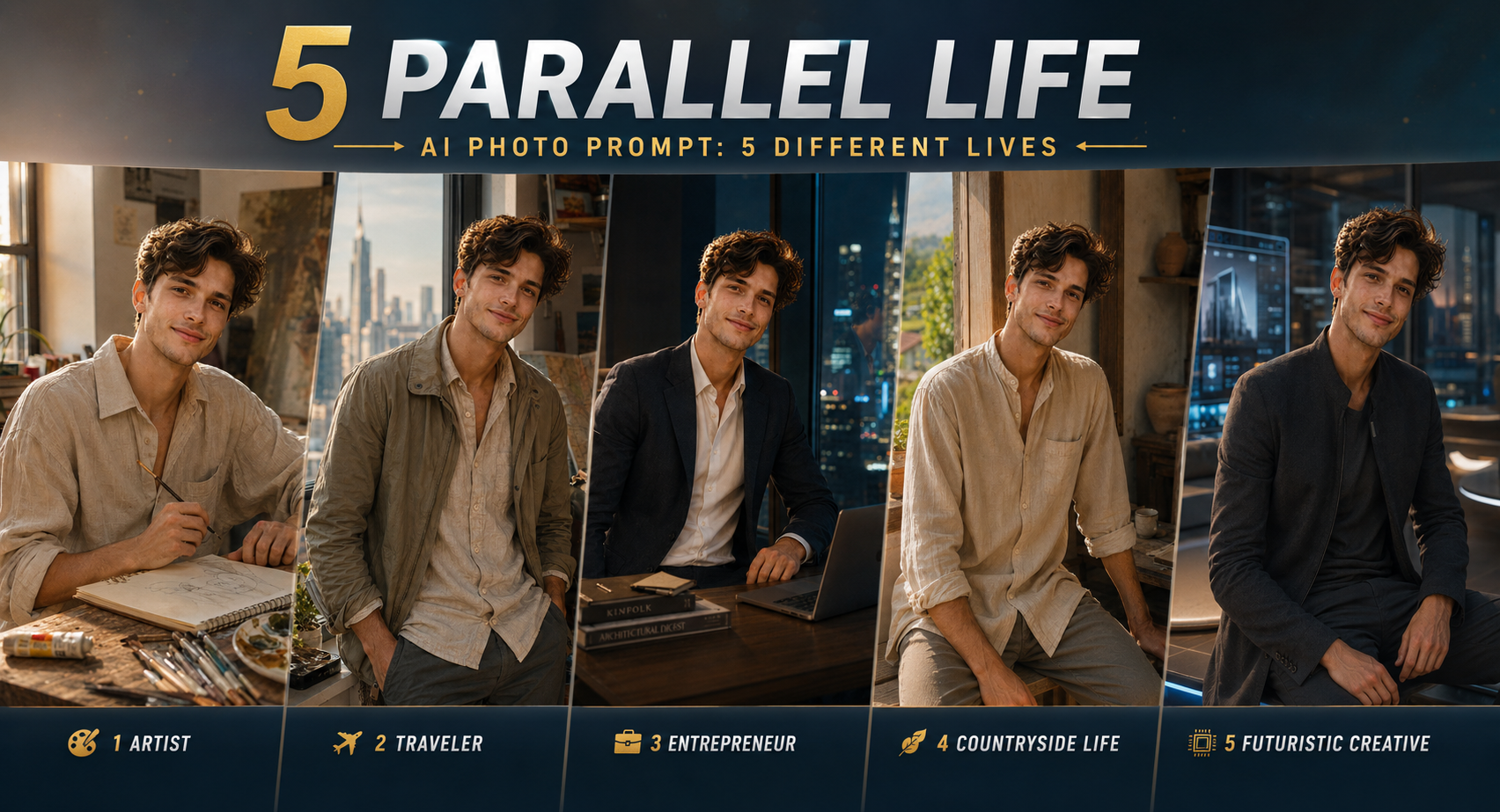
A Parallel Life AI Photo Prompt lets you turn one portrait into a visual story about five versions of the same person. Instead of changing only clothes or backgrounds, the image gives each version a different lifestyle while keeping the person recognizable. I found that the strongest results come when all five versions share the same building and visual perspective; otherwise, the image can start looking like five unrelated portraits. This idea suits Instagram posts, profile experiments, storytelling projects and creative AI edits. You only need one clear reference photo, then you can explore an artist, traveler, entrepreneur, rural-life version and futuristic creative version without changing the core identity.
Before you start
Your source photo matters more than adding extra adjectives to the prompt. Use a front-facing or slightly angled portrait where your eyes, jawline and hairline are clearly visible. A photo taken in soft shade around 10–11 AM usually gives the model cleaner facial information than a heavily filtered selfie.
Photo: clear face, natural skin texture, minimal filters
Tool: Gemini with image generation/editing enabled
Aspect ratio: 4:5 for Instagram-style posts; use 16:9 if the building composition needs more width
Best source: one person, medium close-up, unobstructed face
Avoid: sunglasses, extreme beauty filters and very dark photos
The Artist’s Window — A Creative Life
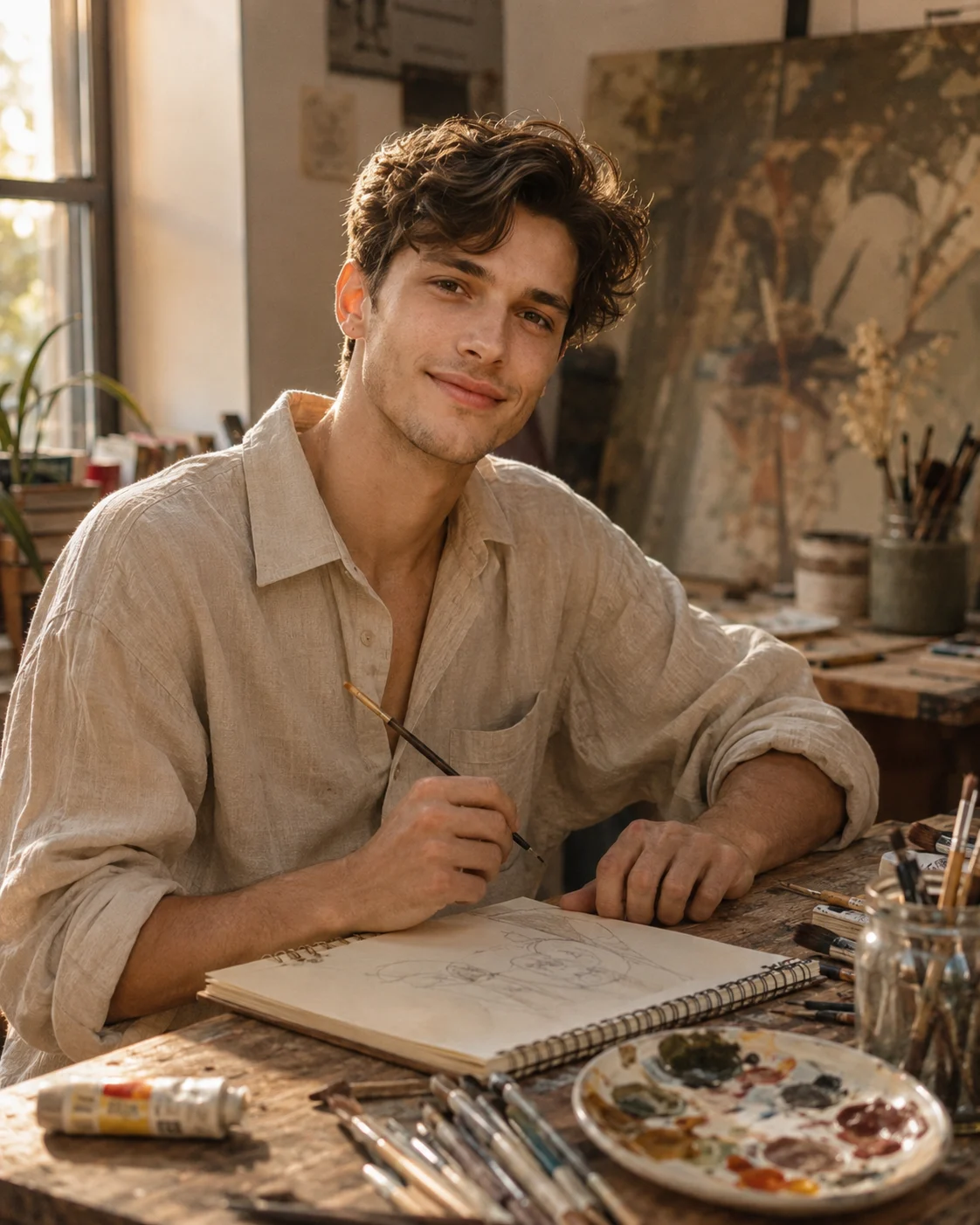
This version turns your alternate self into an artist surrounded by evidence of an ongoing creative career. Think unfinished canvas, brushes, sketchbooks and warm apartment light rather than a generic “artist” background. It works particularly well for portraits with expressive faces because the environment adds personality without needing dramatic posing. The key detail is the lived-in studio: small imperfections make the window feel occupied rather than staged.
The Prompt
Using the uploaded photo, create a warm editorial portrait of the same person as an artist working inside a lived-in apartment studio. KEEP — Keep the exact face structure from the uploaded photo, including jawline, cheek shape, nose shape, lip shape, forehead proportions and distinctive facial details. Keep the original eye shape and natural eye colour. Keep the real skin tone, visible skin texture, natural complexion variation and facial proportions. Keep the original hairline, hairstyle and hair texture. Keep facial hair exactly as present, without adding or removing it. Keep the original body proportions, shoulder width and natural build. CHANGE — Change only the styling, environment, pose, wardrobe, lighting and colour treatment. Dress the person in a relaxed textured linen shirt in muted cream or warm beige, with natural fabric folds rather than a polished fashion finish. Place one hand near an open sketchbook and the other loosely holding a paintbrush. Add a worn wooden table, ceramic paint palette, scattered brushes, graphite pencils and partially used art materials. Do not make the studio perfectly clean or symmetrical. SCENE — Set the portrait inside a small apartment art studio during late afternoon. Behind the person, show an unfinished canvas leaning against the wall, several sketchbooks, brushes in a simple glass jar and subtle marks of ongoing creative work. Keep these objects softly blurred so the face remains the visual focus. LIGHT — Use warm window light entering from the left side of the face at roughly 45 degrees. Keep the shadow side gently darker, with soft falloff across the cheek and jaw. Use a warm 4300K–4800K colour temperature so the skin and beige fabric feel naturally connected to the room. CAMERA — Use an 85mm lens at f/1.8, camera positioned at chest height, with natural perspective and shallow depth of field. GRADE — Apply warm neutral tones, restrained saturation, medium contrast and subtle film grain, avoiding orange skin or crushed shadows. OUTPUT — Create a vertical 4:5 portrait at 2048 × 2560 pixels with realistic skin detail and natural fabric texture. DO-NOT — No face slimming, no skin whitening, no changed eye colour, no plastic smoothing, no invented jewellery or tattoos.
✦ Curated by MFDA
The Traveler’s Window — A Life Built Around Exploration
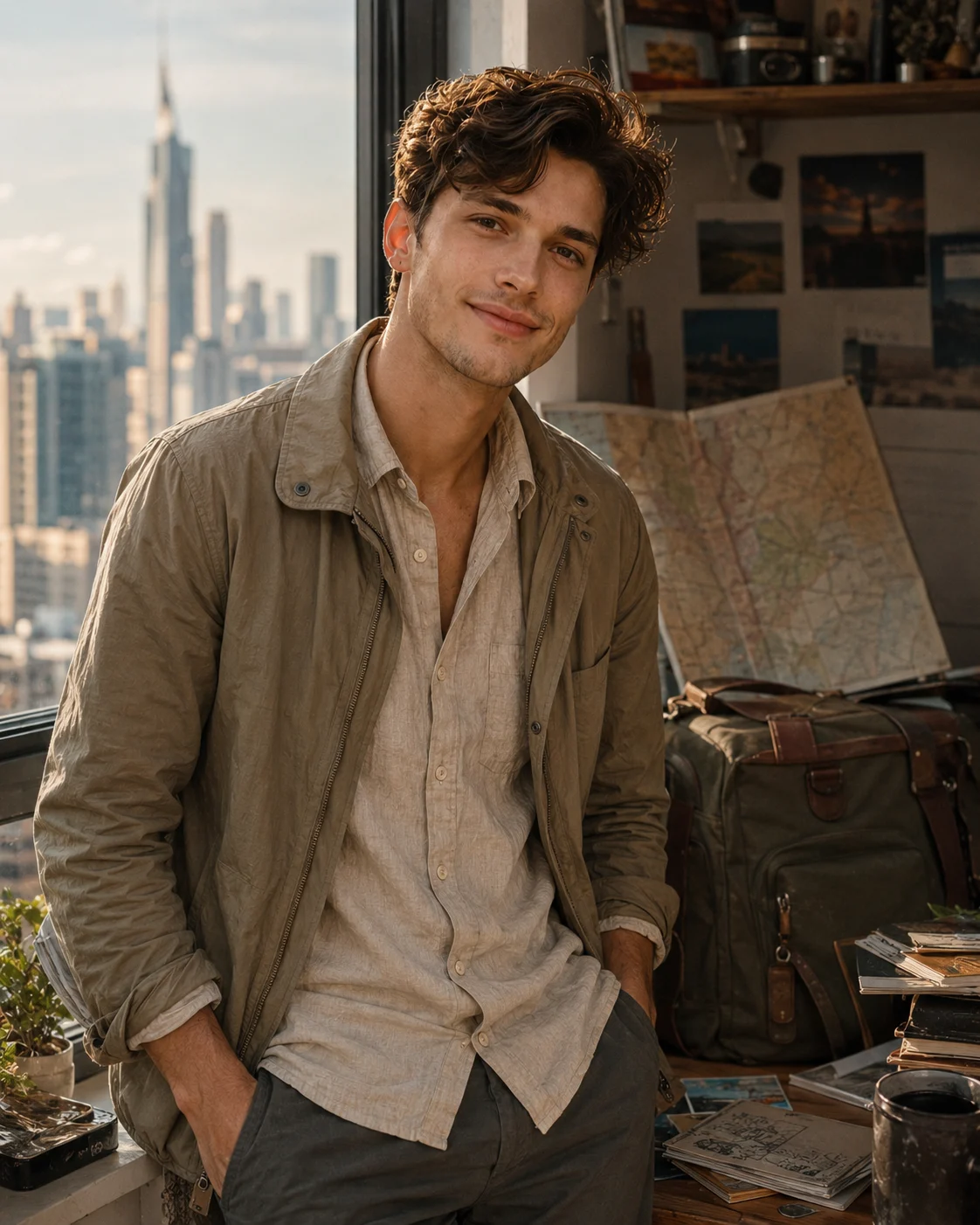
Here, your second life belongs to someone who spends more time moving than staying home. The apartment window can reveal travel bags, maps, postcards and a distant cityscape, while the clothing stays practical and understated. A linen shirt or lightweight jacket helps sell the travel mood. Keep the expression natural; an overly dramatic pose can make the five-window composition feel artificial.
The Prompt
Using the uploaded photo, create a realistic editorial portrait of the same person living a travel-focused life beside an apartment window filled with subtle signs of exploration. KEEP - Keep the exact face structure, eye shape and natural eye colour, skin tone and visible skin texture, hairline, facial hair if present, and natural body proportions from the uploaded photo. Preserve the original jawline, cheek structure, nose shape, lip shape, forehead proportions, and distinctive facial details. Keep the person clearly recognizable as the same individual. Do not reshape facial features or alter their natural age. CHANGE - Change the wardrobe to a relaxed travel outfit: a natural beige or muted olive linen shirt with visible woven fabric texture, layered with a lightweight cotton or nylon travel jacket. Add practical trousers in charcoal or warm khaki. Change the pose to a relaxed standing position beside the window, with one shoulder slightly closer to the camera and a natural, calm expression. Do not exaggerate the pose. Change the background into a compact, lived-in apartment travel corner with luggage, folded maps, postcards and small travel objects placed naturally around the window. SCENE - Set the scene during late afternoon, with a distant city skyline visible through the apartment window. Keep the cityscape softly blurred so the person remains the visual focus. Place a medium-sized travel bag and partially unfolded paper maps behind or beside the subject without covering the body. LIGHT - Use warm late-afternoon daylight entering from the window at a 45-degree side angle. Keep the light soft and directional, with gentle shadow falloff across the face. Use a warm-neutral colour temperature around 4500K so the skin matches the window light naturally. CAMERA - Shoot at 85mm, f/1.8, camera positioned at chest height. Use shallow depth of field with the eyes as the sharpest point and the luggage, maps and skyline gradually falling out of focus. GRADE - Apply a restrained cinematic grade with warm highlights, slightly muted greens and browns, natural skin tones, medium contrast and fine film grain. OUTPUT - Create a vertical 4:5 composition at 2048 × 2560 resolution. DO-NOT - no face slimming, no skin whitening, no changed eye colour, no plastic smoothing, no invented jewellery or tattoos.
✦ Curated by MFDA
The Entrepreneur’s Window — A Quietly Successful Future
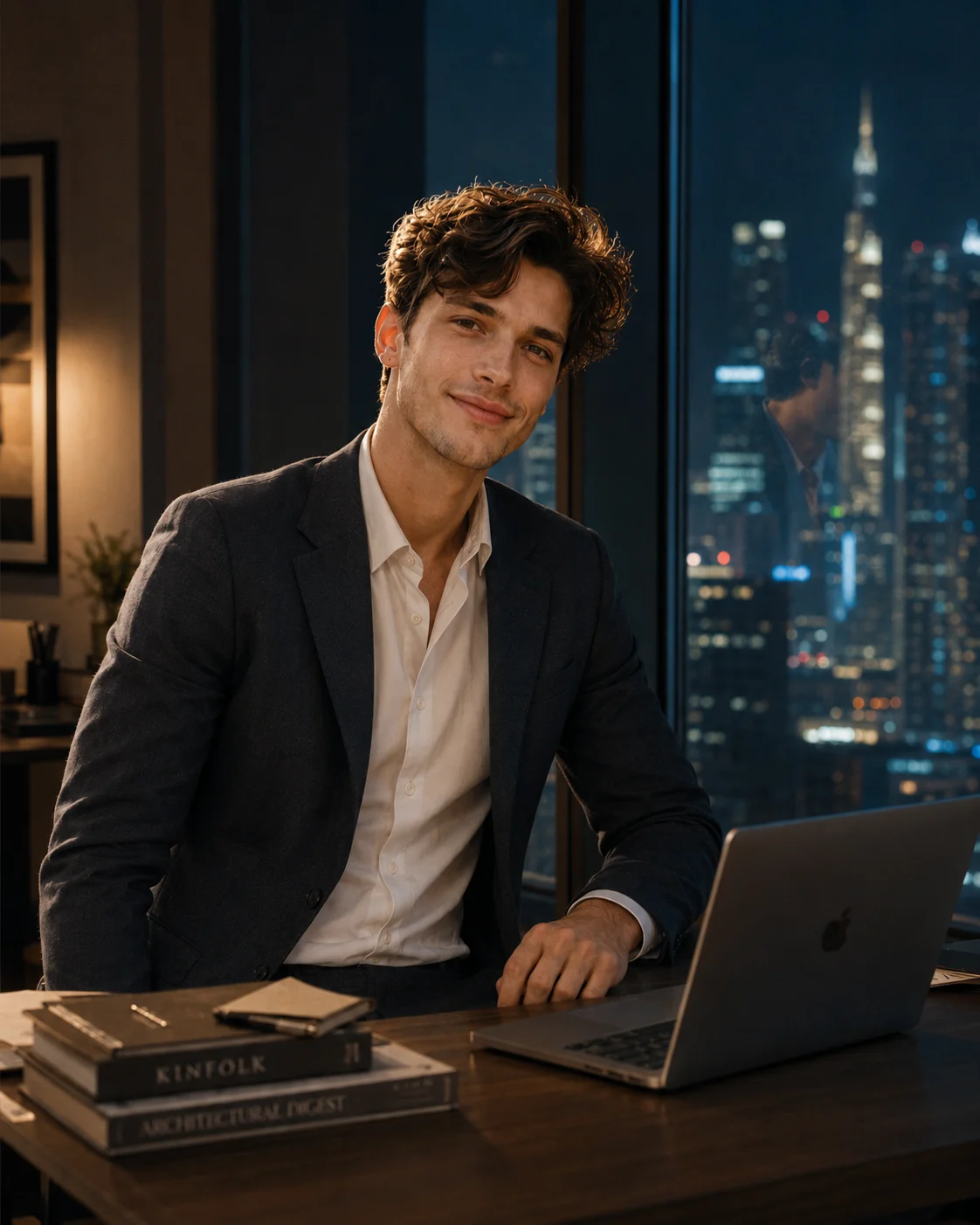
This version works through restraint rather than filling the room with luxury objects. Picture a tailored blazer, clean desk, laptop, architectural books and a nighttime skyline beyond the glass. The person should look established, not like they're posing for a business advertisement. Reflections on the window are especially useful here because they connect the subject with the surrounding building and give the scene more depth.
The Prompt
Using the uploaded photo, create a quietly successful entrepreneur portrait inside a refined modern office at night. KEEP — Keep the exact face structure, natural jawline, cheek shape, nose, lips, and chin from the uploaded photo. Keep the original eye shape and eye colour unchanged. Keep the original skin tone, natural skin texture, freckles, pores, and small facial marks. Keep the original hairline, hairstyle structure, and facial hair exactly as shown. Keep the person's natural body proportions, shoulder width, neck length, and overall build. The person must remain clearly recognisable as the same individual in the uploaded photo. CHANGE — Change only the wardrobe, office setting, pose, lighting environment, and colour treatment. Dress the subject in a sharply tailored charcoal or deep navy wool blazer over a clean white or muted grey shirt, with no visible logo. Use a matte wool fabric with realistic tailoring rather than glossy synthetic material. Place the subject beside a large floor-to-ceiling glass window, seated or standing naturally beside a clean dark wood desk. Keep the pose relaxed and self-assured rather than a formal corporate advertisement pose. Add a slim laptop and a small stack of architectural or business books on the desk. Do not overcrowd the room with luxury objects. SCENE — Set the scene in a high-rise office after sunset, with a modern nighttime city skyline visible beyond the glass. Buildings should appear naturally distant and softly blurred, while a few window lights remain recognisable. Keep subtle reflections of the office and subject on the glass to create depth without obscuring the face. LIGHT — Use soft warm interior light from the front-left at roughly 3200K, balanced by cooler blue ambient light from the window behind and to the right. Keep both light sources physically consistent across the face, blazer, desk, and background. CAMERA — Shoot at 85mm, f/1.8, with the camera at chest height and a natural eye-level perspective. Keep the face sharply focused while the skyline falls into smooth optical blur. GRADE — Use a restrained cinematic grade with warm skin tones, cool blue exterior shadows, moderate contrast, controlled highlights, and realistic black levels. Avoid glossy commercial retouching. OUTPUT — Create a vertical 4:5 composition at 2048 × 2560 pixels, keeping the head, shoulders, desk edge, laptop, window reflections, and skyline comfortably inside frame. DO-NOT — no face slimming, no skin whitening, no changed eye colour, no plastic smoothing, no invented jewellery or tattoos.
✦ Curated by MFDA
The Rural Window — A Slower, Peaceful Life
The fourth life moves away from the city completely. Use a modest countryside home, wooden textures, plants, handmade objects and soft morning sunlight to suggest a quieter routine. Cotton clothing works better than formal fashion because it supports the natural setting. This variation is strongest when the rural environment has believable details—slightly uneven wood, simple furniture and greenery outside—rather than looking like a polished resort.

The Prompt
Using the uploaded photo, create a realistic peaceful rural-window portrait that looks like the same person living a slower countryside life. KEEP - Keep the exact face structure, including jaw shape, cheek placement, chin size, nose proportions and natural facial asymmetry. Keep the exact eye shape and eye colour from the uploaded photo. Keep the original skin tone, natural skin texture, pores and small real marks. Keep the original hairline, hair density and facial hair exactly as visible. Keep the same body proportions, shoulder width and overall build. Do not reshape the person to fit the scene. CHANGE - Change the wardrobe to a simple loose cotton outfit in [cream, muted beige or soft sage green], with visible woven cotton texture and natural folds. Replace any formal styling with understated countryside clothing. Place the person beside a modest wooden-framed window inside a simple countryside home. Add slightly uneven wood surfaces, a plain wooden table, handmade clay objects, small potted plants and simple furniture. Use a relaxed seated or standing pose with the body naturally angled toward the window. Change the lighting to soft warm morning sunlight and apply a gentle natural colour grade. SCENE - Set the scene inside a modest rural home during early morning, around 8:00 AM. The person stands or sits close to a wooden window, with leafy greenery and a quiet countryside view visible outside. Keep the background believable and lived-in rather than resort-like. Let objects behind the person fall into moderate blur while the window frame and nearby wooden textures remain recognizable. LIGHT - Place the main sunlight source outside the window, coming from the front-left side of the face. Use broad, diffused morning light with soft shadows under the chin and nose. Keep the light direction consistent across the face, neck and clothing so the person does not look pasted into the room. Use a warm-neutral daylight temperature around 4800–5200K. CAMERA - Use an 85mm lens at f/2.0, camera positioned at chest height. Keep the face sharply focused while allowing the wooden room and greenery to soften naturally behind the subject. GRADE - Use warm natural highlights, gentle earthy greens, muted wood browns and low-to-medium contrast. Keep skin colour neutral and realistic rather than orange or overly polished. OUTPUT - Create a vertical 4:5 composition at 2048 × 2560 resolution, with enough space around the head and shoulders for a natural portrait crop. DO-NOT - no face slimming, no skin whitening, no changed eye colour, no plastic smoothing, no invented jewellery or tattoos.
✦ Curated by MFDA
The Futuristic Creative Window — Life Ten Years Ahead
For the final version, imagine a creative professional living in a near-future apartment rather than a science-fiction movie set. Translucent screens, sculptural furniture and subtle ambient lighting can establish the era while keeping the face grounded. Use restrained technology so the person remains the visual focus. This one can struggle with glasses and complex transparent objects, so a clean reference photo gives you a better starting point.
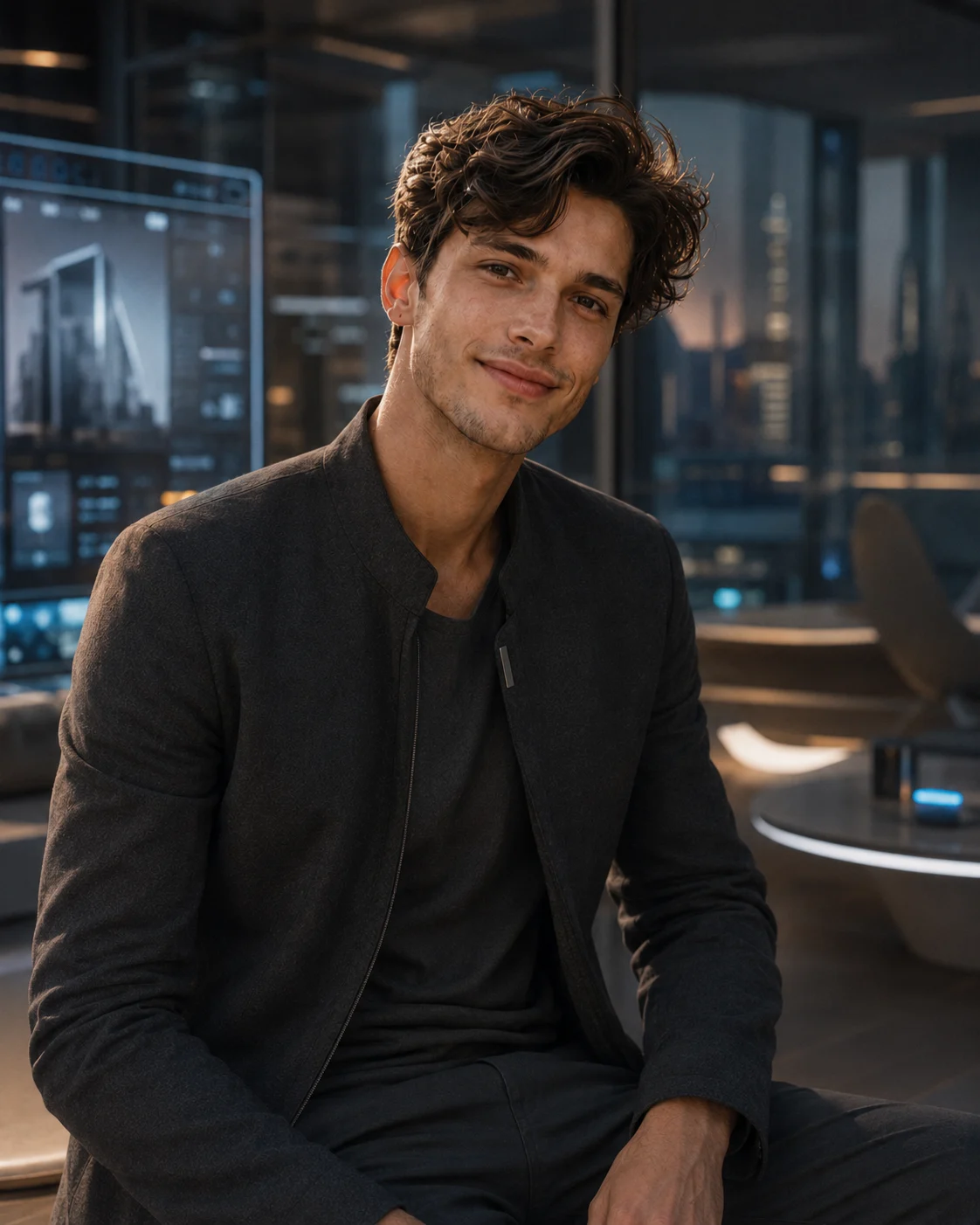
The Prompt
Using the uploaded photo, create a realistic professional portrait of the same person living in a near-future apartment, with the visual language of a creative professional about ten years ahead of today. KEEP - keep the exact face structure, eye shape and natural eye colour, skin tone and visible skin texture, hairline, facial hair if present, and body proportions from the uploaded photo. Keep the person's recognizable identity, natural facial asymmetry, nose shape, lips, jawline and cheek structure unchanged. Keep the apparent age and defining facial details unchanged. CHANGE - change the wardrobe to a clean contemporary outfit made from matte charcoal technical wool, soft cotton and subtle brushed-metal details, without logos. Change the background into a refined near-future apartment with translucent display panels, sculptural furniture and restrained ambient technology. Change the pose to a relaxed seated or standing three-quarter pose with the shoulders naturally angled toward the camera. Use soft neutral lighting with a faint cool-blue practical glow in the environment. Apply a controlled cinematic colour grade with warm skin and restrained blue-grey surroundings. SCENE - place the person inside a sophisticated apartment during early evening, when the exterior light is fading. Behind them, show one or two translucent screens, a sculptural chair or table, smooth architectural surfaces and minimal futuristic objects. Keep the technology secondary to the person. Blur the background strongly enough to separate the subject while leaving the screen shapes and furniture recognizable. LIGHT - use a large soft key light from 45 degrees to the front-left, slightly above eye level, around 4300K, with gentle neutral fill from the opposite side. Let the translucent screens create only a subtle cool rim or background glow so the face remains naturally exposed. CAMERA - photograph at 85mm, f/1.8, camera positioned at chest height, with natural perspective and shallow depth of field. Keep the eyes sharply focused and avoid wide-angle distortion. GRADE - use restrained cinematic contrast, neutral blacks, warm natural skin tones and muted blue-grey environmental colour. Avoid heavy cyberpunk colours or exaggerated neon. OUTPUT - create a vertical 4:5 portrait at 2048 × 2560 resolution, with realistic photographic detail and clean edges around hair and clothing. DO-NOT - no face slimming, no skin whitening, no changed eye colour, no plastic smoothing, no invented jewellery or tattoos, no altered facial structure, no exaggerated futuristic technology.
✦ Curated by MFDA
How to use these in Gemini
Open Gemini and start an image-generation or image-editing conversation that accepts an uploaded photo.
Upload one clear reference image with your face visible.
Add the relevant prompt card after the image has finished uploading.
Ask Gemini to preserve the recognizable identity while applying the requested alternate-life scene.
For a five-window composition, use 4:5 when you want a portrait-oriented social post; choose 16:9 if the building needs more horizontal space.
If the first result is wrong, don't regenerate blindly. Tell Gemini exactly what failed—for example, “keep the original eye shape and reduce the artificial skin texture”—then regenerate.
Getting better results
Use an unfiltered daylight portrait because heavy smoothing can make Gemini reconstruct facial features instead of preserving them.
Choose a 4:5 canvas for social posts because it gives each window enough vertical room without making the faces tiny.
Keep all five windows in one building because a shared architectural structure makes the alternate lives read as one connected concept.
Give each life a different material language—canvas and wood for the artist, linen and leather for the traveler, glass and metal for the entrepreneur—so the versions don't blur together.
Avoid five radically different lighting conditions because inconsistent shadows can make the people look composited afterward.
Keep props behind the person because laptops, plants and bags crossing the face are more likely to produce distorted hands or facial details.
Start with a photo where both eyes are unobstructed because identity consistency becomes harder when the reference contains sunglasses, hair across the face or extreme angles.
When the result comes out wrong
What went wrong | Why it happens | What to change |
|---|---|---|
Face looks different in each window | The model treats each lifestyle as a separate character | Reinforce the same facial structure, eye shape, skin tone and hairline across all five versions |
Skin looks overly smooth or plastic | AI enhancement removes natural texture | Ask for visible pores, natural skin texture and restrained retouching |
Hands look distorted | Small hands plus props create difficult overlaps | Keep hands simple, visible and away from laptops, bags and furniture |
Lighting looks pasted on | Each window receives a separate light source | Ask for one coherent lighting direction across the building |
One version dominates the others | Composition gives one window more visual weight | Request equal-sized windows and similar framing for all five lives |
Architecture looks unrealistic | Too many complex rooms and objects confuse the composition | Use simple apartments with repeated window proportions and believable materials |
FAQ
Does this work with any photo?
Not equally well. A clear portrait with visible eyes, natural skin and little obstruction gives Gemini more useful identity information. Side profiles, group photos, sunglasses and aggressive beauty filters can reduce consistency. You can still experiment with them, but expect more facial variation between the five alternate versions.
Why does Gemini change my face?
The model isn't copying every pixel of your reference. It interprets the image and generates a new scene around the identity information it detects. When five different characters appear together, that reconstruction becomes harder. A sharp, unfiltered reference and explicit identity-preservation instructions usually reduce the drift.
Can I use these AI images commercially?
That depends on the tool's current terms, your account type, the source photograph and any recognizable third-party material appearing in the final image. Don't assume that an AI-generated image is automatically cleared for advertising, products or client work. Check Gemini's current commercial-use terms and make sure you have rights to the uploaded photo.
Is Gemini free for these images?
Gemini has offered image-generation features under different plans and limits, and availability can vary by account, region and product version. A free account may have usage restrictions or different access from a paid plan. Check the image-generation option shown in your own Gemini account before planning a large batch.
How do I get a different variation?
Keep the same reference photo and change one major variable at a time. For example, move the entrepreneur from a nighttime office to a sunrise workspace rather than rewriting the entire concept. Small changes to wardrobe, camera distance, architecture or time of day usually produce more controlled variations.
Can I make all five faces look exactly identical?
You can improve consistency, but you shouldn't expect pixel-level duplication. Each window is a newly generated representation, so small differences in expression, hair or facial proportions can appear. The practical goal is for viewers to immediately recognize all five people as the same person.
Closing
Start with the Artist’s Window if you want the easiest test because its props and warm interior give the model plenty of visual context. Once the face stays consistent, try the entrepreneur or futuristic version. The rural scene is a good next step if you want something softer and less obviously AI-generated.
About the Author
Naziya
Creative AI writer at MFDA, sharing trendy photo-editing prompts and fresh ideas for beautiful, stylish AI images.