5 Girl Img for Ganesh Chaturthi 2026
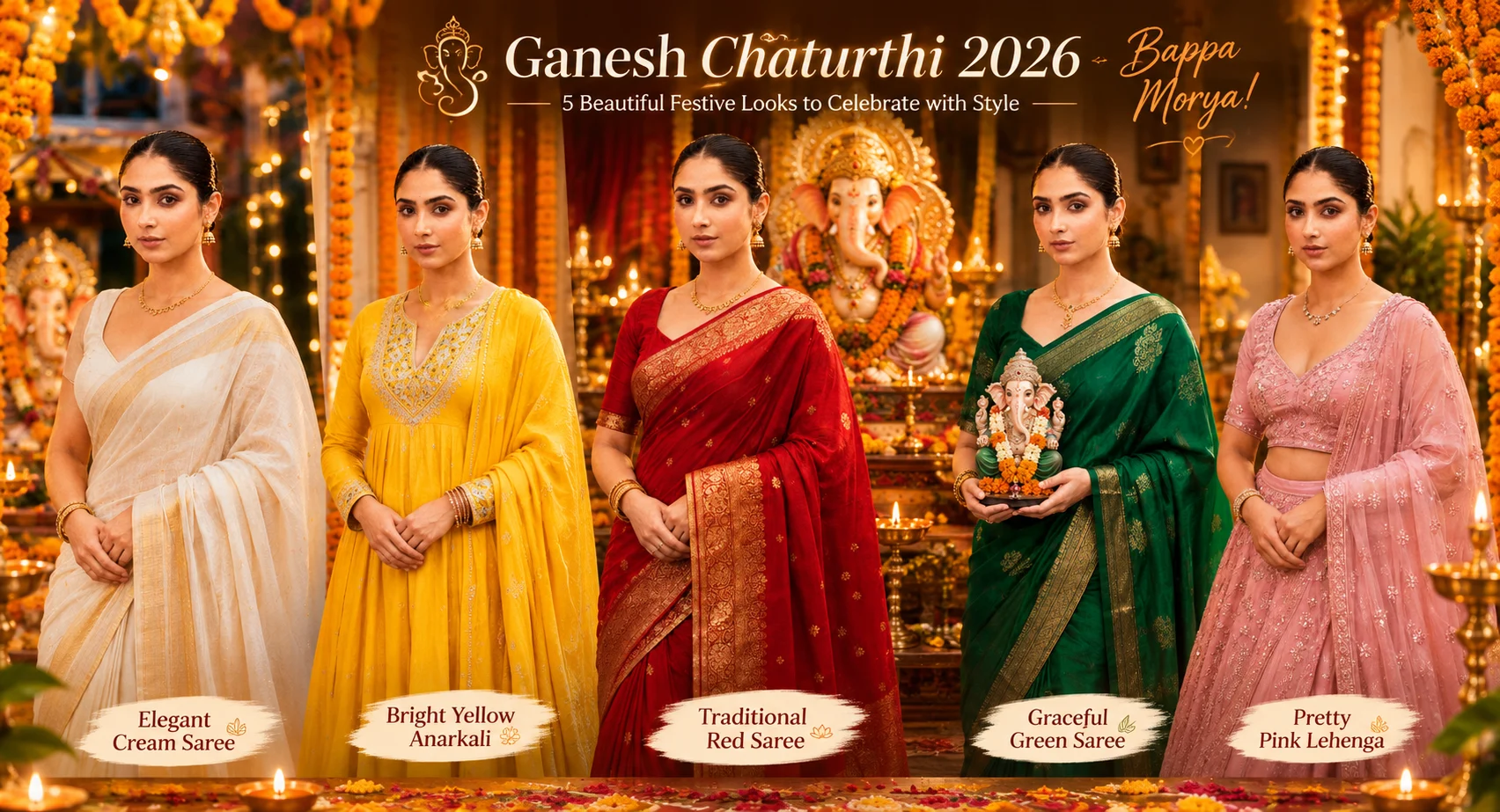
If you want a festive AI portrait that still looks like your uploaded photo, these top 5 girl img for Ganesh Chaturthi ideas give you five different directions instead of five versions of the same pose. I tested this style with traditional clothing, decorated Ganesh idols, marigold flowers and warm festival lighting. The biggest difference comes from keeping the face reference clear while changing the setting around it. You’ll get options ranging from a classic red saree portrait to a softer evening celebration look. These work well for Instagram posts, WhatsApp status images, profile pictures and festive greetings. They’re especially useful when you want a polished traditional photo without arranging a full festival shoot.
Before you start
Use a clear photo where your face is visible from the front or at a slight angle. Avoid heavy filters, dark sunglasses and group photos because they give the image model less information about your features. Use Gemini or another image generator that supports image uploads. For social posts, 4:5 is a useful starting ratio; use 9:16 when you want a Story or status image.
Best photo: clear solo portrait with natural facial detail
Tool: Gemini image generation
Ratio: 4:5 for posts, 9:16 for Stories
Clothing reference: traditional Indian outfits work particularly well
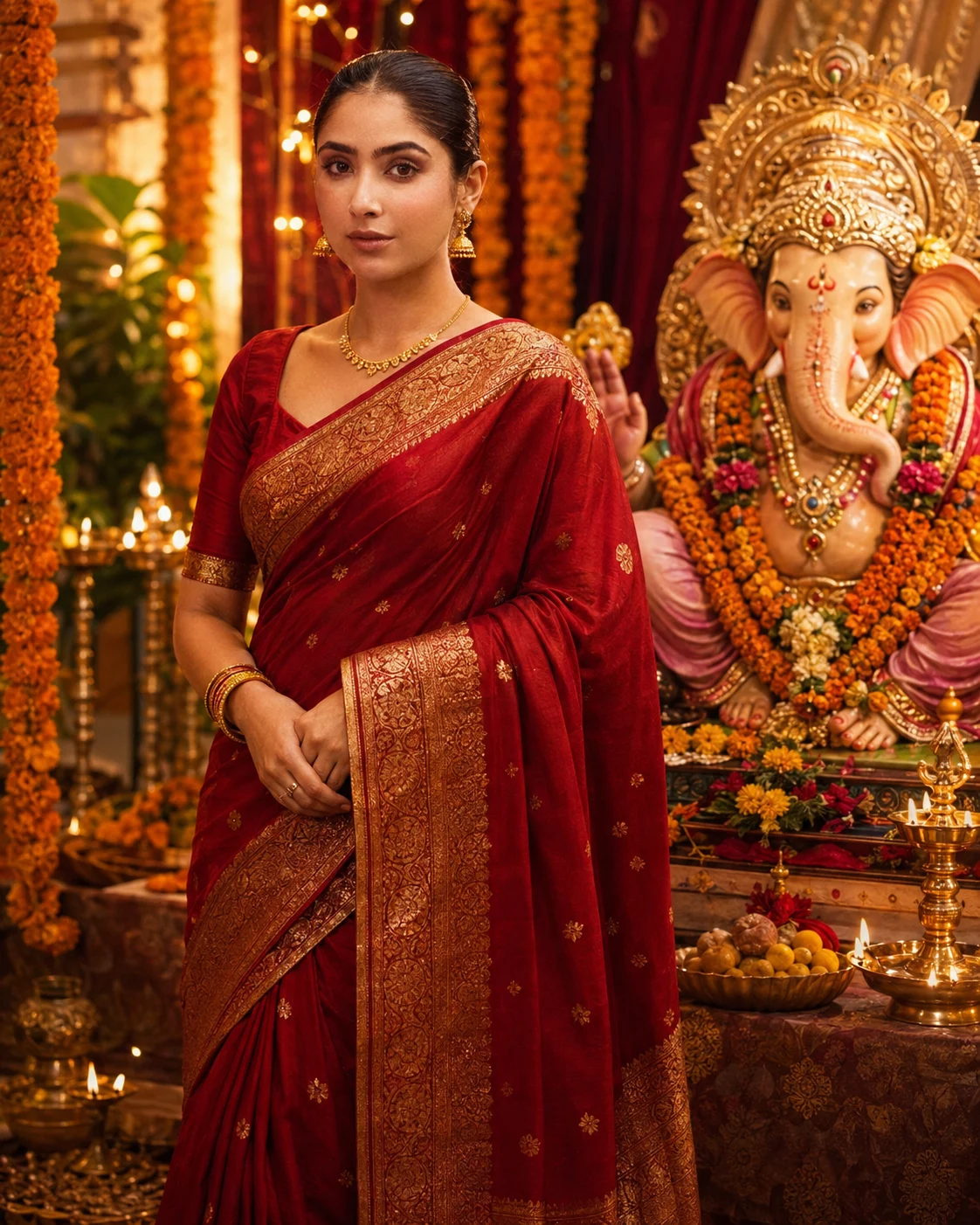
Red Saree Portrait Beside a Decorated Ganesh Idol
This version gives you a classic festive portrait with a red saree, gold detailing and a richly decorated Ganesh Chaturthi setup. It suits warm skin tones and works particularly well when your original photo has a simple background. The important detail is the separation between your face and the idol, so the generator doesn’t merge facial or jewelry details with the decorations.
The Prompt
Using the uploaded photo, create a realistic Ganesh Chaturthi portrait of the same person standing beside a richly decorated Ganesh idol. KEEP — Keep the exact face structure, eye shape and natural eye colour from the uploaded photo. Keep the original skin tone, visible skin texture, hairline, facial hair if present, and natural facial proportions. Keep the person’s body proportions, shoulder width, height relationship and recognizable facial identity unchanged. Do not reinterpret the person as a different model or change their age. CHANGE — Change the wardrobe to a deep red saree with a visible gold zari border and fine gold woven detailing. Use a matching red blouse with a modest traditional cut and realistic fabric folds. Add only subtle traditional gold earrings, a delicate gold necklace and simple bangles. Change the background into a decorated Ganesh Chaturthi setting with marigold flowers, warm decorative lights and festive fabric details. Change the pose to a relaxed three-quarter standing pose beside the idol, with the face clearly separated from the idol. Use warm directional lighting and a natural festive colour grade. SCENE — Place the person indoors at a carefully decorated Ganesh Chaturthi celebration during early evening. Position a detailed Ganesh idol slightly behind and to one side of the person, never directly over the face. Include marigold garlands, soft golden lamps and red-gold decorative fabric in the background. Keep the background moderately blurred so the person and idol remain distinct. LIGHT — Use a large warm light source from the upper front-left, around 3200–3800K, with softer fill from the opposite side. Keep natural shadow depth around the nose, jaw and neck so the face belongs in the scene. CAMERA — Photograph at 85mm, f/1.8, camera at chest height, with realistic portrait compression and shallow depth of field. GRADE — Use warm reds, muted golds and natural skin tones with medium contrast, gentle highlight roll-off and subtle cinematic warmth. OUTPUT — Create a vertical 4:5 composition at 2048×2560 resolution, keeping the full saree drape and upper-to-mid body visible. DO-NOT — Do not slim the face, whiten the skin, change eye colour, plastic-smooth the skin, alter body proportions, merge the face with the idol, or invent jewellery or tattoos.
✦ Curated by MFDA
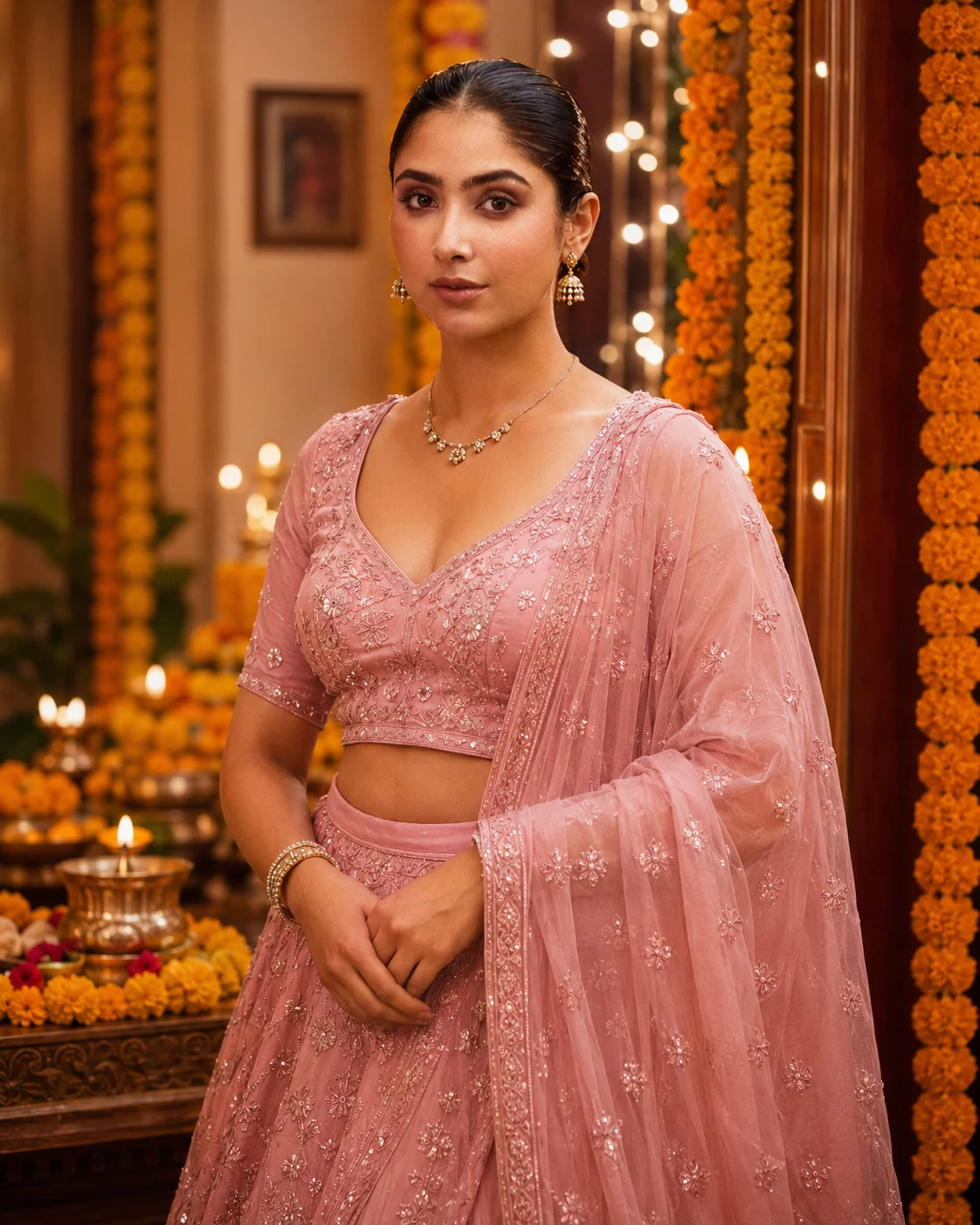
Pink Lehenga With a Soft Indoor Festival Setup
Choose this look if you want something youthful and slightly more glamorous without losing the traditional mood. A pink lehenga, delicate jewelry and marigold decorations create a softer frame around the face. It works especially well for a portrait where you’re already looking toward the camera. Keep the background moderately detailed; too many flowers can compete with the subject.
The Prompt
Using the uploaded photo, create a realistic indoor festival portrait of the same person wearing a youthful pink lehenga, with a soft traditional celebration setting and a moderately detailed marigold-decorated background. KEEP from the uploaded photo: keep the exact face structure, natural jawline, cheek shape, nose shape, lip shape, eye shape and eye colour, skin tone and visible skin texture, hairline, facial hair if present, and natural body proportions. Keep the person's recognizable facial identity unchanged. Do not reconstruct or beautify the face into a different person. CHANGE only these elements: replace the clothing with a soft pink lehenga made from lightweight embroidered fabric, with subtle tonal threadwork and a matching blouse. Add delicate traditional jewellery with small earrings and a fine necklace, keeping it understated rather than oversized. Change the pose to a relaxed three-quarter portrait facing the camera, with shoulders naturally angled and hands positioned comfortably. Replace the background with an indoor festive setup containing warm marigold flower strings and restrained decorative details. Use soft warm lighting and a gentle warm colour grade. SCENE: Place the subject indoors during an evening festival celebration. Keep marigold decorations behind the subject at medium distance, with the background moderately blurred so individual flowers remain recognizable without competing with the face. LIGHT: Use a large soft light from the front-left, slightly above eye level, with warm 3200–3800K ambient illumination. Keep gentle shadowing along the opposite cheek so the face remains naturally dimensional. CAMERA: Shoot as an 85mm portrait photograph at f/1.8, camera positioned at chest height and aimed level with the face. Use natural perspective and shallow depth of field. GRADE: Apply a soft warm pink-and-gold colour treatment, moderate contrast, natural skin tones, and restrained highlight roll-off without a heavy cinematic effect. OUTPUT: Create a vertical 4:5 composition at 2048 × 2560 resolution, with the head and upper body comfortably inside the frame. DO-NOT: no face slimming, no skin whitening, no changed eye colour, no plastic smoothing, no invented jewellery or tattoos.
✦ Curated by MFDA
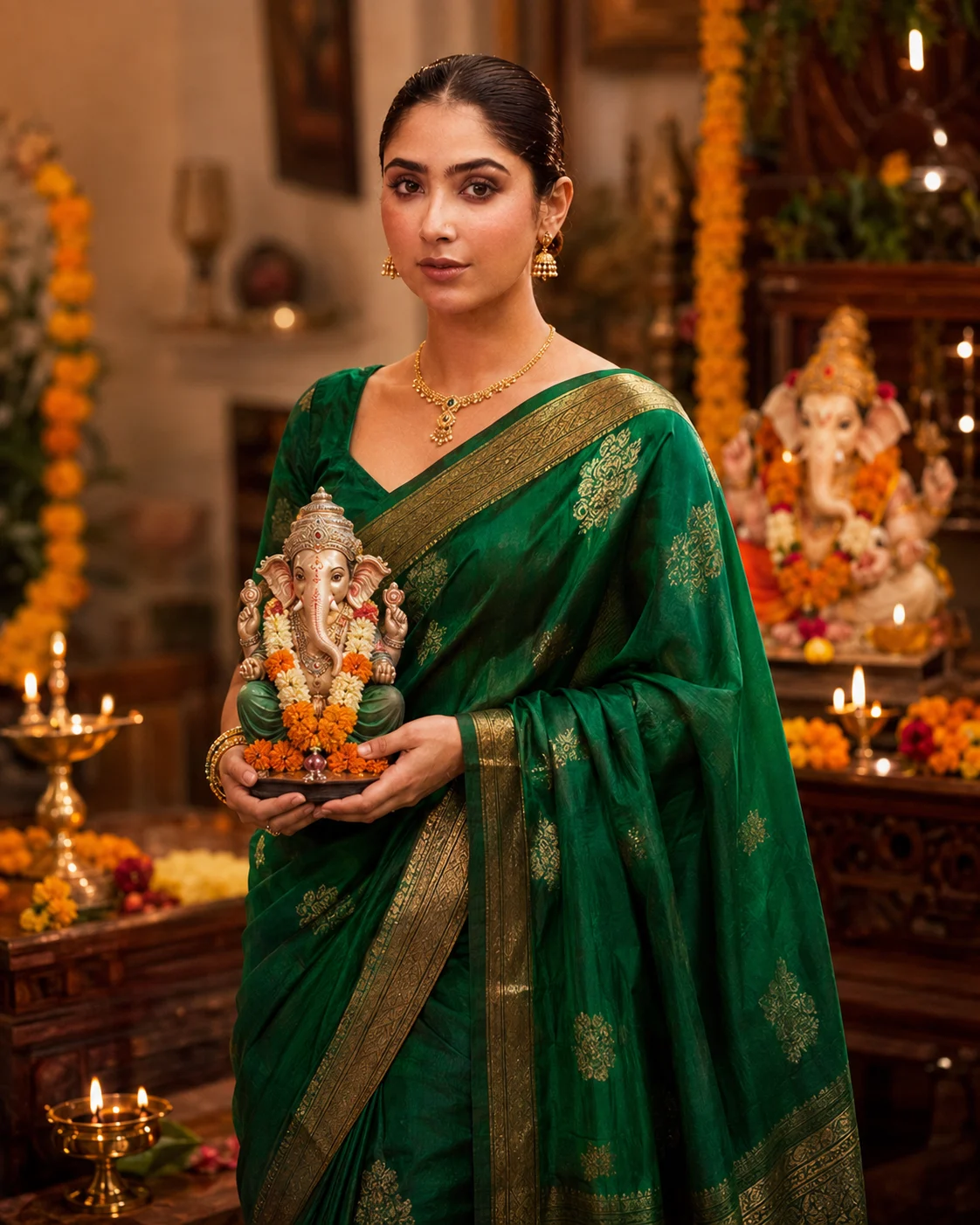
Green Silk Saree With a Small Ganesh Idol
The green silk saree version has a more elegant, mature feel. A small Ganesh idol held naturally near the body gives the image a clear Ganesh Chaturthi connection without filling the entire frame with decorations. Silk texture and gold borders are important here because they make the clothing look photographic rather than like a flat digital costume.
The Prompt
Using the uploaded photo, create a photorealistic Ganesh Chaturthi portrait of the same person wearing an elegant green silk saree and holding a small Ganesh idol naturally close to the body. KEEP — Keep the uploaded person’s exact face structure, eye shape and natural eye colour, skin tone and visible skin texture, hairline, facial hair if present, and natural body proportions. Preserve the real jaw width, cheek structure, nose shape, lips, forehead, chin, neck, shoulders, and overall identity. Keep the person recognisable as the same individual from the uploaded photo. Do not alter age-defining facial details or reshape the body. CHANGE — Change only the styling and setting: dress the person in a rich emerald-green silk saree with clearly visible woven silk texture and a refined antique-gold border. Use a matching traditional blouse in deep green silk with subtle gold detailing. Give the person a small, tasteful Ganesh idol to hold naturally near the torso, without covering the face. Change the pose to a relaxed three-quarter standing pose with natural shoulders and hands. Replace the original background with a warm festive Indian home setting and use soft cinematic lighting. SCENE — Place the person indoors during early evening during Ganesh Chaturthi. Keep a small decorated area behind them with a Ganesh festival setup, a few warm lamps, and restrained marigold accents. Keep the background softly blurred rather than heavily decorated, so the person and green silk saree remain the visual focus. LIGHT — Use warm light coming from the front-left at roughly 45 degrees, with gentle fill from the right. Keep facial shadows soft and believable. Use approximately 3800–4200K warm ambient light so the skin, green silk, and gold border share the same illumination. CAMERA — Photograph at 85mm, f/1.8, ISO 200, with the camera at chest height. Use natural perspective, moderate compression, sharp focus on the eyes, and realistic depth of field. GRADE — Apply a warm Indian festive colour grade with natural skin tones, rich emerald greens, controlled gold highlights, moderate contrast, and subtle film-like grain. OUTPUT — Create a vertical 4:5 portrait at 2048 × 2560 pixels with realistic photographic detail. DO-NOT — Do not slim the face, whiten the skin, change eye colour, smooth skin plastically, alter body proportions, invent jewellery, add tattoos, or change facial identity.
✦ Curated by MFDA
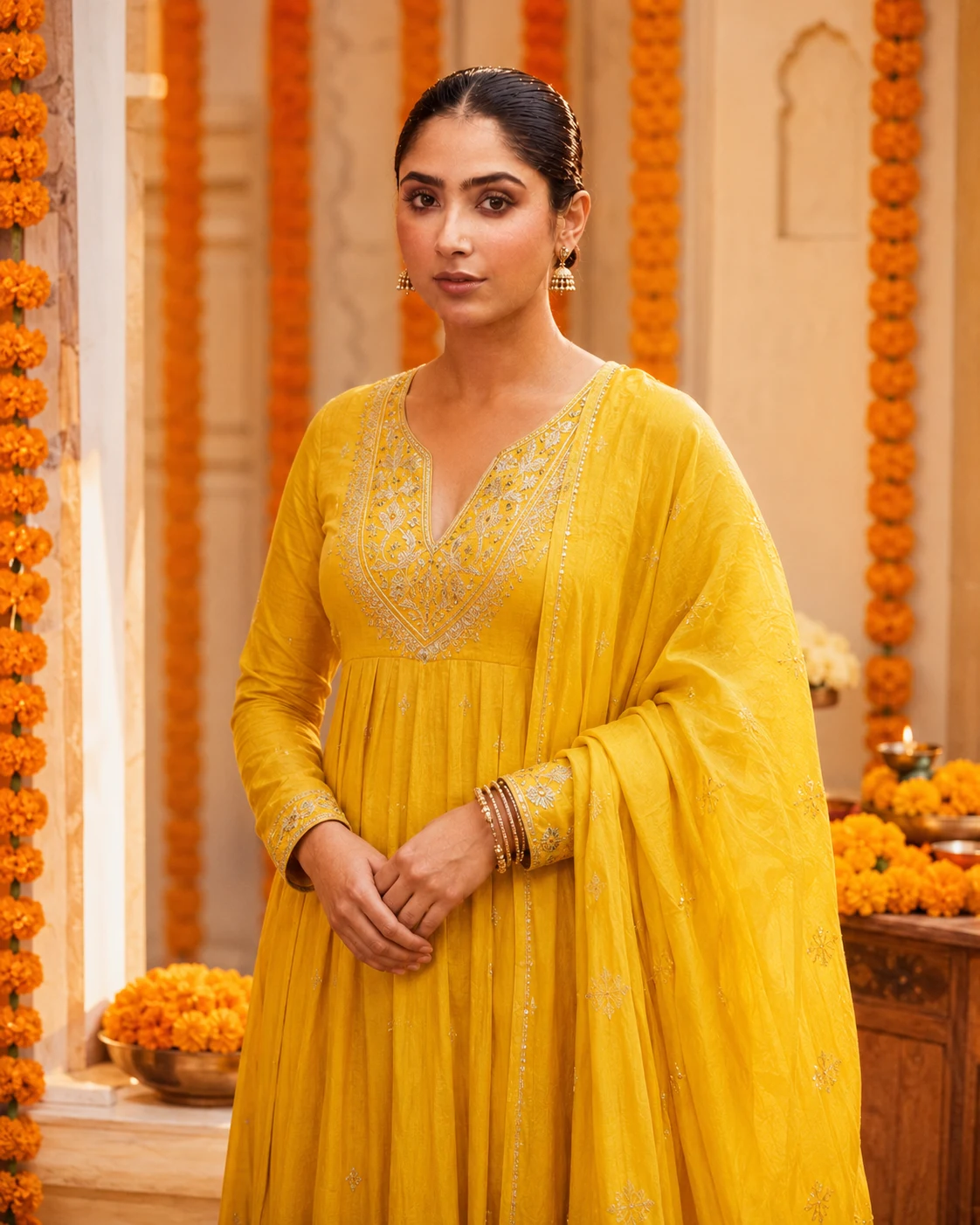
Yellow Anarkali With Marigold Decorations
For a brighter festive image, the yellow anarkali gives you a clean, cheerful appearance. This works nicely for daytime or early-evening compositions, particularly with orange marigold garlands and a warm cream-colored background. The strongest results come when the hands remain simple and visible rather than being hidden behind flowers, jewelry or the idol.
The Prompt
Using the uploaded photo, create a realistic festive portrait of the same person wearing a bright yellow Anarkali surrounded by orange marigold decorations. KEEP - Keep the exact face structure, including forehead width, cheek shape, jawline, chin, nose shape, lips, and natural facial asymmetry. Keep the original eye shape, eye size, eye colour, eyelid structure, and natural gaze characteristics. Keep the person's real skin tone, visible skin texture, pores, small marks, and natural complexion variation. Keep the original hairline, natural hair density, and any visible facial hair exactly as shown. Keep the person's real body proportions, shoulder width, neck length, hand proportions, and overall build. Do not alter identity-defining facial details from the uploaded photo. CHANGE - Change the wardrobe to a bright marigold-yellow Anarkali made from lightweight cotton-silk fabric, with subtle woven texture and modest traditional detailing. Add a simple matching yellow dupatta with a soft, natural drape. Change the setting to a festive space decorated with fresh orange marigold garlands. Use a warm cream-coloured background with restrained decoration. Place the subject in a relaxed standing pose with both hands naturally visible and uncomplicated, without covering the face or hiding the fingers. Use soft warm daylight or early-evening light and a gentle warm colour grade. SCENE - Place the person in a clean festive courtyard or decorated indoor veranda during late afternoon, with orange marigold strings hanging behind them. Keep the cream background softly blurred so the flowers remain recognizable without competing with the face. LIGHT - Light the face from the front-left at roughly 45 degrees with broad, diffused daylight. Keep the opposite cheek slightly softer, with a gentle warm fill so the yellow clothing and skin receive the same light direction. CAMERA - Photograph at 85mm, f/2.0, camera at chest height, with natural perspective and moderate background compression. Keep the face sharply focused while the marigolds fall gradually out of focus. GRADE - Use warm cream highlights, rich natural yellow and orange tones, moderate contrast, preserved skin texture, and restrained saturation without making the skin or clothing neon. OUTPUT - Create a vertical 4:5 portrait at 2048 × 2560 pixels, with the full upper body and both hands visible. DO-NOT - No face slimming, no skin whitening, no changed eye colour, no plastic smoothing, no invented jewellery or tattoos.
✦ Curated by MFDA
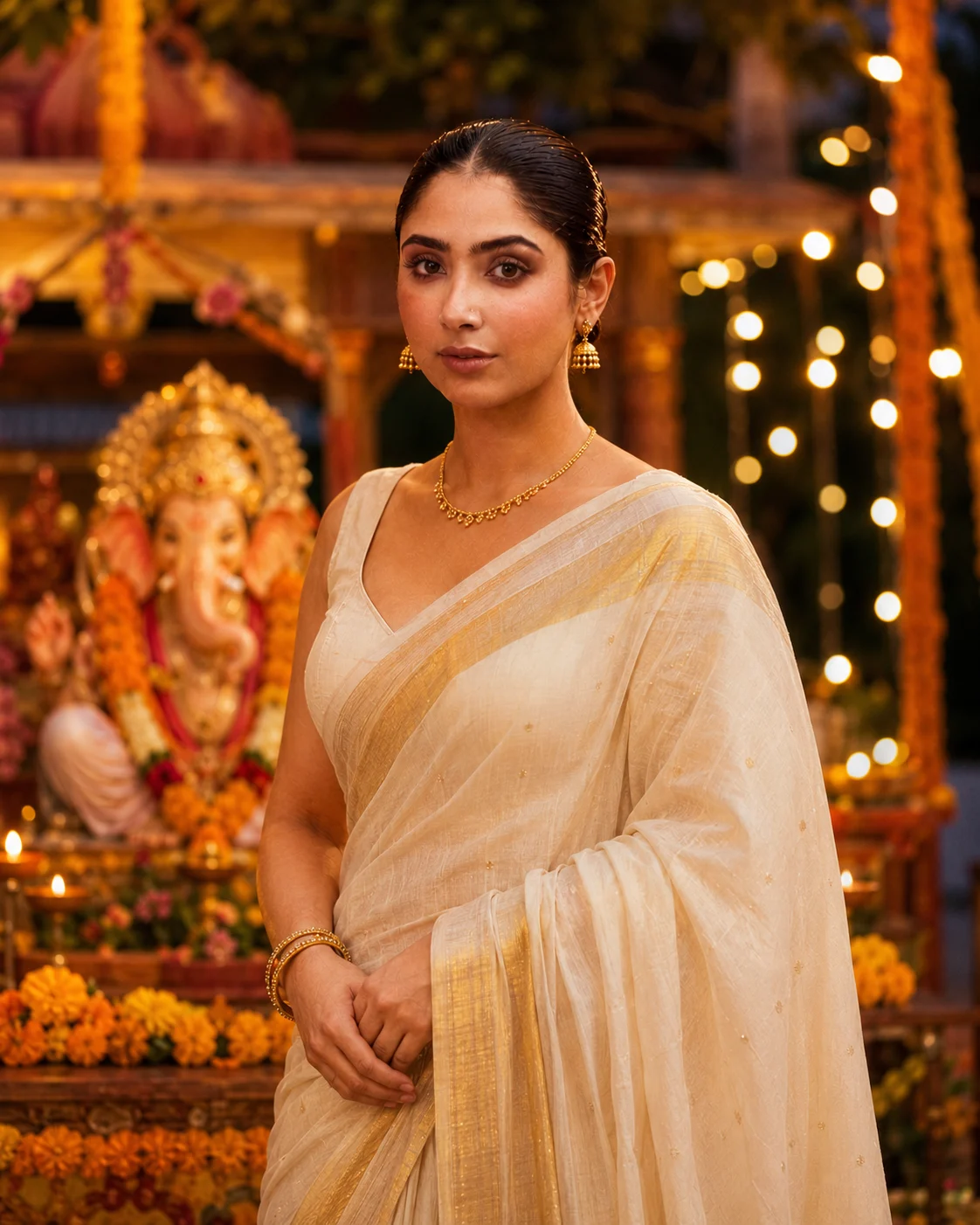
Cream Saree During an Evening Ganesh Celebration
This option is more understated, using a cream saree, gold accessories and warm evening lights around the Ganesh decoration. It’s a good choice when you want the final image to feel like an actual festival photograph rather than a heavily decorated poster. This one can struggle with glasses, so a reference photo with unobstructed eyes usually gives better identity retention.
The Prompt
Using the uploaded photo, create a realistic evening Ganesh celebration portrait of the same person, styled as a natural festival photograph rather than a graphic poster. KEEP - Keep the exact face structure, eye shape and natural eye colour from the uploaded photo. Keep the original skin tone and visible skin texture, including natural pores and small facial details. Keep the exact hairline, forehead shape and facial hair if present. Keep the person's real body proportions, shoulder width, neck shape and overall build. Do not reinterpret the person's facial identity while changing the styling. CHANGE - Change the wardrobe to a refined cream saree made from soft silk or lightly textured cotton-silk, with a subtle gold border. Add restrained gold accessories such as small earrings, a delicate necklace and simple bangles, without making them oversized. Change the pose to a relaxed three-quarter standing pose, with the shoulders naturally angled and the face turned slightly toward the camera. Change the background to a decorated Ganesh celebration area with warm evening lights and a tasteful Ganesh idol display. Use warm amber lighting instead of flat indoor illumination. Apply a gentle warm festival colour grade while preserving realistic skin colour. SCENE - Place the person at an outdoor or semi-open Ganesh celebration during early evening, around sunset transitioning into blue hour. Put the Ganesh decoration several metres behind the subject, with small warm string lights and soft decorative elements visible but not competing with the face. Keep the background strongly blurred so the setting reads clearly without looking staged. LIGHT - Use a large, soft warm light from the front-left at roughly 45 degrees, with weaker ambient evening light from behind. Keep the face evenly exposed, with a soft shadow along the opposite cheek and natural catchlights in both eyes. Use approximately 3500-4200K warm illumination around the subject. CAMERA - Photograph at 85mm, f/1.8, camera positioned around chest height, with natural perspective and moderate compression. Keep the face sharply focused while the Ganesh decoration and string lights fall into smooth background blur. GRADE - Use warm cream, muted gold and amber tones, moderate contrast, soft highlight roll-off and realistic skin colour. Keep saturation controlled so the image resembles a high-quality DSLR festival photograph rather than a heavily edited social-media poster. OUTPUT - Create a vertical 4:5 image at 2048 × 2560 resolution, with the subject framed from approximately mid-torso upward. DO-NOT - No face slimming, no skin whitening, no changed eye colour, no plastic smoothing, no invented jewellery or tattoos. Do not replace the person's identity, alter their body proportions, or hide the natural hairline behind styling.
✦ Curated by MFDA
How to use these in Gemini
Open Gemini and start an image-generation conversation that supports photo uploads.
Upload your clearest solo photo first and wait for it to be recognized as the reference image.
Add one prompt card from this article without changing the identity-related details.
Ask for a 4:5 image for an Instagram feed post or 9:16 for a Story.
Check the face, hands, saree or lehenga details, Ganesh idol and lighting before accepting the result.
If the first result is wrong, regenerate with a specific correction such as “keep the original facial features unchanged” or “make both hands anatomically natural” rather than rewriting the entire prompt.
Getting better results
Use a photo taken in soft window light: even facial exposure gives the generator clearer information about your eyes, nose and skin texture.
Keep your original hairstyle visible: changing both hairstyle and clothing at once makes face and hair identity easier to drift.
Choose 4:5 for portraits: the taller frame leaves enough room for the saree, jewelry and Ganesh decoration without shrinking your face.
Avoid very busy reference photos: a plain wall or uncluttered room makes your facial structure easier for the model to distinguish.
Use one festive concept at a time: changing the saree, pose, location and lighting repeatedly in one request can produce inconsistent results.
Check jewelry around the ears and neck: AI often adds extra earrings or necklaces when the festival setup contains many decorative elements.
Try evening lighting after getting the face right: changing lighting first can make identity comparison harder when you’re still fixing the portrait.
When the result comes out wrong
What went wrong | Why it happens | What to change |
|---|---|---|
Face looks like a different person | The reference has a weak angle, blur or heavy filter | Use a sharper solo photo and explicitly preserve the original facial structure |
Skin looks plastic | Excessive beauty styling or overly smooth lighting | Ask for natural skin texture, visible pores and realistic facial detail |
Hands have extra or distorted fingers | Hands are small or partly hidden by clothing and decorations | Keep hands visible and request anatomically correct hands |
Lighting looks pasted on | The face and background are being lit differently | Specify one consistent light source, such as warm lamps coming from the same side |
Saree or lehenga looks artificial | Fabric texture is too generic | Name the material, such as silk, chiffon or embroidered georgette |
Ganesh idol changes strangely | Decorative details are competing with the main subject | Keep the idol slightly behind or beside the girl and make it secondary to the portrait |
FAQ
Does this work with any girl’s photo?
It can work with most clear solo photos, but results vary. A front-facing or slightly angled portrait with visible eyes and natural lighting gives the generator more useful facial information. Very dark photos, strong beauty filters, sunglasses and heavily edited selfies can cause more identity drift.
Why does Gemini change my face?
Face changes usually happen when the reference image doesn’t provide enough clear facial detail or when the requested styling changes too many things at once. Start with a sharp photo and keep the face instruction consistent. If the first result drifts, regenerate rather than accepting the closest-looking version.
Can I use these Ganesh Chaturthi images commercially?
The prompt itself doesn’t automatically give you commercial rights to every generated image. Check the current terms of the image-generation service you use and make sure you have rights to the uploaded photo, logos, artwork and other reference material. Commercial use can also depend on how recognizable third-party content appears.
Is Gemini free for creating these images?
Gemini has offered different image-generation access and limits depending on the account, plan, region and current product rules. Free access may have usage restrictions, while paid plans can provide additional features or higher limits. Check the options shown in your own Gemini account before planning a large batch.
How do I get a different variation?
Keep the same reference photo and change one visual element at a time. For example, switch from a red saree to a lavender saree or change daytime lighting to warm evening lighting. Changing everything simultaneously makes it harder to tell which instruction caused an unwanted result.
Will my face stay exactly the same?
Not necessarily. AI image generators can preserve a strong resemblance without reproducing every facial detail perfectly. Glasses, unusual camera angles, low-resolution selfies and major hairstyle changes can make this harder. Compare the eyes, nose, jawline and overall facial proportions before using the image publicly.
Which ratio is best for Instagram?
Use 4:5 for a standard portrait post because it gives the subject plenty of vertical space while keeping the face prominent. For Instagram Stories, WhatsApp Status or other full-screen vertical uses, 9:16 is usually more suitable. Generate in the intended ratio rather than cropping a square image later.
Closing
Start with the red saree and decorated Ganesh idol version if you want a traditional first result. Once the face looks right, try the green silk or cream saree variation for a more refined style. Keep your reference photo clear, change one element at a time, and judge the hands and face before choosing your final image.
About the Author
Naziya
Creative AI writer at MFDA, sharing trendy photo-editing prompts and fresh ideas for beautiful, stylish AI images.