5 Funny iPhone 18 Pro Max Photo Prompts
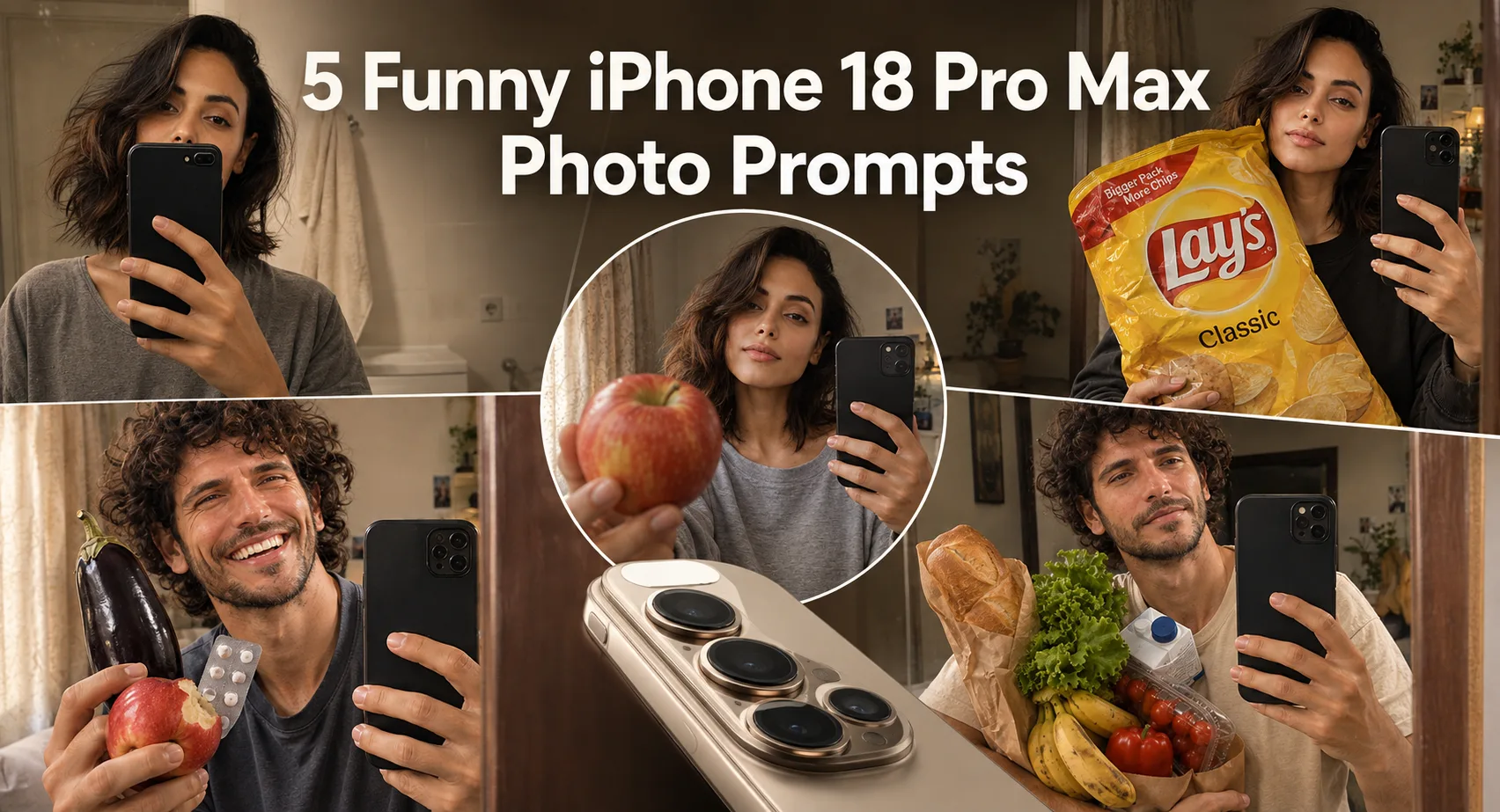
A normal mirror selfie gets much more interesting when one ordinary object becomes the joke. These funny iPhone 18 Pro Max photo prompts focus on that idea: realistic smartphone photography mixed with strange, everyday situations. You can use a clear photo of yourself and turn it into a close mirror selfie, a prop-heavy portrait, or a deliberately awkward social-media-style shot. When testing this style, the hardest part isn't making the scene funny. It's keeping the phone, hands, face, and added objects physically believable. A high-resolution source photo also helps because the face has fewer missing details for the image tool to reconstruct. The results work best when you keep the room simple and let one unusual object carry the visual joke.
Before you start
Start with a sharp photo where your face and hair are clearly visible. A front-facing portrait or ordinary selfie works well because the generator has enough identity information to work from. Avoid heavily filtered images or tiny, blurry photos. Keep the requested scene vertical so the mirror-selfie framing doesn't become cramped.
Photo: Clear portrait, selfie, or waist-up photo
Tool: ChatGPT image generation
Aspect ratio: 9:16 vertical
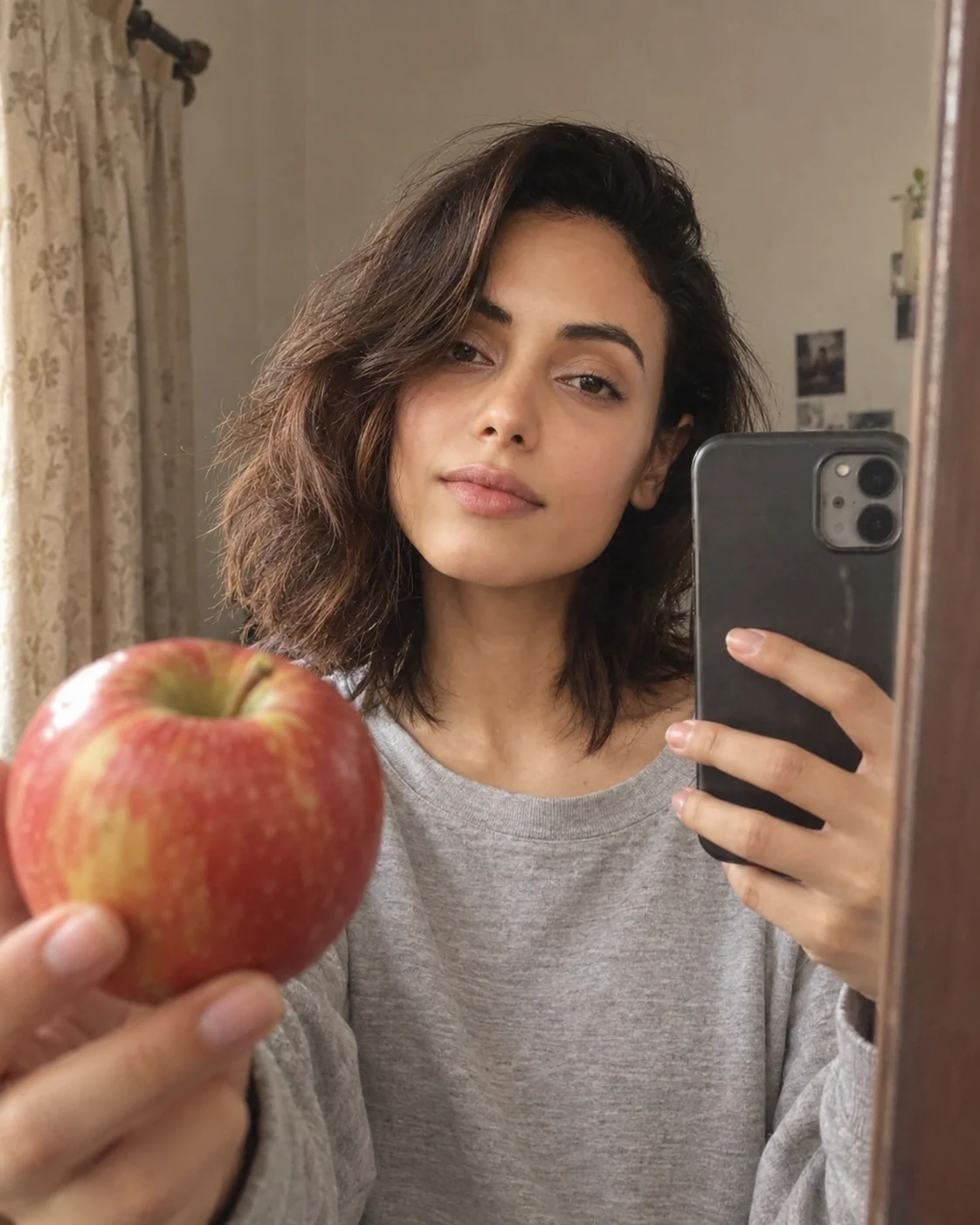
Apple-in-the-Mirror Selfie
This look turns a basic home mirror selfie into a deliberately odd food-and-phone composition. The humor comes from placing an everyday apple directly into the foreground instead of treating it like a polished fashion prop. Keep the curtain, wall, and room believable rather than adding a luxury interior. The small imperfections in the apple and phone reflection help the result feel like a real snapshot.
The Prompt
Using the uploaded photo, create a photorealistic mirror selfie in a believable home interior, built around an ordinary apple held close to the mirror as the main foreground detail. KEEP - Preserve the exact facial structure from the uploaded photo, including forehead shape, eyebrow structure, eye shape, natural eye colour, nose, lips, cheeks, jawline, chin, facial proportions, and natural asymmetry. Keep the original skin tone and real skin texture, including pores, fine lines, freckles, and visible marks. Preserve the original hairline, hair density, hair texture, hairstyle pattern, and facial hair if present. Keep the person's natural body proportions, shoulder width, neck, arms, hands, fingers, height impression, and build. Keep the person's recognizable identity unchanged. CHANGE - Dress the person in [WARDROBE], using a clearly visible cotton or soft jersey texture in [WARDROBE COLOUR]. Place an ordinary red or green apple close to the mirror in the foreground, with realistic small surface marks and natural uneven skin. Keep the phone visible in the hand and let its reflection appear naturally in the mirror. Use a relaxed [POSE] rather than a polished fashion pose. SCENE - Set the selfie inside a modest lived-in home room with a believable plain wall and simple curtain behind the person. Keep the curtain fabric natural and slightly uneven. The apple should sit much closer to the mirror than the face, creating obvious but realistic depth separation. Keep the background softly blurred without turning the room into a luxury interior. LIGHT - Use soft warm indoor window light coming from [LIGHT SIDE], gently crossing the face and apple from the same direction. Keep the shadow side slightly darker and use a warm-neutral 4000K-4500K balance so the face, phone, apple, and curtain share one believable light source. CAMERA - Simulate a 28mm smartphone camera at chest height, f/1.8 equivalent, with natural phone-camera perspective and mild mirror-edge distortion. GRADE - Use a warm neutral snapshot grade, restrained contrast, realistic skin colour, subtle highlight roll-off, and no glossy fashion retouching. OUTPUT - Create a vertical 4:5 composition at 2048 × 2560 pixels, keeping the face, phone, apple, and mirror reflection fully readable. DO-NOT - No face slimming, no skin whitening, no changed eye colour, no plastic smoothing, no invented jewellery or tattoos, no luxury interior, no floating apple, no duplicated phone, no warped hands, and no face drift.
✦ Curated by MFDA
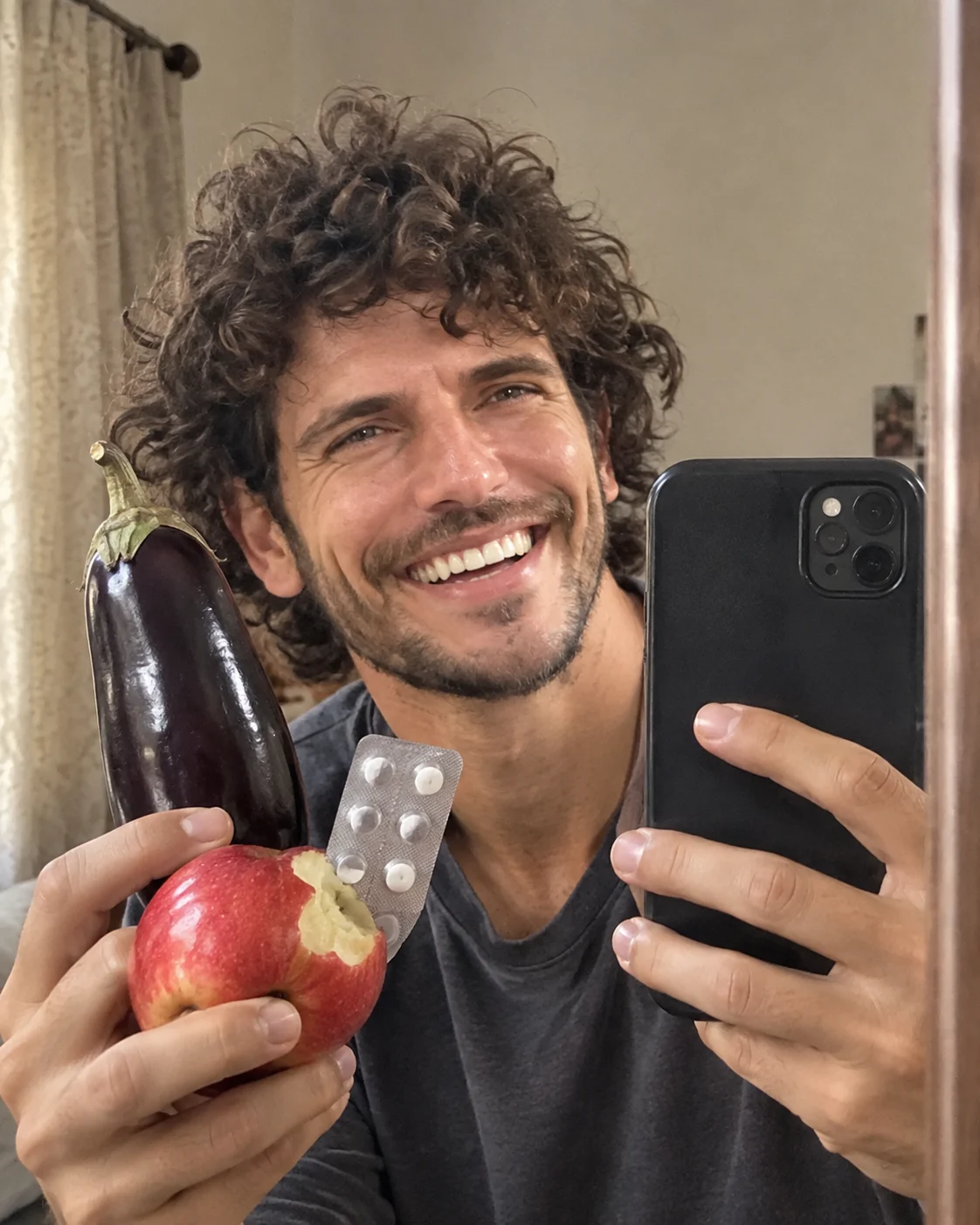
Eggplant, Apple and Medicine Combo
Here the joke comes from an impossible-looking collection of normal household items being held together for one selfie. The eggplant, bitten apple, medicine strip, phone, and hands need clear physical relationships, otherwise the image quickly looks artificial. A close crop works particularly well because the strange object arrangement becomes the main subject while the person's face remains partly hidden.
The Prompt
Using the uploaded photo, create a photorealistic close-cropped mirror selfie where an eggplant, a bitten apple, a medicine strip, a smartphone, and the person's hands form the main visual arrangement. KEEP - Preserve the exact facial structure from the uploaded photo, including forehead shape, eyebrow structure, eye shape, natural eye colour, nose proportions, lips, cheeks, jawline, chin, facial proportions, and natural asymmetry. Keep the original skin tone and visible texture, including pores, fine lines, freckles, and natural marks. Preserve the original hairline, hair density, hair texture, hairstyle pattern, and facial hair if present. Keep the person's natural body proportions, shoulder width, neck, arms, hands, fingers, and build. Maintain the person's recognizable identity even though part of the face is hidden by the objects. CHANGE - Dress the person in [WARDROBE], using [FABRIC] with a natural everyday texture and [COLOUR]. Place a glossy dark-purple eggplant vertically beside the face, a bitten red apple near the lower foreground, and a small silver medicine strip with visible tablets between the hands. Keep the black or dark smartphone clearly visible as part of the mirror selfie. Use [POSE] so the objects overlap naturally without covering the entire face. SCENE - Set the image in a modest home bedroom or dressing area during late afternoon. Use a plain warm wall, simple curtain, and a narrow visible mirror edge behind the subject. Keep the room softly out of focus while the face, hands, phone, eggplant, apple, and medicine strip remain readable. LIGHT - Use soft warm window light from the left side of the face, around 4300K, with gentle shadows under the chin and hands. Light every object from the same direction so none appears pasted into the scene. CAMERA - Simulate a 28mm smartphone lens at chest height with an f/1.8 equivalent aperture, close framing, natural phone perspective, and mild depth separation. GRADE - Apply a warm neutral snapshot grade with moderate contrast, realistic skin colour, controlled highlights, and subtle natural grain. OUTPUT - Create a vertical 4:5 image at 2048 × 2560 pixels, keeping the object relationships clear and physically believable. DO-NOT - No face slimming, no skin whitening, no changed eye colour, no plastic smoothing, no invented jewellery or tattoos, no duplicated objects, no floating objects, no fused hands, no warped fingers, no altered medicine packaging into readable claims, and no face drift.
✦ Curated by MFDA
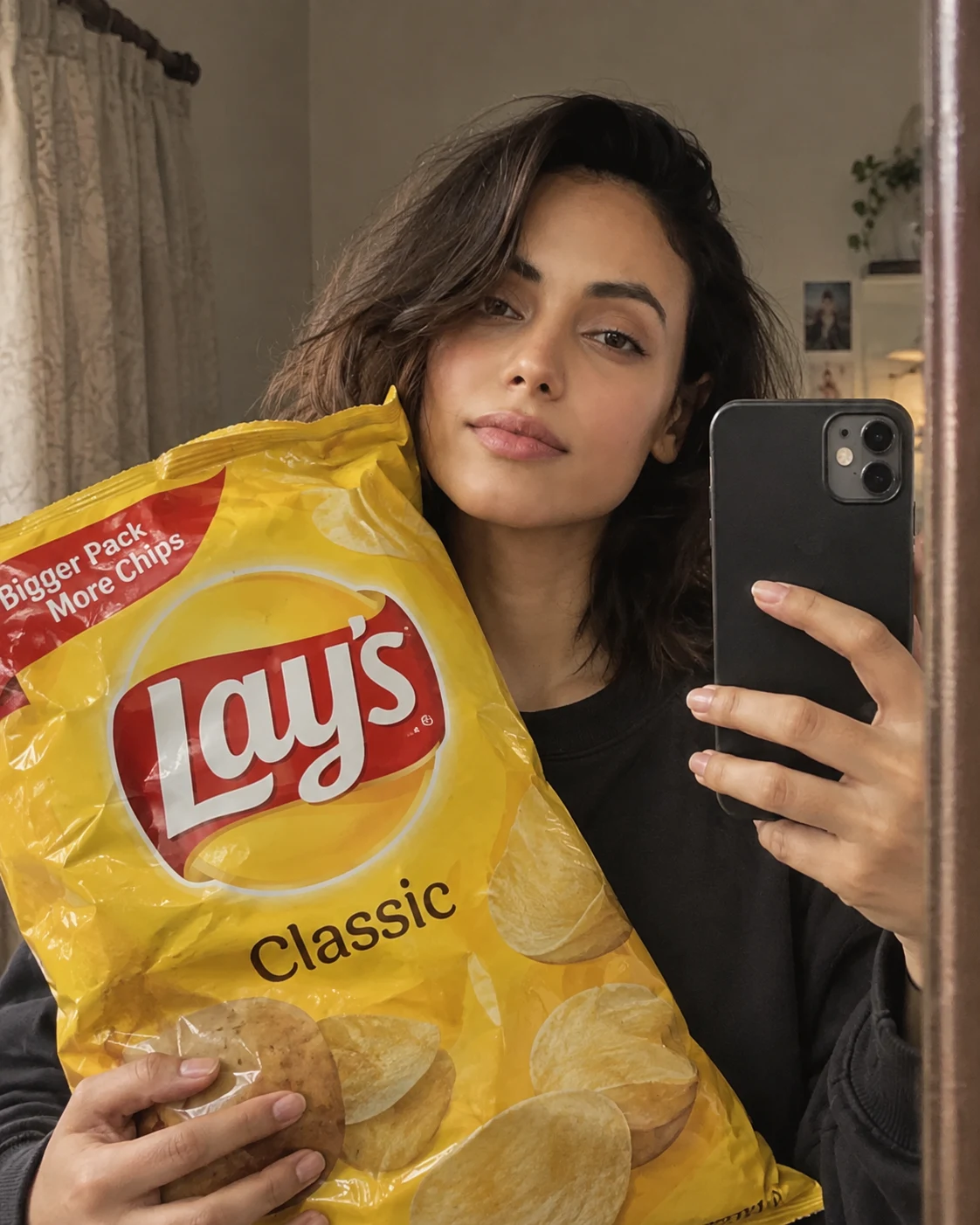
Oversized Snack Mirror Shot
For a simpler funny edit, make one familiar snack or packaged food unusually large in the foreground while the person takes a casual mirror selfie. The important detail is scale: the object should look oversized but still have believable contact with the person's hands and phone. Keep the clothing ordinary and the background slightly messy so the image doesn't turn into a studio advertisement.
The Prompt
Using the uploaded photo, create a photorealistic casual mirror selfie with one familiar snack made unusually oversized in the foreground, while keeping the person and phone naturally connected to the scene. KEEP - Preserve the exact facial structure from the uploaded photo, including forehead shape, eyebrow structure, eye shape, natural eye colour, nose proportions, lips, cheeks, jawline, chin, facial proportions, and natural asymmetry. Keep the original skin tone and visible skin texture, including pores, fine lines, freckles, and natural marks. Preserve the original hairline, hair density, hair texture, hairstyle pattern, and facial hair if present. Keep the person's natural body proportions, shoulder width, neck, arms, hands, fingers, and build. Keep the person's recognizable identity unchanged. CHANGE - Dress the person in [WARDROBE] made from [FABRIC] with a natural [COLOUR] finish. Replace the normal foreground object with one oversized [SNACK] package or food item, scaled roughly two to three times larger than the person's head. Keep its material physically believable, including flexible plastic, cardboard, paper, or realistic food texture as appropriate. Use a relaxed [POSE] with one hand supporting or touching the oversized snack while the other holds the smartphone. SCENE - Place the person in a real lived-in bedroom or dressing area during early evening. Keep a slightly messy background with a plain wall, curtain, small household items, and a visible mirror edge. Blur the background moderately while keeping the oversized snack, hands, phone, and face sharp enough to read. LIGHT - Use soft warm room light from the left-front side at about 4000K, with gentle falloff across the face and snack. Add matching contact shadows where the hands touch the oversized object so its scale feels physically grounded. CAMERA - Simulate a 28mm smartphone lens at chest height, f/1.8 equivalent, with close foreground perspective and mild wide-angle distortion. GRADE - Use a warm neutral phone-photo grade, moderate contrast, natural skin colour, controlled highlights, and subtle digital grain. OUTPUT - Create a vertical 4:5 image at 2048 × 2560 pixels, with the oversized snack dominating the lower foreground without completely hiding the face. DO-NOT - No face slimming, no skin whitening, no changed eye colour, no plastic smoothing, no invented jewellery or tattoos, no floating snack, no duplicated packaging, no warped hands, no impossible contact, no studio advertising look, and no face drift.
✦ Curated by MFDA
Grocery-Bag Selfie
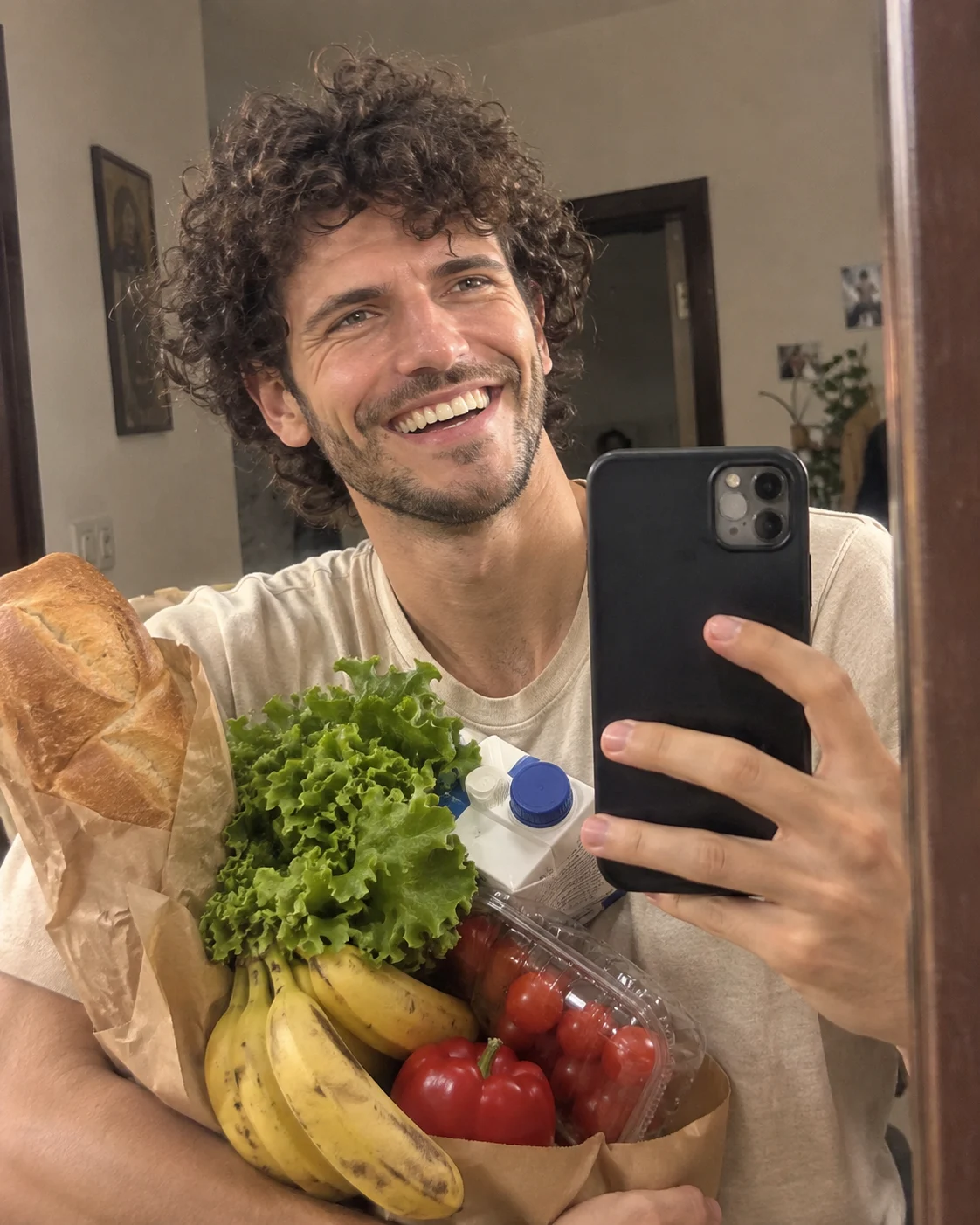
This version uses several harmless grocery items as the visual gag. Instead of scattering them around the scene, keep them gathered close to the phone and hands, as if the person is trying to take a selfie while carrying everything at once. A beige T-shirt, natural hair, household lighting, and a plain wall keep the joke grounded in an everyday situation.
The Prompt
Using the uploaded photo, create a photorealistic casual mirror selfie where several ordinary grocery items are gathered tightly around the smartphone and hands, making the person look as if they are carrying groceries while taking the photo. KEEP - Preserve the exact facial structure from the uploaded photo, including forehead shape, eyebrow structure, eye shape, natural eye colour, nose proportions, lips, cheeks, jawline, chin, facial proportions, and natural asymmetry. Keep the original skin tone and visible texture, including pores, fine lines, freckles, and natural marks. Preserve the original hairline, hair density, hair texture, hairstyle pattern, and facial hair if present. Keep the natural body proportions, shoulder width, neck, arms, hands, fingers, and overall build. Preserve the person's recognizable identity and natural expression. CHANGE - Dress the person in a simple beige cotton T-shirt with visible soft knit texture and a relaxed everyday fit. Gather [GROCERY ITEMS] close to the smartphone and hands, including realistic paper, cardboard, plastic, or produce textures according to each item. Use a relaxed [POSE] where the person balances the groceries while holding the phone for the mirror selfie. Keep the items clustered rather than scattered around the room. SCENE - Place the person inside a modest home hallway, bedroom, or kitchen during early evening. Use a plain warm-white wall behind them with a few ordinary household details. Keep the background slightly untidy but believable and softly blurred, while the face, hands, phone, and grocery items remain clear. LIGHT - Use warm household lighting from the upper-left front at approximately 3800K-4200K. Let the same soft light fall across the face, hands, phone, and grocery packaging, with gentle contact shadows where objects touch the body. CAMERA - Simulate a 28mm smartphone lens at chest height, f/1.8 equivalent, with close mirror framing and mild wide-angle perspective. GRADE - Use a warm neutral phone-camera grade with moderate contrast, realistic skin colour, restrained highlights, and subtle natural grain. OUTPUT - Create a vertical 4:5 composition at 2048 × 2560 pixels, keeping the face recognizable while the groceries fill the lower and side foreground. DO-NOT - No face slimming, no skin whitening, no changed eye colour, no plastic smoothing, no invented jewellery or tattoos, no floating groceries, no duplicated items, no warped fingers, no impossible object contact, no luxury interior, and no face drift.
✦ Curated by MFDA
Awkward Bathroom Mirror Portrait
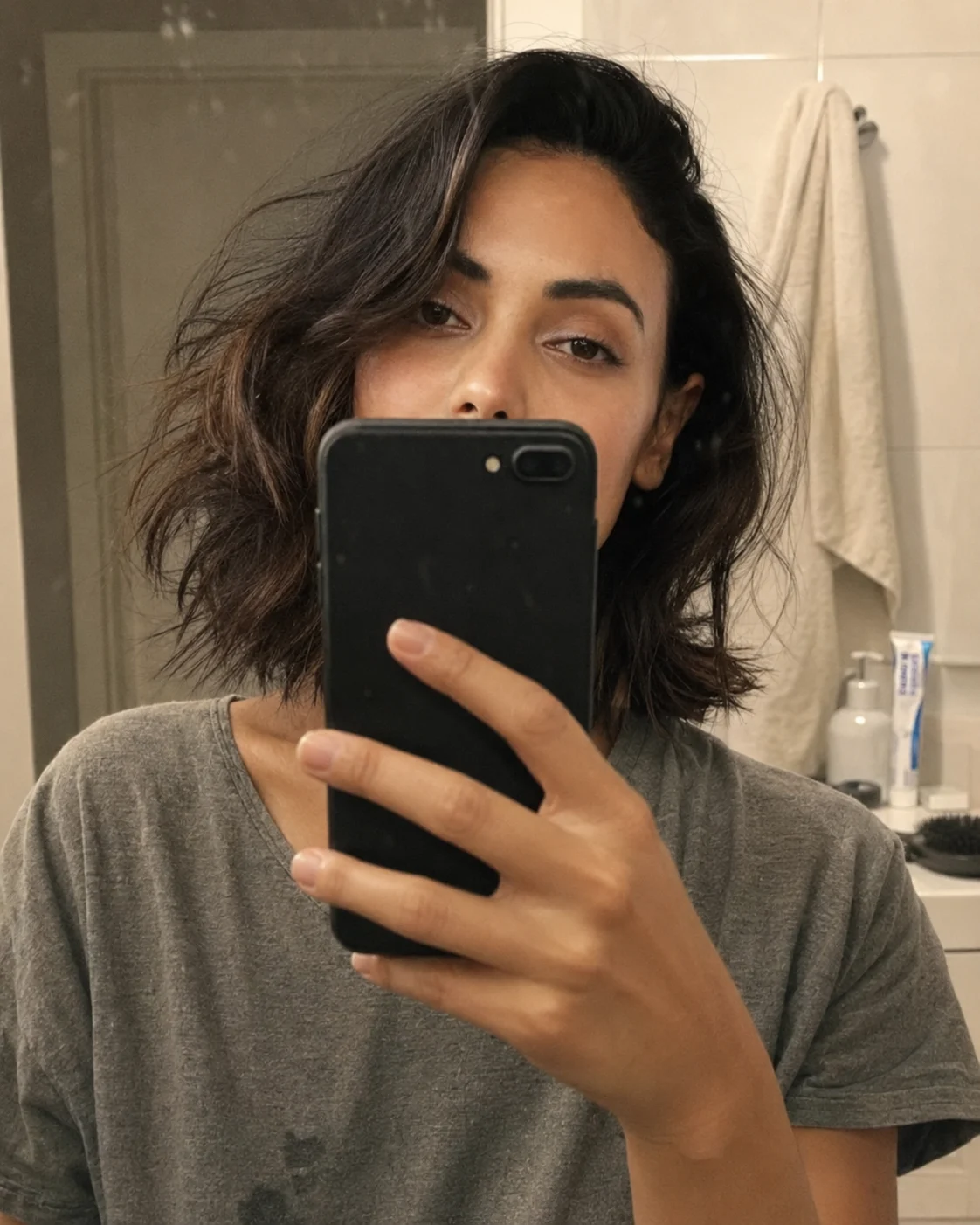
The final concept deliberately keeps the pose slightly awkward. The person stands too close to the mirror, the phone hides much of the face, and one ordinary bathroom item becomes the unexpected focal point. Don't make the room spotless or luxurious. Small realistic details such as towel folds, mirror marks, uneven lighting, and normal skin texture make this style more convincing.
The Prompt
Using the uploaded photo, create a photorealistic awkward bathroom mirror portrait of the same person, keeping the pose intentionally close, slightly uncomfortable, and naturally unpolished. KEEP - Preserve the exact face structure from the uploaded photo, including forehead shape, eyebrow structure, eye shape and natural eye colour, nose proportions, lips, cheeks, cheekbones, jawline, chin, ears, facial asymmetry, and overall facial proportions. Keep the original skin tone, pores, fine lines, marks, and natural skin texture. Keep the original hairline, hairstyle, and facial hair exactly where visible. Keep the person's body proportions, shoulder width, height impression, and natural posture. Do not merge or redesign identity features. CHANGE - Place the person very close to a bathroom mirror, with the smartphone held directly in front of the face so it naturally hides much of the facial area. Dress them in a simple realistic [wardrobe choice] using visible cotton, jersey, denim, or terry fabric rather than glossy synthetic material. Keep the clothing slightly lived-in, with natural folds and small compression marks. Change the setting to an ordinary bathroom with white or pale ceramic surfaces, a practical sink, a folded cotton towel, and one clearly visible everyday bathroom item such as a toothpaste tube, soap dispenser, or hairbrush. Keep the room modest rather than luxurious. SCENE - Set the portrait in a normal residential bathroom during early evening, with a slightly fogged or marked mirror showing faint streaks and small water spots. Let the towel hang unevenly and allow subtle countertop clutter behind the subject. Keep the background moderately blurred but recognizable enough to show the bathroom context. LIGHT - Use uneven overhead bathroom lighting mixed with a weaker side light from the room, creating soft facial shadows and mild brightness variation across the mirror. Use neutral-warm 3800K light so the skin does not look artificially white. CAMERA - Simulate a 35mm full-frame lens at f/2.8, camera held at upper-chest height through the mirror, with natural smartphone perspective and moderate depth of field. GRADE - Use a muted neutral-warm colour grade, restrained contrast, realistic skin saturation, gentle highlight roll-off, and subtle digital-camera grain. OUTPUT - Create a vertical 4:5 image at 2048 × 2560 resolution with realistic mirror reflections and natural photographic detail. DO-NOT - No face slimming, no skin whitening, no changed eye colour, no plastic smoothing, no invented jewellery or tattoos, no spotless luxury bathroom, no exaggerated beauty retouching, and no perfectly posed expression.
✦ Curated by MFDA
How to use these in ChatGPT
Open ChatGPT's image generation feature and upload a clear photo of yourself.
Use a source image with visible facial features, natural skin texture, and enough surrounding body area for the requested pose.
Add the selected prompt card with your image rather than describing the entire scene again in a separate message.
Keep the composition vertical at 9:16 when the result is intended for Instagram Stories, Reels covers, or phone screens.
Check the hands, phone geometry, reflections, and identity before accepting the result.
If the first result is wrong, ask for a correction to the specific failed area rather than regenerating everything; for example, request correct finger count, a properly positioned object, or stronger preservation of the original face.
Getting better results
Use a sharp reference photo, because blurred eyes and facial edges give the model less reliable identity information.
Keep one main joke per image, because too many unrelated objects make the composition harder to control.
Describe physical contact, because saying that an object rests against the phone or is held by the fingers helps prevent floating props.
Keep the background ordinary, because a simple curtain, tiled wall, or bedroom makes the unusual object feel funnier and more believable.
Check hand anatomy first, because close selfies put hands and fingers near the camera where small errors are especially noticeable.
Use 9:16 for phone-first images, because a tall frame gives the mirror, arms, phone, and face enough vertical space.
Don't over-polish the skin, because pores, fine hair, small marks, and mild smartphone noise make the result resemble a casual photograph rather than an AI portrait.
When the result comes out wrong
What went wrong | Why it happens | What to change |
|---|---|---|
Face looks like a different person | The new pose hides important facial features | Use a clearer source photo and reinforce identity preservation |
Hands have extra or missing fingers | Several objects overlap the hands | Simplify the hand arrangement and explicitly request natural finger anatomy |
Phone looks warped | The camera module and reflective surfaces are difficult to reconstruct | Keep the phone vertical and describe its position clearly |
Funny object is floating | The prompt describes the object but not its physical contact | State exactly what the hand, phone, or surface is touching |
Scene looks like a studio photo | Too many polished visual cues override the casual setting | Ask for ordinary indoor light, realistic clutter, and smartphone exposure |
Skin looks plastic | Excessive photorealism language can still produce over-smoothed skin | Request visible pores, fine texture, natural marks, and no beauty filtering |
FAQ
Can I use any photo for these funny iPhone 18 Pro Max prompts?
You can start with most clear photos, but the quality of the reference matters. A sharp portrait with visible eyes, hairline, and natural skin texture gives the image generator more useful information. Very dark, blurry, heavily filtered, or extremely cropped images are more likely to produce identity changes.
Will these prompts keep my face unchanged?
They can help preserve your identity, but no image generator guarantees a perfect match every time. Face visibility also matters. If the phone covers most of your face, the system has fewer features to reproduce. If identity is important, use a clear source image and correct any facial drift in the next generation.
Can boys and girls use the same prompts?
Yes. The concepts are not tied to one gender. You can keep the same funny object arrangement while changing clothing, hairstyle, or general styling to suit the person in the reference image. The strongest results usually come from keeping those changes limited instead of redesigning the entire photograph.
Are these prompts free to use?
The prompt text itself doesn't require a special license simply because it is used as an instruction for an image generator, but the image tool you choose may have its own usage limits or paid features. Check the current terms and plan for the specific service you're using before relying on it regularly.
Can I use the generated images commercially?
That depends on the image generator's current terms, your input material, and any recognizable brands, products, people, or copyrighted elements included in the final image. If you're creating advertising or paid content, check the service's commercial-use terms rather than assuming every generated image is automatically cleared.
Why does the funny object sometimes disappear?
Image models often prioritize the person's face and overall composition when several elements compete for attention. Give the main object a precise position and describe how it physically connects with the hands, phone, or body. Reducing secondary objects can also make the intended joke easier to preserve.
Closing
Funny smartphone edits work best when the setup looks completely ordinary and only one part of the photograph feels unexpected. Start with a clear reference photo, keep the composition simple, and check hands, reflections, and identity before sharing the result. These prompts give you a base to test different everyday objects without losing the casual mirror-selfie feel.
Tags
About the Author
Naziya
Creative AI writer at MFDA, sharing trendy photo-editing prompts and fresh ideas for beautiful, stylish AI images.